
- Server-side JavaScript platform
- Evented I/O for Chrome V8 JavaScript Engine
- Node.js Windows installer download: https://nodejs.org/en/
| libuv + V8 + js,c++ = Node.js |
|---|
- libuv – Abstracts several Unix-only libraries that were once directly required by the project. It was built as part of porting Node.js to the Windows environment.
- V8 Google’s JavaScript Engine – the same engine found in the Chrome web browser.
- Custom JS and C++ code developed specifically for the Node.js platform itself.
- Manage multiple versions of Node (in the same manner as Ruby’s RVM)
- Windows Installer https://github.com/coreybutler/nvm-windows/releases
| Command | Description |
|---|---|
| nvm list | list all Node.js versions installed on the system |
| nvm list available | list all Node.js that are available for installation |
| node -v | see currently used version of Node.js |
| nvm install {version} | install the selected version of Node.js, optional argument: {architecture}, e.g. nvm use 0.12.9 64 |
| nvm use {version} | use this already installed version |
- Using node directly, writing Node.js and JavaScript code in the console.
- Running a JS script file node {fileName}.js
- On your local system or using https://c9.io, Cloud9 online IDE for Node.js, mostly written in Node.js itself.
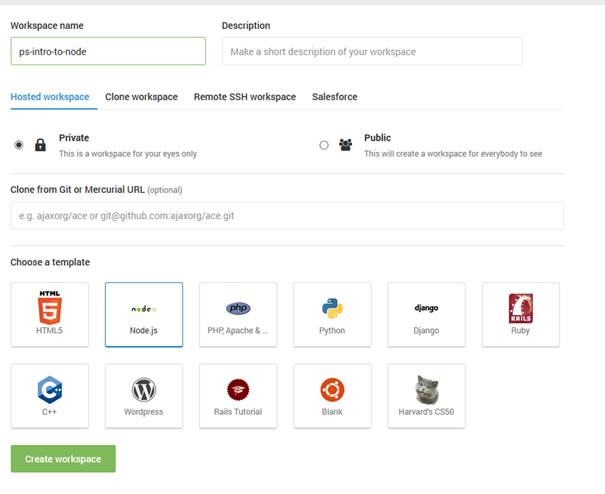
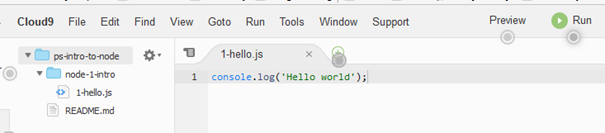
- Log "Hello" immediately and "world" after 1000ms
- Anynomous callbacks with closures
- setTimeout(callback, timeut) and setInterval(callback, interval) are built-in functions, available from the global namespace. The first argument of the functions is a callback function and the second argument is the number of miliseconds for timeout/interval.
- Named callback functions (name of the callback is "handleTimeout")
- Log "Timeout at 200ms" after 200ms
- Creates a server listening on the port 1337. The body content is “Hello world”.
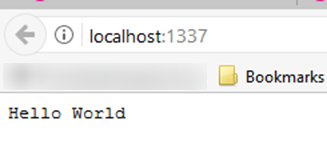
Similar to the browser, that is waiting for keyboard and mouse events, the server is constantly waiting for events. They can be externally or internally generated:
- Incoming HTTP requests
- TCP connections
- Timers
- Internal events
Additionally, other events may be triggered as a response to a request against an external resource
- Asking node to open a file for reading
- Fire an event when the file is open and ready
- Sending a message to an external process will fire an event when the message has been sent etc.
Some events will overlap. For instance we can receive a timer event after a request for opening a file has been received and before the file is open. TCP and HTTP requests can be received while we are sending a message to an external process. Node does not pause and wait for any of these events to complete, it continues to react to events as they arrive.
A common example to demonstrate this non-blocking event-driven communication is a web application that fetches data from a database. The application raises an event, an HTTP request is received, this event generates a query for the database. Node receives an event from the database that the query is complete, an HTTP response is formulated. While it is waiting for a response from the database, node is not blocked and is free to handle additional requests.
On the other hand, traditional serverside programming requires multiple threads for multiple requests.
- Synchronous - Each function returns a value before the next is called.
- Asynchronous - callbacks are used, the result object is an event emmiter, which is capable of emitting events in the future.
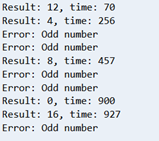
The callback waits a random time, doubles the input if it is even, throws an error if it is odd. This example demonstrates a case when we have multiple calls and the result does not have to be in the same order as the invocation, since the calls need a different, random amount of time.
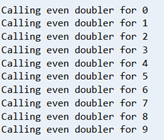
When we call the function in a for-loop, the order of the results can also not be predicted.
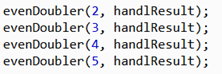
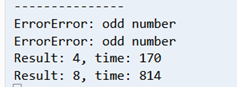
Change the named function to an anonymous one and increment a counter. Only when the counter comes to 10, write that "Done".
Modules are a way to bring external functionality into your Node.js application. The require function loads a module and assigns it to a variable so that it can be used in your application.
Convention: Camel case is used for variables that can be instantiated with new.
var module = require("module_name");var variable = require("module_name").variableName;There are three sources for modules:
a) Pre-packaged with Node
e.g. setInterval and setTimeout are in the Node's global namespace
b) The ones that have to be required (most modules)
The argument of the require method is the string identifier of the module. This is an example for the "os" module.
- Each .js file is its own module, a way of modularizing application's code. We do not include the .js extension in the require. One uses relative path navigation.
In this example we require mathfun.js.
Note: One has to export a variable or function, otherwise it is not visible from outside.
module.exports.variableName = variableName;If we try to use a variable that is not exported, we get a warning that it is undefined.
a) Application specific
npm install module_nameinstalls the module to the node_modules folder.
b) Have the module accessible via the command line - globally
npm install -g module_nameRequire the installed module "request".
- You do not receive any results until you receive all the results. In between, the results are stored in memory.
- All or nothing proposition: If the error has been set, the call is assumed to have failed.
- The function returns a value immediately. The value is an instance of the EventEmitter object.
- An event is more of a publish/subscribe approach, you can invoke the "on" function repeatedly, to provide multiple functions to invoke on each event. That is, in essence, subscribing to the events. Functions associated for each event will be invoked for each item of the result.
- An error is emitted as a separate event, even after some events have been emitted. Access to partial results may be desirable in some situations.
Functions of an event emitter object: emit (publishing an event) and on (subscribing to an event).
There are two ways of using event emitters:
1) Returning an emitter
Example:
2) Inheriting from EventEmitter
Example:
split into two files, using this and util.inherits
-
Streams are instances of EventEmitter with an agreed upon interface.
-
A stream is an instance of a ReadableStream or WriteableStream or both.
Interface for a ReadableStream
- readable - boolean indicator if the stream is readable or not
Events:
- "data" - new data has arrived
- "end" - there is no more data
- "error"
- "close"
Functions:
- pause()
- resume()
- destroy()
- pipe()
The "request" module is a simple HTTP client interface, which also represents a stream.
Interface for a WritableStream
- writable - boolean indicator if the stream is writable or not
Events:
- "drain" - it is safe to write to a stream
- "error"
- "close"
- "pipe" - passed a readable stream to the pipe function
Functions
- write()
- end()
- destroy()
- destroySoon()
stdout is an example for a writeable stream.
Similar to piping commands in Unix, data read from the readable stream is piped to the writeable stream. Node handles well the situation when a readable stream produces data that a writeable stream cannot so quickly consume.
- ReadableStream pipe() -> WritableStream event 'pipe'
When you invoke a pipe() function on a readable stream, you pass as an argument the writeable stream you want to pipe to. This in turn emits the pipe event on the writeable stream.
- ReadableStream event "data" -> WritableStream write()
When data arrives to the readable stream, the data event is emitted and the write() function on the writeable stream is invoked.
- WritableStream write() returns false -> ReadableStream pause()
If at some point the write() function returns a false value, indicating that no more data should be written, the pause() function of the readable stream is called to stop the flow of data.
- WritableStream event 'drain' -> ReadableStream resume()
Then, once the writeable stream is ready again (the drain event is emitted), the resume() for the reading stream is called.
- ReadableStream event 'end' -> WritableStream end()
One the readable stream is finished, the end event is emitted and the end() function of the writeable stream is called.
This example represents piping the resulting request stream to standard output.
This example shows Piping the request stream to the file system.
Herw we have a stream that is both readable and writeable (request stream piped to a zipped file).
CreateGZip returns a stream that is both readable and writeable. It reads and uncompressed content, outputs compressed content.
zcat - Linux command for openning zipped file
The process object provides a way for your application to manage its own processes as well as other processes on the system. It is available by default in your node application, it does not need to be required.
A collection of streams:
- process.stdin – readable stream
- process.stdout – writeable stream
- process.stderr – writeable stream
Attributes of the current process:
- process.env – list of environment variables
- process.argv – command line arguments
- process.cwd - current working directory
- process.pid - process id etc.
Process related actions:
- process.abort()
- process.kill()
- process.chdir() - change directory etc.
It is also an instance of the EventEmmiter, it emits an event exit when a process is about to exit and throws an uncaughtException if an exception gets to the eventloop.
Synchronous approach, using functions that end with Sync:
- existsSync - if the file or directory exists
- unlinkSync - delete a file
- rmdirSync - delete a directory
- mkdirSync - create a directory
- writeFileSync - write to a file
- renameSync - rename a file.
Asynchronous approach, with corresponding functions, without Sync in the end.
The Buffer class provides a raw memory allocation for dealing with binary data directly.
Buffers can be converted to/from strings using an encoding - ascii, utf8(default), binary, hex etc.
- Making a client using http module
http.request(options, callback)- The options argument is in this case a URL.
- The callback recieves the response and status code
js request.end()is necessary in order to execute the request.
- Using host, port, path and method instead of an URL in the options argument.
js http.get()is more simple thanjs http.request(options, callback)nojs req.end()is needed
- call the
js http.createServer()function which accepts a single function as an argument, which accepts both a request and a response. This function is invoked on each request.
- Server code
- Client code
- Assert module
- Mocha framework
- Should.js module
child_process - exec, spawn, fork