

A framework for unified end-to-end autonomous driving datasets processing






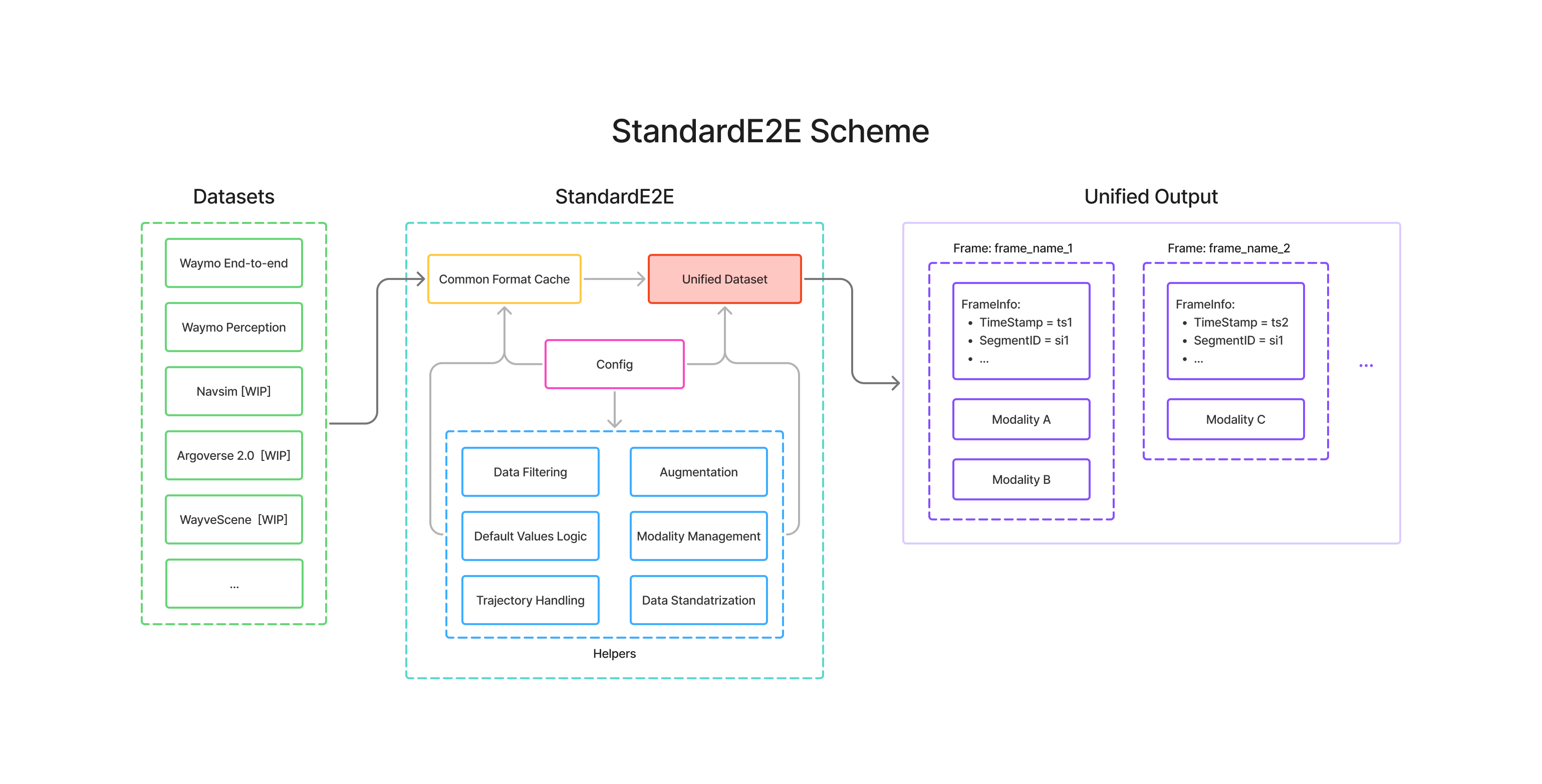
StandardE2E provides a consistent interface for preprocessing, loading, and training with multimodal data from various end-to-end autonomous driving datasets. It standardizes the complex process of working with different dataset formats, allowing researchers to focus on model development rather than data engineering.
- Latest docs: https://standarde2e.readthedocs.io/en/latest/
The repository root is the training environment: StandardE2E with PyTorch, and no dataset SDKs. With uv:
git clone https://github.com/stepankonev/StandardE2E.git
cd StandardE2E
uv sync
In your own project, pip install standard-e2e (or uv add standard-e2e) installs the
same thing. For development, add the test and lint tools and run the tests (each
dataset's tests skip where its SDK is not installed; they run in that dataset's
environment, see datasets/):
uv sync --all-extras
uv run pytest tests/Every dataset has a folder under datasets/ with its description,
its own isolated environment (only the SDK it needs: TensorFlow for Waymo, av2 for
Argoverse 2, nuplan-devkit for NAVSIM, ...) and a preprocessing pipeline that
stepix runs. Set the paths in the dataset's
README, then:
uvx stepix run datasets/waymo_e2e/README.mdWhere the data can be fetched by a script (Waymo, Argoverse 2, nuScenes mini, comma2k19,
KITScenes, NATIX Edge Case), setting download = true in the README makes the pipeline
download the split first, with the dataset's own tool and your access.
0.1.0 splits StandardE2E into the training environment (the repository root) and one environment per dataset with that dataset's SDK. Data processed with 0.0.x loads unchanged, except for the camera extrinsics of four datasets and WayveScenes101 timestamps and SfM clouds (last two points); code needs these changes:
-
PyTorch-side names moved to
standard_e2e.training, the only sub-package that imports PyTorch (import standard_e2eno longer does):0.0.x 0.1.0 standard_e2e.UnifiedE2EDataset,standard_e2e.unified_dataset.UnifiedE2EDatasetstandard_e2e.training.UnifiedE2EDatasetstandard_e2e.dataset_utils.augmentation.MultipleFramesImageAugmentationstandard_e2e.training.MultipleFramesImageAugmentationTransformedFrameDataBatch,BatchedTrajectory,BatchedLidarPointCloud,BatchedFrameDetections3D,collate_modalitiesfromstandard_e2e.data_structuresthe same names from standard_e2e.training -
TensorFlow-side names moved to modules of their own, importable where TensorFlow is installed (the Waymo environments):
0.0.x 0.1.0 standard_e2e.caching.TFRecSourceDatasetConverterstandard_e2e.caching.tfrec_source_dataset_converter.TFRecSourceDatasetConverterstandard_e2e.utils.image_utils.waymo_fetch_images_from_frame,WAYMO_CAMERAS_ORDERthe same names from standard_e2e.utils.waymo_image_utils -
Preprocessing runs in the dataset's environment. TensorFlow and the other dataset SDKs are no longer installed with StandardE2E. Run the dataset's pipeline (
uvx stepix run datasets/<name>/README.md), or the same CLI or your own script in that environment:uv run --project datasets/<name> python -m standard_e2e.caching.process_source_dataset <name> .... Outside a checkout, install the SDK listed indatasets/<name>/pyproject.toml. -
Camera extrinsics are in the OpenCV optical frame for every dataset.
CameraData.extrinsicsisT_ego_from_camerawith camera axes x right, y down, z forward (the frameintrinsicsprojects from). In 0.0.x, Waymo Open E2E, Waymo Open Perception, WayveScenes101 and comma2k19 stored an x-forward / y-left / z-up camera frame instead, soKcould not project through theirT. Re-preprocess data of these four datasets that was made with thecameras_identity_adapter, or convert it in place withT_new = T_old @ FLU_FROM_OPTICAL(standard_e2e.utils.FLU_FROM_OPTICAL). Data made with thepano_adaptercarries no extrinsics and is unaffected. -
WayveScenes101 timestamps and SfM clouds changed. 0.0.x read the image timestamps as nanoseconds instead of microseconds, so frame timestamps and the past/future trajectories' time deltas were 1000× too small, and its SfM cloud kept the ~5% of points outside the 1st–99th percentile bounding box that the official SDK drops. Re-preprocess WayveScenes101 data made with 0.0.x.
-
BatchedFrameDetections3Dholds every frame's detections. 0.0.x exposed only the first frame's.trajectories,unique_agent_idsanddetection_typesnow run over all detections of the batch, in the concat-with-batch-index form ofBatchedLidarPointCloud:batch_idxmaps each row to its frame andis_validmarks the time padding. A batch of one frame is unchanged.
| Dataset | Cameras | Lidar | HD Map | Detections | Driving Command | Preference Trajectories |
|---|---|---|---|---|---|---|
Waymo End-to-end  |
 |
❌ | ❌ | ❌ | ✅ | ✅ |
| Waymo Perception |
 |
✅ | ✅ | ✅ | ❌ | ❌ |
| Navsim |
|
✅ | ✅ | ✅ | ✅ | ❌ |
| WayveScenes101 |
|
 |
❌ | ❌ | ❌ | ❌ |
| Argoverse 2 Sensor |
|
✅ | ✅ | ✅ | ❌ | ❌ |
| Argoverse 2 Lidar |
❌ | ✅ | ✅ | ❌ | ❌ | ❌ |
| comma2k19 |
 |
❌ | ❌ | ❌ | ❌ | ❌ |
| TruckDrive |
|
✅ | ❌ | ✅ | ❌ | ❌ |
| View-of-Delft |
|
✅ | ❌ | ✅ | ❌ | ❌ |
| nuScenes |
|
✅ | ✅ | ✅ | ❌ | ❌ |
| KITScenes Multimodal |
|
✅ | ✅ | ❌ | ❌ | ❌ |
| KITScenes LongTail |
|
❌ | ❌ | ❌ | ✅ | ✅ |
| NATIX Multi-Camera |
 |
❌ | ❌ | ❌ | ❌ | ❌ |
| NATIX Edge Case |
|
❌ | ❌ | ❌ | ❌ | ❌ |
Argoverse 2 Map Change  |
✅ | ✅ | ✅ | ❌ | ❌ | ❌ |
| KITTI |
|
✅ | ❓ | ❓ | ❓ | ❓ |
| KITTI-360 |
+ 2 x  |
✅ | ❓ | ❓ | ❓ | ❓ |
| Waymo Motion Prediction |
❌ | ✅ | ✅ | ✅ | ❌ | ❌ |
| Argoverse 2 Motion Forecasting [?] |
❌ | ❌ | ✅ | ✅ | ❌ | ❌ |
Each dataset's folder describes what StandardE2E extracts from it, its caveats, and how to run its pipeline; rows marked TBD are not supported yet.
- Unified Dataset Interface: Work with multiple datasets through a single API
- Multimodal Support: Cameras, LiDAR (point cloud + BEV histogram), HD maps (BEV raster), trajectories, detections and more
- Flexible Preprocessing: Configurable pipelines with standardization and augmentation
- Lazy modality loading: Configured adapters declare what they consume; no decoding work is done for modalities no adapter reads
- Trajectory Management: Advanced handling of time-series vehicle data
- PyTorch Integration: Ready-to-use datasets and dataloaders
- intro_tutorial.ipynb - Introduction to StandardE2E framework
- containers.ipynb - Working with data containers
- multi_dataset_training_and_filtering.ipynb - Multi-dataset training and filtering
- creating_custom_adapter.ipynb - Creating custom dataset adapters
The first three read data that a dataset's pipeline has already processed, so they run in
the training environment: uv run --with jupyter jupyter lab. The adapter notebook
preprocesses Waymo End-to-end data itself, so start it from that dataset's environment:
uv run --project datasets/waymo_e2e --with jupyter jupyter lab.
Run from the project root. Training-side examples use the default environment (uv run); preprocessing runs in the dataset's own environment (uv run --project datasets/<name>).
-
Preprocess Waymo End-to-end dataset - Convert raw dataset to standardized format from Python, with custom adapters (
dataset_preprocessing.py); thedatasets/waymo_e2epipeline does the same from its configuv run --project datasets/waymo_e2e python examples/dataset_preprocessing.py \ --e2e_dataset_path E2E_DATASET_PATH \ --split {training,val,test} \ --processed_data_path PROCESSED_DATA_PATH -
Train your model - End-to-end training with multimodal data (
very_simple_training.py). This example illustrates iteration over the preprocessed dataset. Also, in this example for validation we use 2 DataLoaders - full validation split and filtered validation split that only contains samples with preferred trajectories.uv run python examples/very_simple_training.py --processed_data_path PROCESSED_DATA_PATH
-
Create a unified DataLoader: This example shows how to process 2 different datasets within same DataLoader. First, preprocess
Waymo E2EandWaymo Perceptioninto the same output root with their pipelines (datasets/waymo_e2e,datasets/waymo_perception).The script
creating_unified_dataloader.pycreated a unified dataloader that iterates over bothWaymo E2EandWaymo Perceptionin one epoch providing consistent data structure.uv run python examples/creating_unified_dataloader.py --processed_data_path PROCESSED_DATA_PATH
-
Visualize processed output - Render any processed
<dataset>/<split>folder to per-scene MP4s, auto-detecting whichever modalities the frames carry: a camera mosaic (surround grid or stitched panorama) plus a co-registered BEV panel (HD-map / lidar / detection rasters, lidar points, 3D boxes, past/future/preference trajectories, ego). Playback speed defaults to the rate inferred from the frame timestamps;--fpsoverrides. Select scenes with--num-scenes Nor repeatable--scene-id ID(default: first scene).uv run python -m standard_e2e.visualization.visualize_processed \ PROCESSED_DATA_PATH/DATASET_NAME/SPLIT --num-scenes 2 --out visualizations
-
Add a new dataset adapter - Guide for adding support for new datasets (
adding_new_dataset.md), plus its folder underdatasets/
This project is licensed under the MIT License - see the LICENSE file for details.
If you find this project useful, you can support it by giving it a ⭐, or by contributing with your PRs / issues / feature requests. Also, if you use this project, you can greatly support it by citing our paper (arXiv:2606.04271):
@misc{konev2026standarde2e,
  title={StandardE2E: A Unified Framework for End-to-End Autonomous Driving Datasets},
  author={Stepan Konev},
  year={2026},
  eprint={2606.04271},
  archivePrefix={arXiv},
  primaryClass={cs.CV},
  url={https://arxiv.org/abs/2606.04271}
}
and using the badge
Markdown
[](https://github.com/stepankonev/StandardE2E)HTML
<a href="https://github.com/stepankonev/StandardE2E">
  <img src="https://raw.githubusercontent.com/stepankonev/StandardE2E/refs/heads/main/assets/StandardE2E_gh_badge_dark.svg" alt="StandardE2E"/>
</a>