
A full-stack expense tracking application with dual-mode functionality for transport businesses and personal expense management, plus AI-powered insights and monthly email reports.


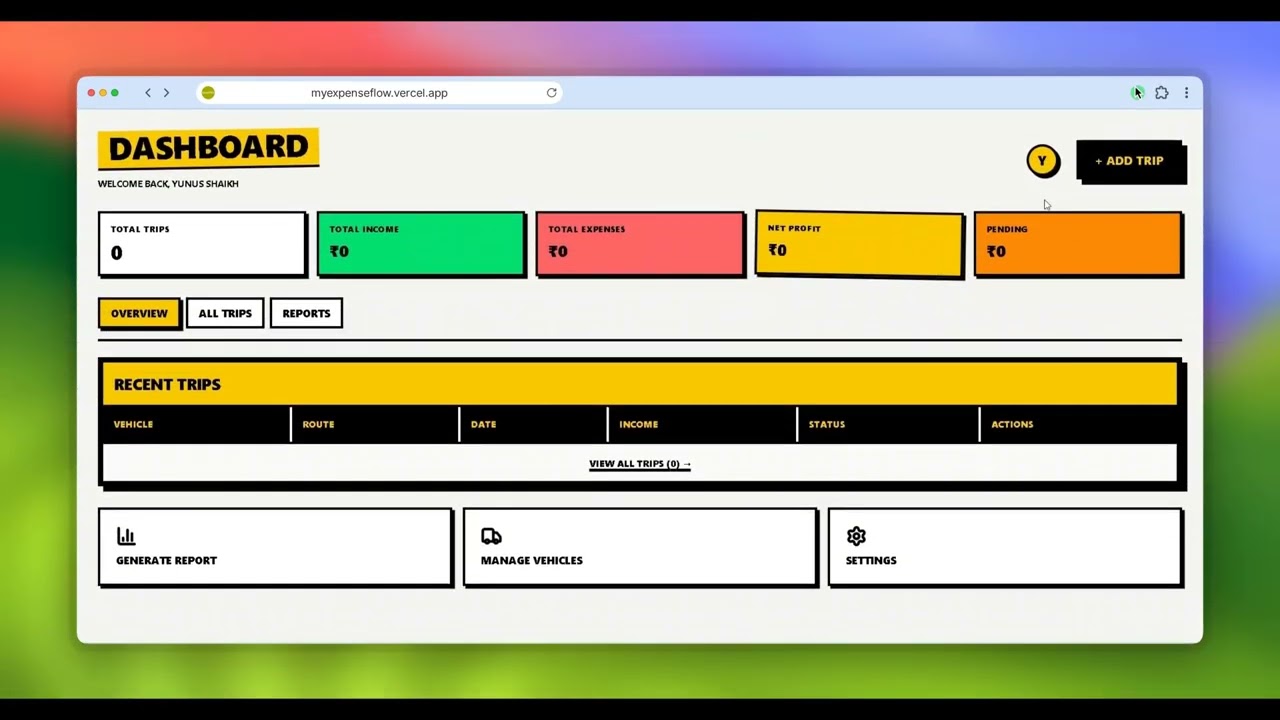


Managing expenses—whether personal or for a transport business—is messy. People lose track of where their money goes, budgets get overspent without warning, and transport owners struggle to calculate trip profitability with scattered data.
The core problems:
- No spending visibility — People don't know where their money goes each month
- Budget overspending — No alerts when approaching or exceeding budget limits
- Scattered records — Expenses tracked in notebooks, spreadsheets, or not at all
- Manual tracking — Tedious data entry leads to inconsistent or no tracking
- No business insights — Transport owners can't calculate per-trip profit/loss
- Lost receipts — Paper receipts get lost, making reimbursement and tax filing harder
- No automated reporting — No monthly summaries or AI-powered spending insights
ExpenseFlow solves this by providing:
- A centralized platform to track all expenses with categories
- Real-time budget alerts with visual progress bars
- AI-powered spending analysis and monthly email reports
- Receipt scanning with automatic data extraction
- Dual-mode for both personal and transport business tracking
- Clean dashboards with charts and analytics
- JWT-based auth with httpOnly cookies
- Email verification with OTP
- Password reset with OTP
- Input validation with express-validator
- Multi-tenant data isolation
- Trip expense tracking with detailed breakdowns
- Fuel, maintenance, and toll management
- Trip-wise profit/loss calculation
- Receipt upload for each trip
- Multiple receipt management per trip
- Daily expense tracking across 11+ categories
- Budget management with visual progress bars and alerts
- Monthly spending analytics
- Recurring expense support
- Payment method tracking (Cash, UPI, Card, etc.)
- Receipt scanning with OpenAI Vision API
- Monthly AI email reports with spending insights
- Automated report generation via cron jobs
- Real-time analytics dashboards
- Cloud storage via Cloudinary
- Payment integration with Razorpay
- Responsive brutalist UI design
| Technology | Purpose |
|---|---|
| Node.js v18+ | Runtime |
| Express.js v5 | Framework |
| MongoDB + Mongoose | Database & ODM |
| JWT | Authentication |
| Brevo API | Email service |
| Cloudinary | File storage |
| Razorpay | Payments |
| OpenAI API | AI receipt scanning |
| express-validator | Input validation |
| Technology | Purpose |
|---|---|
| React 19 | UI library |
| Vite | Build tool |
| Tailwind CSS v4 | Styling (Brutalist UI) |
| React Router v7 | Routing |
| Context API | State management |
| Axios | HTTP client |
| Recharts | Charts |
| React Icons | Icons |
- Node.js v18 or higher
- MongoDB (local or Atlas)
- npm or yarn
- Clone the repository
git clone https://github.com/sohaildevx/ExpenseFlow.git
cd ExpenseFlow- Backend Setup
cd Backend
npm install
Create .env file:
PORT=8000
NODE_ENV=development
MONGODB_URI=mongodb://localhost:27017/expenseflow
JWT_SECRET=your_jwt_secret
CLOUDINARY_CLOUD_NAME=your_cloud_name
CLOUDINARY_API_KEY=your_api_key
CLOUDINARY_API_SECRET=your_api_secret
SENDER_EMAIL=your_email@gmail.com
BREVO_API_KEY=your_brevo_api_key
RAZORPAY_KEY_ID=your_razorpay_key_id
RAZORPAY_KEY_SECRET=your_razorpay_secret
OPENAI_API_KEY=your_openai_api_key
CRON_SECRET=your_cron_secret
LOCALFRONTEND=http://localhost:5173
FRONTEND=https://your-deployed-frontend.vercel.app- Frontend Setup
cd Frontend
npm install
Create .env file:
VITE_API_URL=http://localhost:8000
VITE_RAZORPAY_KEY_ID=your_razorpay_key_id- Run the app
# Backend
cd Backend
npm run dev

# Frontend (new terminal)
cd Frontend
npm run dev- Access
- Frontend: http://localhost:5173
- Backend: http://localhost:8000
Ai-Expense-Tracker/
├── Backend/
│   ├── __tests__/              # Unit tests
│   ├── config/
│   │   ├── cronJobs.js         # Cron job scheduler
│   │   ├── EmailTemplate.js    # Email HTML templates
│   │   ├── nodeMailer.js       # Brevo email service
│   │   └── Razorpay.js         # Razorpay config
│   ├── controllers/
│   │   ├── AiReportController.js
│   │   ├── budget.controllers.js
│   │   ├── expense.controllers.js
│   │   ├── razorpay.controllers.js
│   │   ├── trip.controllers.js
│   │   └── user.controllers.js
│   ├── DB/
│   │   └── Db.js               # MongoDB connection
│   ├── middleware/
│   │   └── auth.js             # JWT auth middleware
│   ├── model/
│   │   ├── budget.model.js
│   │   ├── expense.model.js
│   │   ├── razorpay.model.js
│   │   ├── tripeExpenses.js
│   │   └── user.model.js
│   ├── routes/
│   │   ├── budget.route.js
│   │   ├── expense.route.js
│   │   ├── razorpay.Route.js
│   │   ├── report.route.js
│   │   ├── trip.routes.js
│   │   └── user.routes.js
│   ├── service/
│   │   ├── AiAnalyzer.js       # AI analysis service
│   │   └── OpenAi.js           # OpenAI API integration
│   ├── utils/
│   │   ├── cloudinary.js       # Cloudinary upload
│   │   └── jsonAuth.js         # JWT token utilities
│   ├── app.js                  # Express app setup
│   ├── server.js               # Server entry point
│   └── package.json
│
└── Frontend/
    ├── Expense/                # Personal expense pages
    │   ├── AddExpense.jsx
    │   ├── AllExpensesPage.jsx
    │   ├── Budget.jsx
    │   ├── ExpenseDasboard.jsx
    │   └── page.js
    ├── src/
    │   ├── Components/
    │   │   ├── Footer.jsx
    │   │   ├── Header.jsx
    │   │   ├── Hero.jsx
    │   │   ├── ServerWaking.jsx
    │   │   └── index.js
    │   ├── config/
    │   │   └── Axios.js
    │   ├── context/
    │   │   ├── AuthContext.jsx
    │   │   ├── razorpayContext.jsx
    │   │   ├── SimpleExpenseContext.jsx
    │   │   └── TripContext.jsx
    │   ├── pages/
    │   │   ├── AddTrip.jsx
    │   │   ├── AllTrips.jsx
    │   │   ├── Dashboard.jsx
    │   │   ├── EditTrip.jsx
    │   │   ├── ForgotPage.jsx
    │   │   ├── Home.jsx
    │   │   ├── Login.jsx
    │   │   ├── SignUp.jsx
    │   │   ├── VerifyEmail.jsx
    │   │   ├── SupportButton.jsx
    │   │   ├── SupportPage.jsx
    │   │   ├── View.jsx
    │   │   └── pages.js
    │   ├── routes/
    │   │   ├── AppRoutes.jsx
    │   │   └── ProtectedRoute.jsx
    │   ├── App.jsx
    │   └── main.jsx
    ├── public/
    │   └── calendar-dollar.svg
    ├── index.html
    ├── vercel.json
    ├── vite.config.js
    └── package.json
| Method | Endpoint | Description |
|---|---|---|
| POST | /register |
Create new account |
| POST | /login |
User login |
| POST | /logout |
User logout |
| GET | /getCurrentUser |
Get authenticated user |
| POST | /send-reset-otp |
Request password reset OTP |
| POST | /verify-reset-otp |
Verify reset OTP |
| POST | /reset-password |
Reset password with OTP |
| POST | /verify-email |
Verify email with OTP |
| POST | /resend-verification-otp |
Resend verification OTP |
| Method | Endpoint | Description |
|---|---|---|
| POST | /trip-expense |
Create new trip |
| GET | /trip-expenses |
Get all user trips |
| GET | /trip-expense/:id |
Get single trip |
| PUT | /:id |
Update trip |
| DELETE | /:id |
Delete trip |
| POST | /:id/receipt |
Upload receipt |
| DELETE | /:id/receipt/:receiptId |
Delete receipt |
| GET | /:id/receipts |
Get all receipts |
| Method | Endpoint | Description |
|---|---|---|
| POST | / |
Create expense |
| POST | /scan-receipt |
Scan receipt with AI |
| POST | /:id/receipt |
Upload receipt |
| GET | / |
Get all expenses |
| GET | /statistics |
Get spending analytics |
| GET | /:id |
Get single expense |
| PUT | /:id |
Update expense |
| DELETE | /:id |
Delete expense |
| Method | Endpoint | Description |
|---|---|---|
| POST | /addBudget |
Create budget |
| GET | /getBudget/:id |
Get single budget |
| GET | /getAllBudgets |
Get all budgets |
| PUT | /updateBudget/:id |
Update budget |
| DELETE | /deleteBudget/:id |
Delete budget |
| Method | Endpoint | Description |
|---|---|---|
| POST | /create-order |
Create payment order |
| POST | /verify-payment |
Verify payment |
| GET | /supporters |
Get supporters list |
| GET | /payments |
Get payment history |
| Method | Endpoint | Description |
|---|---|---|
| POST | /cron/simple-reports |
Generate simple reports (cron) |
| POST | /cron/transport-reports |
Generate transport reports (cron) |
| GET | /test-smtp |
Test email config |
- Fork the repository
- Create a feature branch (
git checkout -b feature/amazing-feature) - Commit your changes (
git commit -m 'Add amazing feature') - Push to the branch (
git push origin feature/amazing-feature) - Open a Pull Request
This project is licensed under the MIT License - see the LICENSE file for details.
Star this repo if you find it helpful!