

URL+ is a Logseq plugin written in ClojureScript with shadow-cljs as the main tooling.
The plugin takes the token at your cursor, be it a word or a URL, and augments the block with associated metadata in various formats.
If that token is a valid URL, page metadata or an API response is fetched, then the block is rewritten by applying a selected template. If it is a word, a compact dictionary definition can be appended instead.
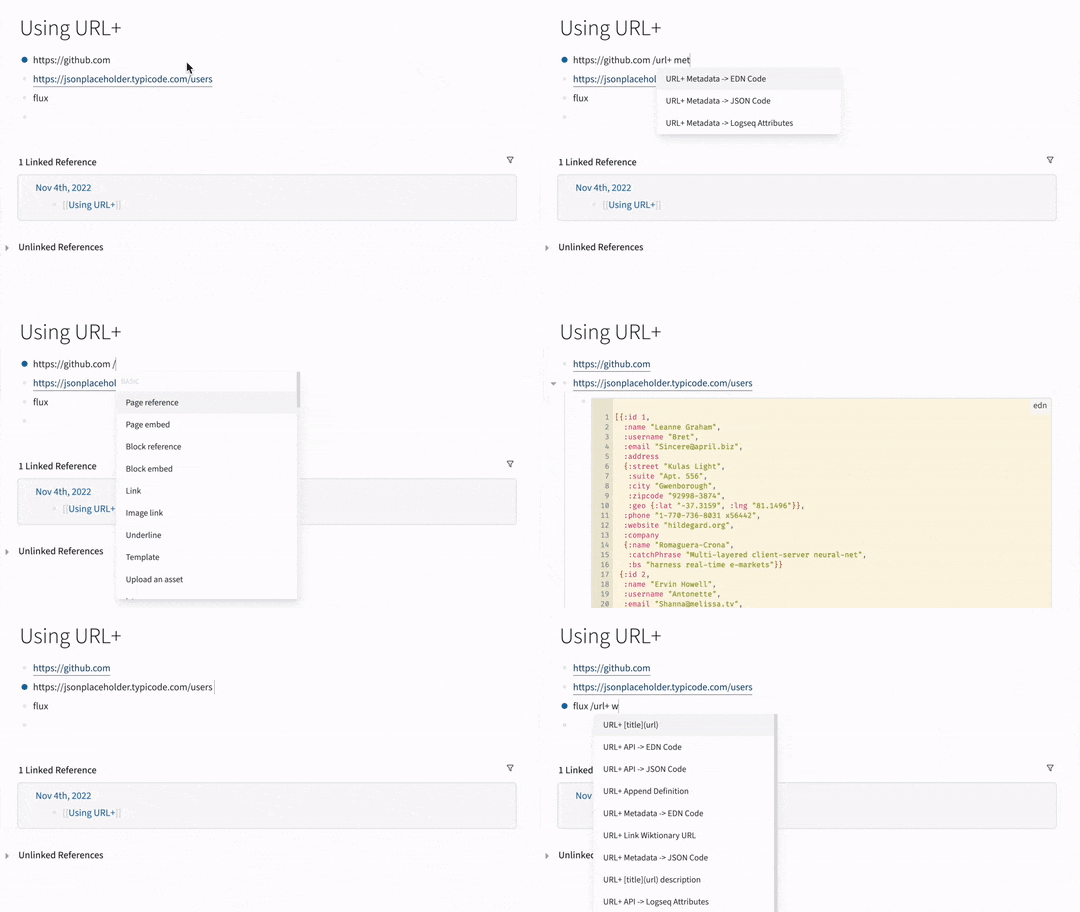
Install URL+ from the Logseq marketplace: Plugins → Marketplace → search for URL+.
To run from source, see the technical notes.
Each command can be enabled or disabled individually in the plugin settings.
URL+ [title](url)URL+ [title](url) descriptionURL+ Metadata -> Logseq AttributesURL+ Metadata -> EDN CodeURL+ Metadata -> JSON CodeURL+ API -> Logseq AttributesURL+ API -> Logseq Attributes BlockURL+ API -> EDN CodeURL+ API -> JSON CodeURL+ All links in block- Turns every bare URL in the block into a markdown link in one pass. URLs that are already links are left alone, and any whose title cannot be fetched are left as they were
URL+ Append Word Definition- Uses dictionaryapi.dev, a free community-run service with no uptime guarantee
URL+ Inspector ...- Opens the inspector UI for token insights and template customization
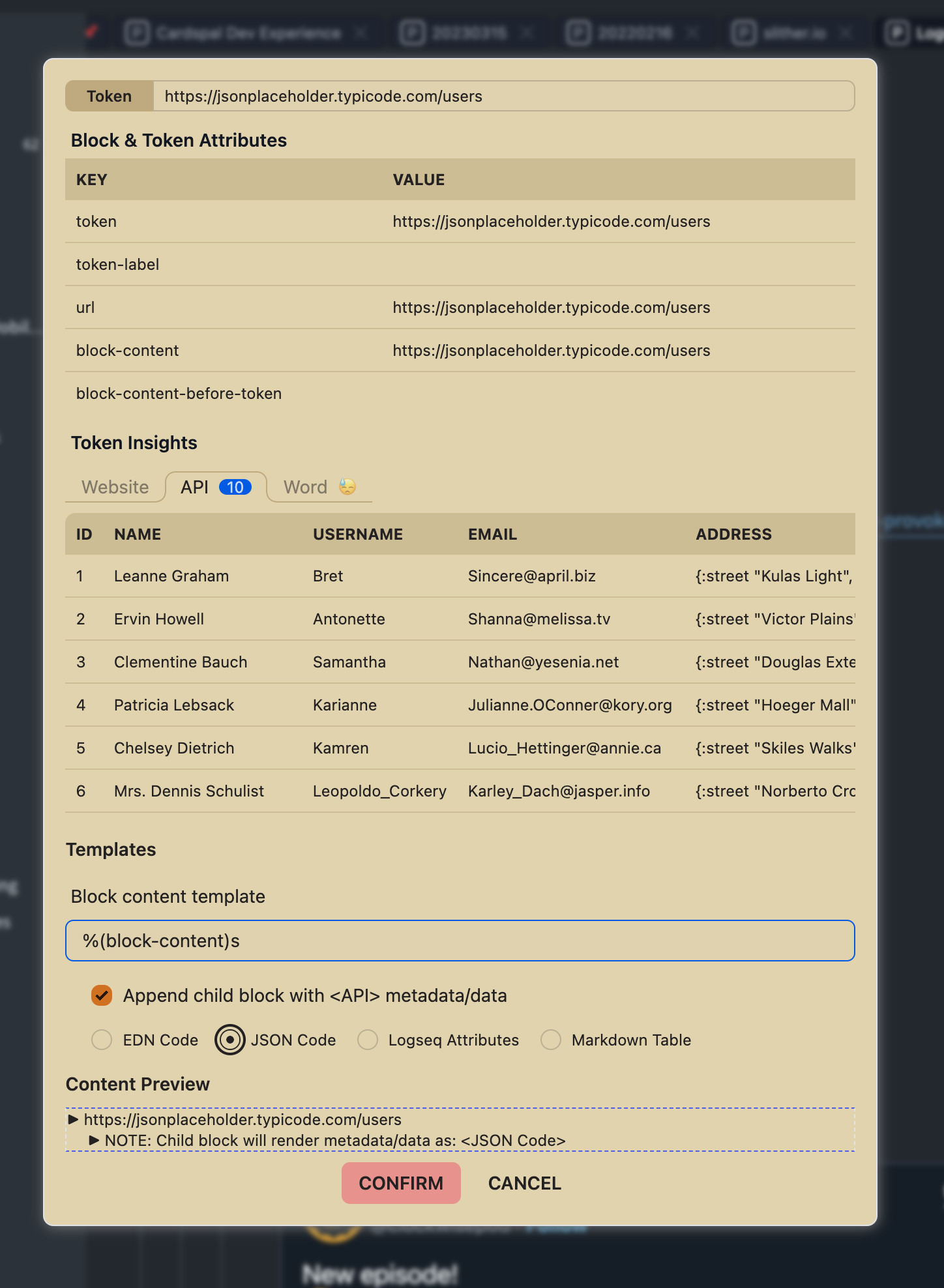
- Opens the inspector UI for token insights and template customization
The one at your cursor. A block can hold several URLs; put the cursor on or just after the one you mean and run the command.
- Put the cursor at the end of a URL, not inside it. Logseq only opens its
slash menu when
/follows a space, so typing that space in the middle of a URL splits it before the command ever runs. - A cursor immediately before a URL acts on the token to its left. One rule, applied everywhere: the token you are at.
- If the block has exactly one URL, it is used no matter where the cursor
is.
see https://example.com for detailsworks with the cursor at the end, because there is nothing it could ambiguously mean. URL+ Append Word Definitionalways uses the word at the cursor, never a URL, even in a block that has one.URL+ Inspector ...still opens on the last token. It has an editable Token field, so type or paste a different one if you want it.
With the cursor at the end of a block - where typing a URL then / leaves it -
this is exactly the old "last token" behaviour, so existing habits are
unaffected.
Before anything is fetched or written to your graph, the URL is tidied up:
- Short and mobile YouTube links are canonicalized.
youtu.be/<id>,/shorts/<id>,/live/<id>,/embed/<id>andm.youtube.comall resolve toyoutube.com/watch?v=<id>, so metadata can be read from them. - Tracking parameters are stripped,
utm_*,fbclid,gclid,igshid, YouTube'ssi, and similar. Parameters you meant to keep, such as at=timestamp, and the#fragmentare preserved. - Fetched titles and descriptions are escaped so remote text cannot inject markdown links or Logseq property and macro syntax into your notes.
Open Plugins → URL+ → Settings.
| Setting | Effect |
|---|---|
| Attributes to EXCLUDE in URL metadata | Drop these keys from fetched metadata. Comma- or space-separated, case sensitive. |
| Attributes to INCLUDE in URL metadata | Keep only these keys. Applied after the exclude list. |
| One toggle per slash command | Register or hide that command. The Inspector has its own toggle. |
URL+ targets Logseq OG, the file-based (Markdown) version. Logseq split into two products in April 2026, and the database version has a different plugin API surface; a port is not yet available.
- Commands act on the URL at your cursor. A block with several URLs used to rewrite the last one no matter where you invoked the command (#20). With the cursor at the end of a block the behaviour is unchanged.
- A single URL is found wherever it sits.
see https://example.com for detailsused to fail withinvalid URL "details". - New:
URL+ All links in block. Converts every bare URL in one pass.
- Short URLs work again. Links that redirect across hosts,
youtu.be,t.co,bit.ly, previously failed outright. This was the main reason to cut this release. - Failures are now reported. Network errors, non-JSON responses and unknown words used to fail silently; they now show a message instead of doing nothing.
- Fewer network requests. Commands that only need page metadata no longer also fetch the page a second time as an API call.
- Removed:
URL+ Extract tweet text of twitter.com. Tweet lookup left the free Twitter API tier in February 2023, so the command could not work without a paid developer plan. The Twitter access token setting is gone with it.
- Prefer slash command
/over autoformat - Need more formatting templates beyond the default
[title](url) - Works for blocks with multiple terms, multiple URLs and multiple lines - the command acts on the token at your cursor and leaves the rest of the block alone
- Persist URL metadata or API response in graph
- Learn Logseq plugin dev with ClojureScript + Rum + Babashka + tailwindcss (Sample ClojureScript based plugin projects are rare when this project started)
See technical notes and AGENTS.md.