
Ask a database questions in English. The model writes a typed query plan, never SQL text; the plan is checked against the real schema and the caller's role before any SQL is generated.
Live demo: https://nl2sql.codewithnk.com — bring your own model key, nothing to install. What you will see.


https://nl2sql.codewithnk.com — the playground on three sample databases, nothing to install.
Bring your own key. The server holds none. You paste yours into the page — one per provider — it stays in that browser tab, travels with the question that needs it, is used in memory for that question and dropped: never stored, never logged, never written to a trace. Settings also puts each of the six model-using steps on a provider and model of its own, so the planner can be on Claude while the rest stays on OpenAI. The sample databases are opened read-only, and questions are rate limited per visitor and capped per session. How it is built: Hosted demo.
Prefer it on your own machine? Quickstart.
- Try it in your browser
- How it works
- Latest benchmark results
- Quickstart: run it locally
- Screenshots
- CLI reference
- REST API
- Python SDK
- Configuration
- Security and what is sent to the model
- Evaluation and quality
- Project status, limitations and roadmap
- Contributing and license
- The question is checked for answerability and routed to one of the registered databases, then split into sub-queries; the decomposer also builds the execution DAG that says which sub-queries can run together and how their results combine.
- Each sub-query gets the part of the schema it needs (vector search over an index of tables, columns and relationships, or the whole schema when it is small).
- The model returns a typed plan (a Pydantic
PlanModel: tables, joins, select items, filters), never a SQL string. It may only name a function from an allow-list, and it writes date work portably —DATE_PART/DATE_TRUNCover a fixed set of units — which each adapter renders in its own dialect. - The logical validator resolves every table and column against the schema, checks joins against the declared foreign keys, checks every table against the caller's role (RBAC), and builds the query tree the generator would build, so a plan whose tables cannot be joined is caught here, where the planner can still be asked to fix it. A refused plan never becomes SQL.
- Only a plan that passes reaches the generator, which renders SQL
deterministically with
sqlglot. The executor runs it and the answer writer summarises the rows. - A retryable validation failure goes back to the planner through a refiner, up
to
SQL_AGENT_MAX_RETRIES(default 3). A security refusal is final.
flowchart LR
    Q([Question]) --> R[Resolve datasource<br/>and decompose]
    R --> S[Schema retrieval]
    S --> P[LLM planner<br/>typed plan, no SQL]
    P --> V{Validator<br/>schema, joins, RBAC}
    V -->|retryable| F[Refiner] --> P
    V -->|refused| X([Refusal with reason])
    V -->|passed| G[SQL generator<br/>sqlglot]
    G --> E[Executor] --> A([Answer])
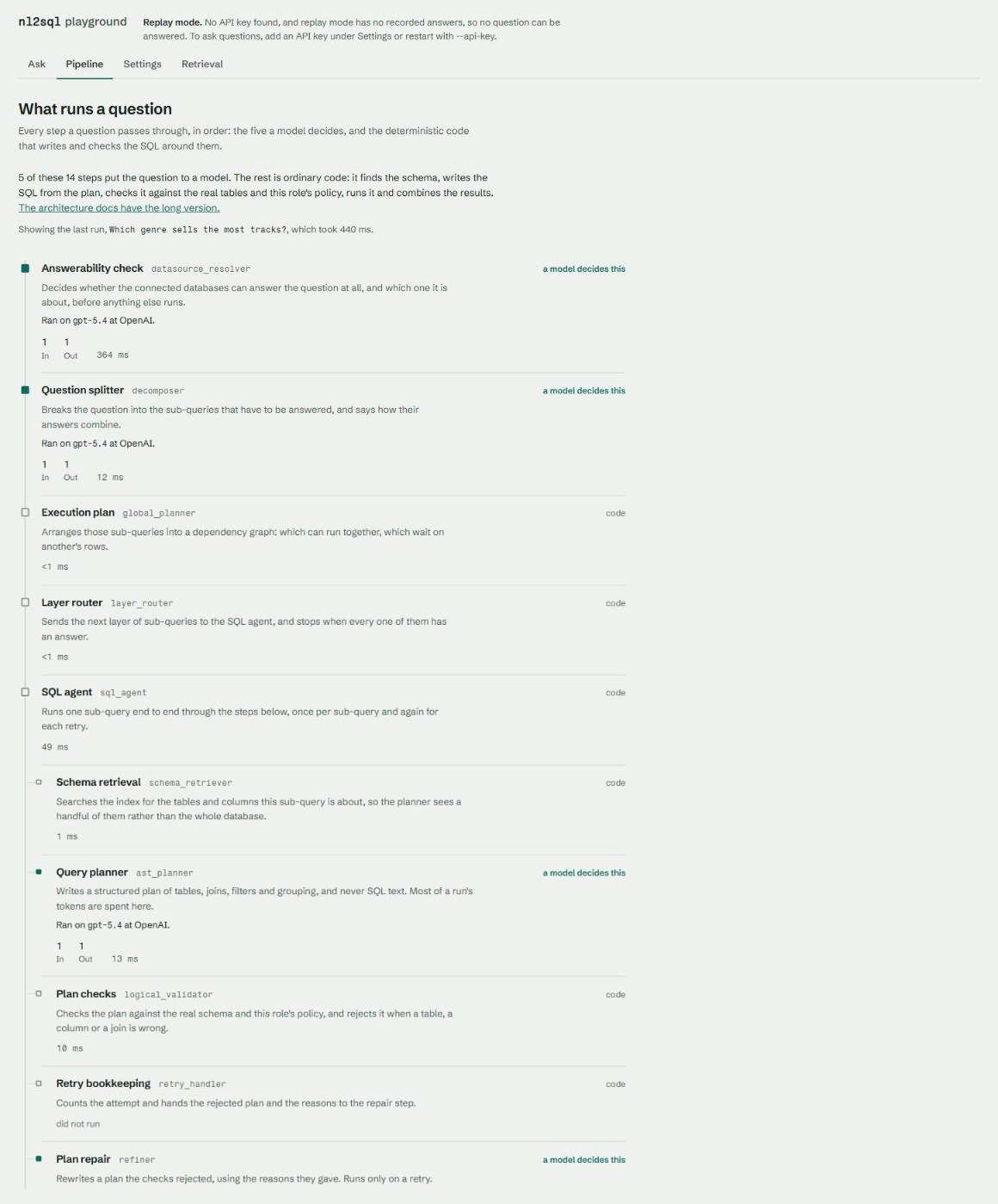
That is the shape of a run; the full pipeline is 15 steps, six of them
decided by a model, and the playground's Pipeline page lists them all. The
first, matching the question to a verified query a data team wrote
(curated answers), runs only when
curated.yaml is configured; the second only when a run is given its plan.
Architecture detail: System Architecture, Pipeline, Agent Nodes, Determinism.
Generated by nl2sql eval publish from the records in
benchmarks/. Every run, with models, tokens, latency
and determinism: docs/benchmarks.md.
The real model end to end on the Chinook suite. Accuracy is execution accuracy, the measure 0.6's tier 2 published: the strict share whose rows match the expected rows exactly, or that are refused where the case expects a refusal (result_match and outcome; no other scorer counts). Lenient allows extra and reordered columns and date labels; faithfulness is the share of written answers whose numbers and names come from the rows.
| Config | Database | Date (UTC) | Commit | Accuracy (strict) | Accuracy (lenient) | Faithfulness | $/question | Δ vs previous |
|---|---|---|---|---|---|---|---|---|
| gpt-5.4 | chinook | 2026-09-23 | de42c40 | 79.1% [64.8-88.6] | 79.1% | 86.8% | $0.0194 | new series (suite changed) |
The share of each answerable case's needed tables and columns that schema retrieval sends the planner, and the share of cases routing ranks the right datasource first and shortlists every one the case needs, with no LLM involved.
| Database | Date (UTC) | Commit | Table recall | Column recall | Routing top-1 / shortlist | Δ vs previous |
|---|---|---|---|---|---|---|
| chinook | 2026-10-15 | a33c8ce | 97.9% | 76.5% | 100.0% / 100.0% | tables +0.0 pp, columns +0.0 pp |
| chinook+support+webanalytics | 2026-10-15 | baaae0c | - | - | 97.4% / 98.7% | new series (suite changed) |
Full history: docs/benchmarks.md
Requires Python 3.12 or newer.
pip install "nl2sql-engine[demo]"
nl2sql demo
The
democommand, the[demo]extra and most of what this README describes are onmainand arrive on PyPI with 0.2.0 (at the time of writing the latest release is 0.1.2). Ifpip install "nl2sql-engine[demo]"warns that the extra does not exist, install from a clone:pip install -e packages/sdk -e "packages/nl2sql[demo]"(add-e packages/apifor the REST server).
- No questions at the terminal.
nl2sql demodoes not prompt. It looks for a model key (the order is below) and says which mode it chose: Live mode with the provider, or replay mode when it finds none. - A project folder and an index. It writes
./nl2sql-demowithnl2sql init --demo(annl2sql.yamland one file per section), copies in three SQLite databases -- Chinook (a music store),support(a help desk) andwebanalytics(website traffic) -- and indexes their schemas on your machine. The first run downloads a ~79 MB embedding model; no key is needed for that. - A local page. It prints
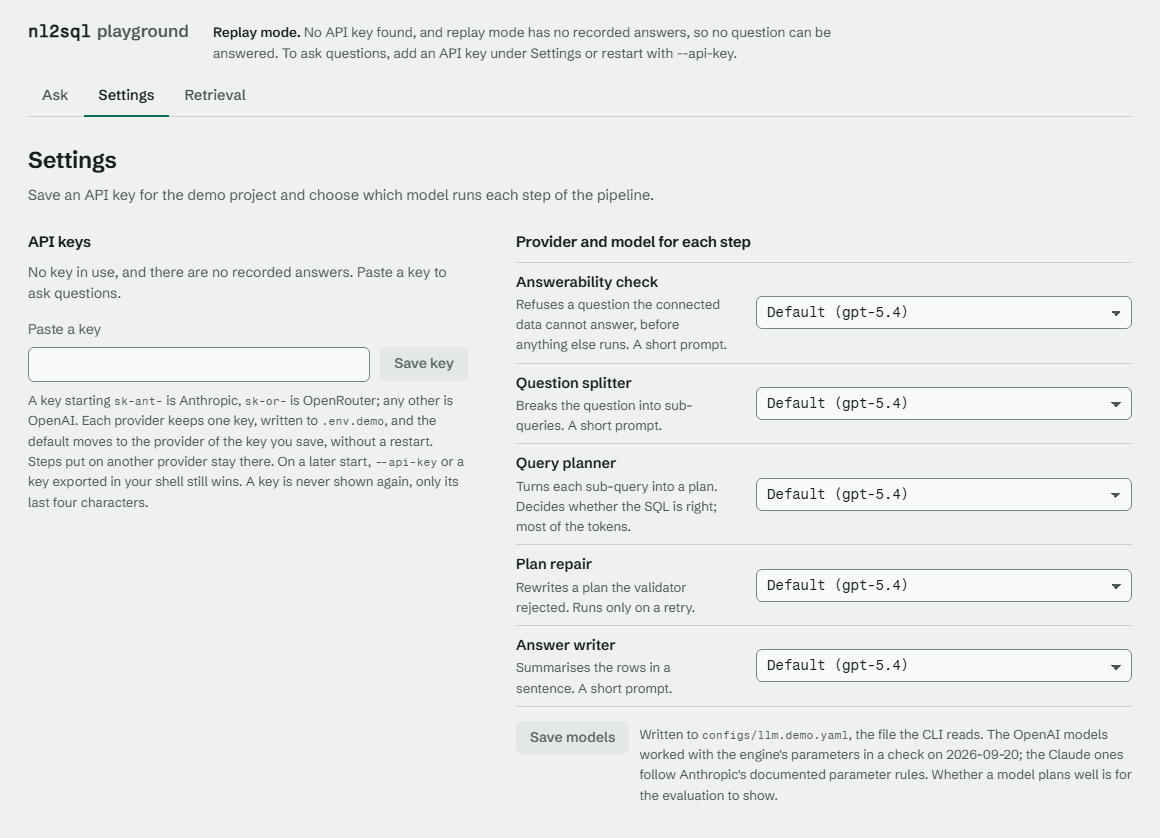
Playground ready at http://127.0.0.1:8765/and opens that address in your browser (--no-browserskips it,--portchanges it). Ctrl+C stops it. - No key yet? Paste an OpenAI or Anthropic key into the Settings page (an OpenRouter one works too); the running demo switches to live without a restart.
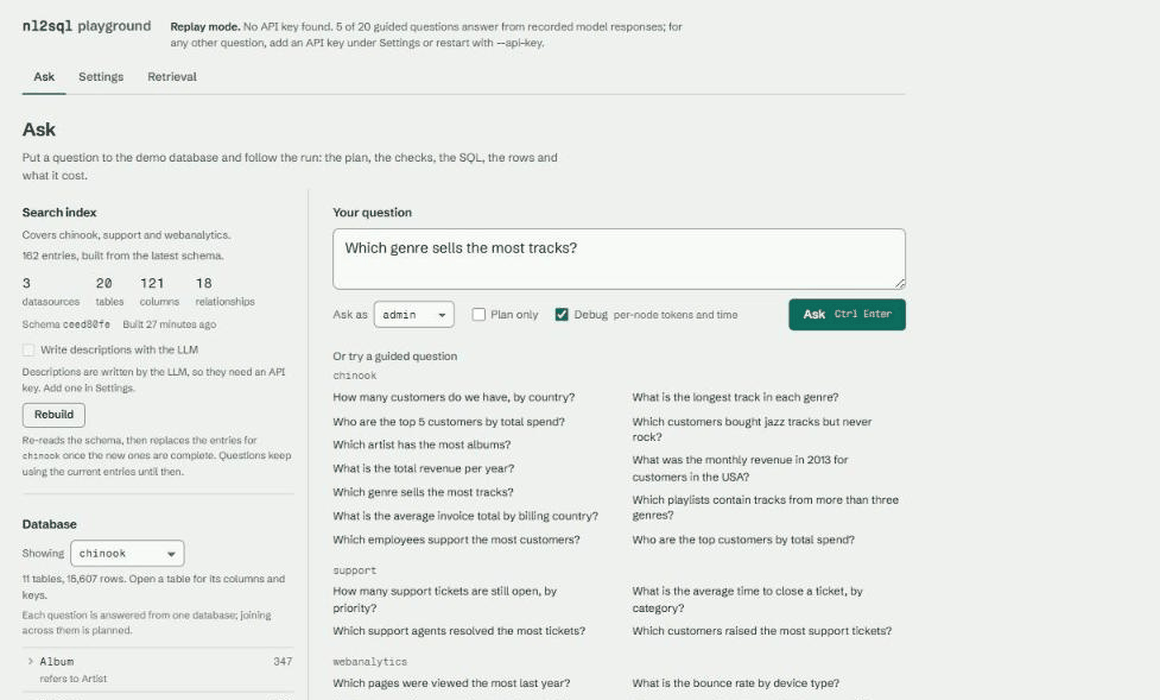
- Ask. Pick one of twenty guided questions or type your own, as
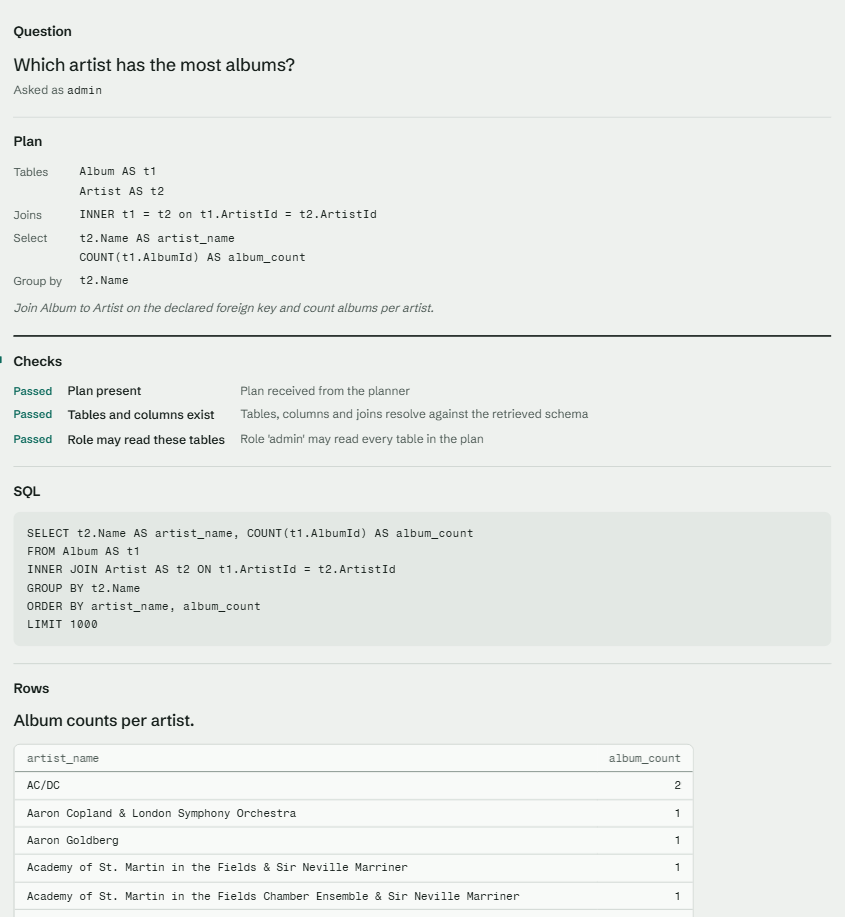
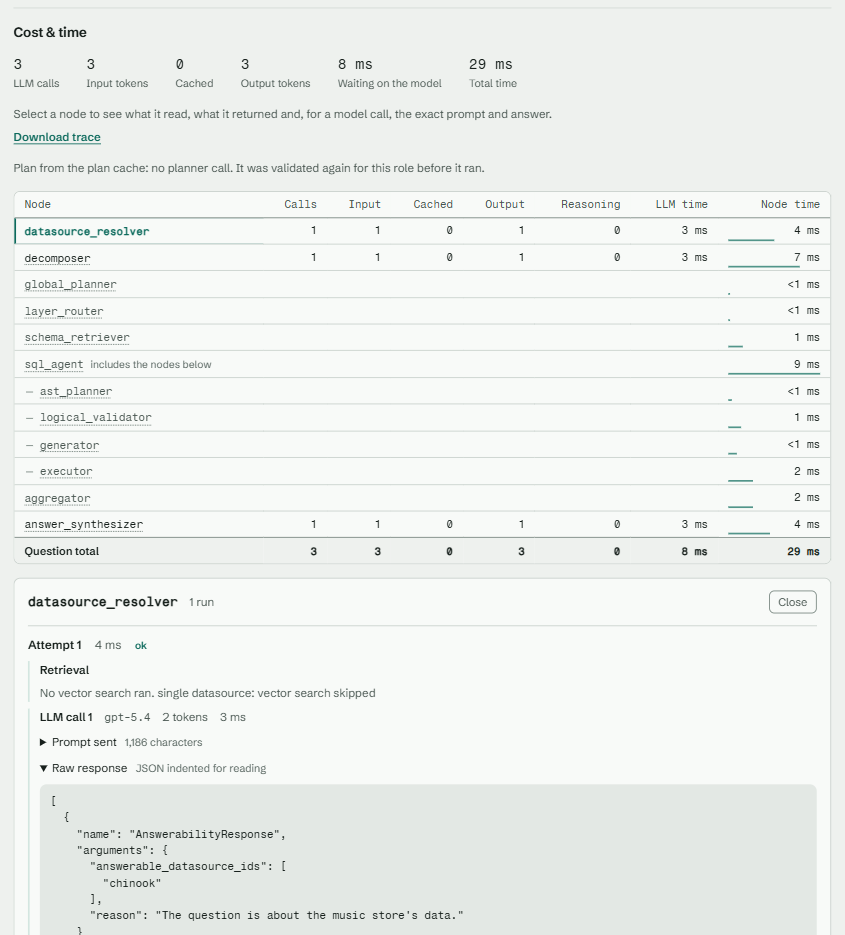
admin,analystorviewer. A run shows the answer first, then the plan the model wrote, the checks it passed or failed, the SQL the code generated, the rows, and cost and time. Debug opens every step's model calls, prompts and responses; Pipeline lists all 13 steps and which five a model decides.
The live demo above is the same playground with the key entry first.
nl2sql demo writes a demo project into ./nl2sql-demo (the same files
nl2sql init --demo writes), copies in three SQLite databases and indexes their schemas on your machine, serves the
playground on http://127.0.0.1:8765/ and opens your browser. The databases
are the Chinook sample database (11 tables, real
foreign keys), support, a help desk (4 tables), and webanalytics, website
traffic (5 tables); the last two are synthetic, generated by this repository
from a fixed seed, and share Chinook's customer identities. All three declare
their foreign keys. Indexing needs no API key; the first run downloads a ~79 MB
ONNX embedding model.
Answering a question needs a model. The demo looks for one in this order:
--api-key KEY(saved to the project's.env, next to itsnl2sql.yaml, so later runs stay live)OPENAI_API_KEY,OPENROUTER_API_KEYorANTHROPIC_API_KEYin the environment- a key already saved in the project's
.env - an Ollama daemon on
localhost:11434 - replay mode
The provider follows the key's shape: sk-ant-... is Anthropic, sk-or-... is
OpenRouter, anything else is OpenAI. Claude needs the extra:
pip install "nl2sql-engine[demo,anthropic]". You can also start without a key
and paste one into the playground's Settings page, which switches the
running demo to live mode without a restart and picks a model per step.
Without a key, the demo runs in replay mode, which answers only from
recorded model responses. None ship with the engine, so the console and the page
say "replay mode has no recorded answers" and a question gets "No recorded
answer for this question. Add an API key to ask it live." The schema, the index
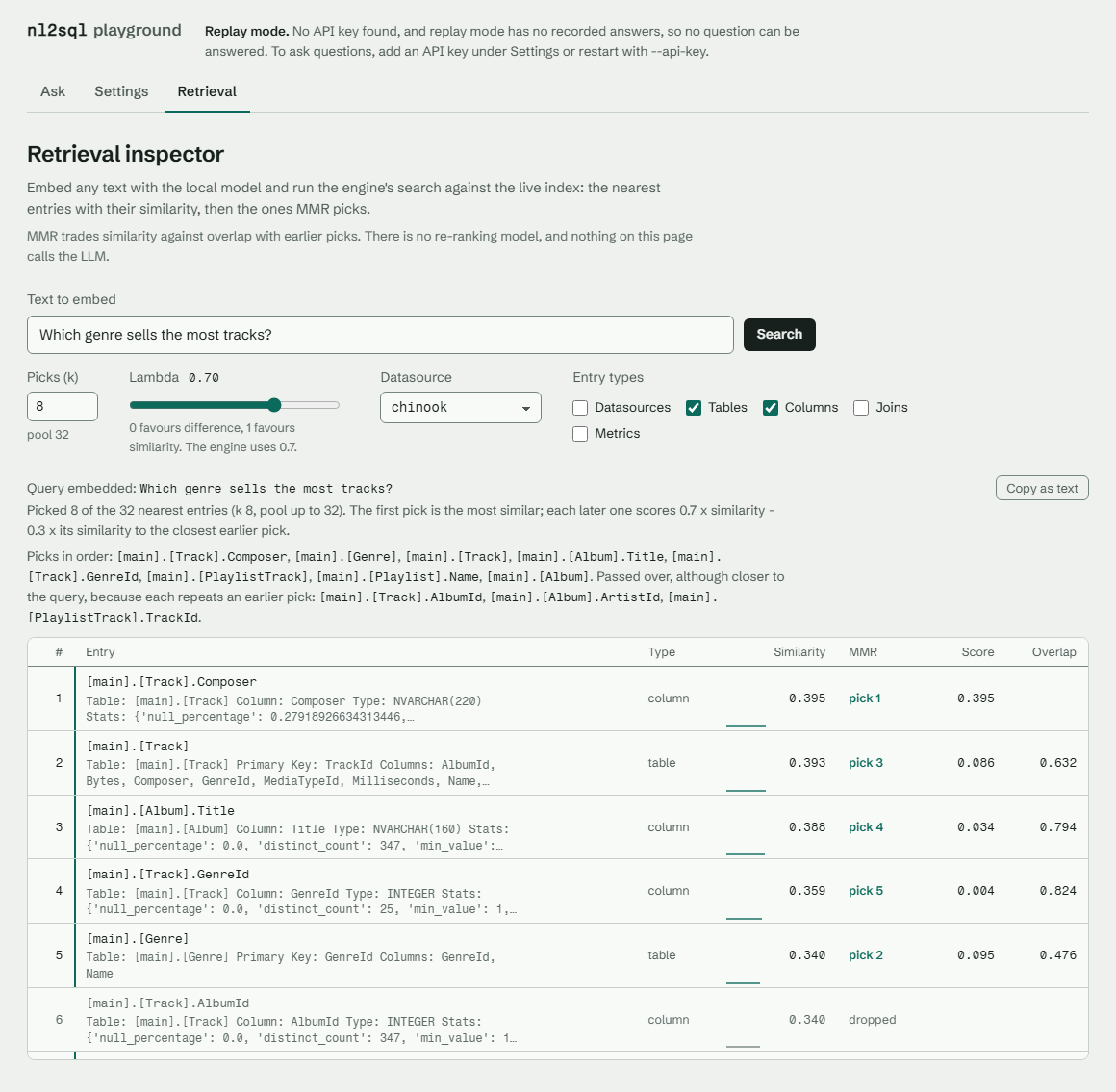
and the Retrieval inspector still work. nl2sql demo --record (with an OpenAI,
OpenRouter or Anthropic key) records the guided questions into the project's
recordings.json, and later key-free runs of that folder replay them.
In the playground, pick one of the twenty guided questions -- twelve on
Chinook, four on support, four on webanalytics -- or type one, and choose a
role: admin and analyst can read the customer tables, viewer cannot, so
asking as viewer about customers shows the validator refusing the plan before
any SQL exists. The rail's Showing switcher reads any of the three schemas,
and follows the guided question you click. With three databases registered,
every question is routed first: the resolver picks the one it is about, a step
a single-database demo never reached, and the run says which one answered. A
question that spans two of them is not answerable yet -- each sub-query is
planned against one datasource, so the engine cannot join across databases, and
the shared customer identities are groundwork for when it can.
While a question runs, Ask becomes Stop: it cancels the request, and
the run stops before its next step or model call (the one in flight finishes).
The same is available to SDK callers as cancellation_token= on
engine.run_query (nl2sql.CancellationToken).
The playground has no login. It binds to 127.0.0.1 by default; Settings,
Rebuild, the Retrieval inspector and answer ratings are off on any other
address unless you pass --allow-settings. Full guide:
Demo.
nl2sql demo --hosted is a third state: the public demo
above, which you can run yourself. The server holds
no API key, each visitor pastes their own into the page, one per provider, and
a visitor without one can still click a guided question and watch a recorded
run of it, labelled Recorded run; any other question asks for a key. Saving settings,
Rebuild, answer ratings and --record are refused there, and the sample
databases are opened read-only. Two limits keep the pace, both in process and
both best-effort: 6 questions a minute keyed by client address
(--questions-per-minute) and 30 a session keyed by a random cookie
(--questions-per-session). deploy/huggingface/ is that demo as a
Hugging Face Space, deployed by every release at the version just published to
PyPI. See
Hosted demo.
Captured from the playground on the demo project, asking about Chinook, with recorded model responses (so token counts are placeholders).
An answer: the question, the plan the model wrote, the validator's checks, the generated SQL and the rows.
Debug: LLM calls, tokens and time per node in execution order. Open a node to see what it read and returned, the retrieval it ran, and each prompt and raw model response.
Pipeline: every step of a run in order, with the six a model decides marked and the deterministic ones left quiet. Before a question it shows the model each step is set to use; after one, the model that answered, that step's tokens and its time.
Settings: save an API key per provider and choose a provider and model for
each LLM step. Written to the demo project's .env and llm.yaml.
Retrieval inspector: run the engine's vector search for any text against the live index, with k, lambda, entry types and datasource as knobs, and see what MMR picked and what it dropped. No LLM call.
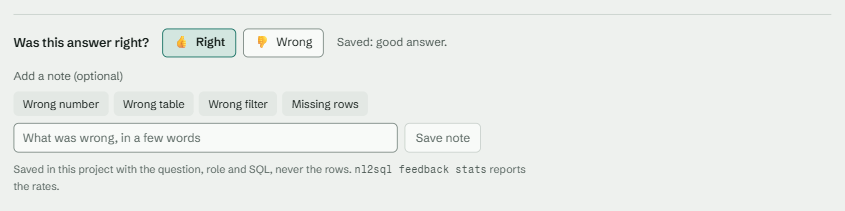
Feedback: rate an answer right or wrong, with an optional note. Stored in the
project with the question, role and SQL, never the rows;
nl2sql feedback stats reports the rates.
Global options: --config PATH names the nl2sql.yaml every command reads
(without it, NL2SQL_CONFIG, then ./nl2sql.yaml), and --version prints the
installed version. The .env next to that nl2sql.yaml is loaded first;
variables already exported in your shell win over the file. Paths inside the
config are relative to nl2sql.yaml, so a command works from any folder. Every
command has --help.
| Command | Purpose | Key options |
|---|---|---|
nl2sql demo |
Write (init --demo), check, index and serve the three-database playground |
--dir (default nl2sql-demo), --host (default 127.0.0.1), --port (default 8765), --no-browser, --api-key, --record, --allow-settings, --hosted, --questions-per-minute (default 6), --questions-per-session (default 30) |
nl2sql init [DIR] |
Write a new config into DIR (default .): nl2sql.yaml plus one file per section, checked with load_config. Never writes a key and never overwrites a file without --force |
--demo (the three sample databases, their roles, verified queries, sample questions and settings), --provider (openai, anthropic or openrouter; default openai), --force |
nl2sql run "QUESTION" |
Ask a question and print the plan, checks, SQL, rows and answer | --role (default admin), --no-exec (plan and validate only), --ds-id, --verbose/-v, --show-perf |
nl2sql index |
Index datasource schemas into the index of the configured embedding model, one datasource at a time | --datasource/-d ID (repeatable), --curated-only (re-index only the verified queries of the curated section, keeping the schema entries; no model call), --enrich (ask the indexing_enrichment LLM for descriptions the database lacks; spends tokens, off by default), --check (re-index nothing: compare each live database with the schema its index was built from; exits 0 unchanged, 1 drifted, 2 a check failed or nothing was checked; with --role (default admin) and --json) |
nl2sql mcp |
Serve the engine to an MCP client over stdio: ask, list_datasources, describe_table, as the role given; needs pip install "nl2sql-engine[mcp]". Refuses to start with no role and no policies.default_role |
--role (repeatable), --user |
nl2sql index prune |
Drop the index of every other embedding model (and 0.5's collection); the current one is kept | |
nl2sql config check |
Check the whole config without starting the engine: every file, include and ${env:...}, and every component it names (installed, right interface version, drivers present). Problems are printed by file; each secret is reported present or missing, never printed. Exits 0, or 1 on any problem. Writes nothing under storage.path |
--connect (also connect to every datasource; one that fails is a problem) |
nl2sql doctor |
Check Python, installed drivers and provider keys, then build the configured engine and print engine.check(): each datasource, each agent's key, the index |
|
nl2sql list-adapters |
List the installed datasource adapters | |
nl2sql install NAME |
pip-install the driver extra for an adapter (postgres, mysql, mssql, duckdb, sqlite: the connection.type names), after a confirmation |
|
nl2sql policy validate |
Check the config's policies against its datasources | |
nl2sql curated validate |
Check the curated section (verified queries): ids, params, read-only SQL in each datasource's dialect, tables against the index; exits 1 on any error |
|
nl2sql curated test |
Run every verified query once against its database, read-only, with each param's default or example bound; reports pass/fail per query and exits 1 on any failure | |
nl2sql curated proposals export |
Write thumbs-up generated answers as proposed verified queries, in the curated section's shape, for review; never writes a file of the config |
--out PATH (default: print to stdout) |
nl2sql trace show TARGET |
Print a run trace's timeline: nodes, attempts, durations, tokens, errors | a trace file, or a trace id in the trace store (storage.traces) |
nl2sql trace replay TARGET |
Re-run a traced question on its recorded LLM responses, with no model calls | |
nl2sql cache clear |
Empty the plan cache in <storage.path>/state.db; schema snapshots are kept |
|
nl2sql storage purge |
Delete traces and results older than their store's max_age_days (14 and 7 days by default); nl2sql-api does this at startup and once a day |
|
nl2sql feedback list |
Playground ratings, newest first | --limit (default 50) |
nl2sql feedback stats |
Ratings plus guardrail rates: refusals, refiner retries, validator rejections, errors, plan-cache hits | --json, --traces DIR |
nl2sql feedback export --good |
Write thumbs-up runs as draft eval cases to a separate suite file for review | --out (default feedback_gold_drafts.yaml) |
nl2sql feedback clear |
Delete every rating | --yes |
nl2sql eval run |
Run the eval suites in one mode (full: the model, priced and capped; plans: the gold plans on a fake LLM; retrieval: no model) and, with --baseline, gate the run against a report, a record or a benchmarks/ folder. Exits 1 on a regression, 2 on a usage error or a baseline it cannot compare, 3 at the cost cap; mode full refuses to run when CI is set |
--mode, --suite, --llm (preset, file or NAME=), --cases, --passes, --max-cost, --baseline, --out (default eval_<mode>.json next to nl2sql.yaml) |
nl2sql eval regenerate PATH |
Write a suite's expected rows: each approved case's SQL through its datasource's adapter; exits 1 when a case's SQL failed | |
nl2sql eval seed |
Draft eval cases from a datasource's schema, as a role: the model writes questions with typed plans, the engine validates each, passes it through the execute hooks and runs it read-only, and the survivors are appended as status: draft for review. Exits 2 on a refusal, 3 at the cost cap or the call limit; refuses to run when CI is set |
--datasource, --out, --count (default 20), --role (default policies.default_role), --max-cost (default evals.yaml's) |
nl2sql eval publish [REPORT ...] |
Record each report eval run wrote under benchmarks/, then rebuild docs/benchmarks.md and the results block above; run from the repo root |
--note, --from DIR |
The nl2sql eval group is the whole command; nl2sql eval --help lists its
subcommands. Evals also run from Python, with engine.evals
(Evals).
Examples, from the demo folder (cd nl2sql-demo, so ./nl2sql.yaml is the
config; from anywhere else, add --config nl2sql-demo/nl2sql.yaml):
nl2sql run "How many customers do we have, by country?"
nl2sql run --role viewer "Who are the top 5 customers by total spend?"   # refused
nl2sql run --no-exec "Which artist has the most albums?"                 # plan only
nl2sql feedback stats
run and index call engine.check() before they start: a
datasource marked required: true that cannot connect stops them with the
report (exit 1); any other datasource that fails is printed and left out.
run exits 1 when the run ends with an ERROR or CRITICAL error (a refusal
included). More: Demo guide,
Debugging a Run,
Feedback and Signals,
Evaluation.
The nl2sql-api package serves the engine over HTTP with FastAPI. At startup
it loads the .env next to nl2sql.yaml (never overriding a variable already
set), builds one engine with NL2SQL.from_config() (NL2SQL_CONFIG, else
./nl2sql.yaml) and calls engine.check() before it accepts a request: a
required datasource that cannot connect stops it from starting.
pip install nl2sql-api
cd nl2sql-demo                               # ./nl2sql.yaml is the config
nl2sql-api --host 127.0.0.1 --port 8000
# or: NL2SQL_CONFIG=nl2sql-demo/nl2sql.yaml uvicorn nl2sql_api.main:app --port 8000
Its own settings are the api section of nl2sql.yaml, which the engine
ignores:
# api.yaml (included from nl2sql.yaml as  api: { file: api.yaml })
role: admin                     # one static role for every request
cors_origins: []                # browser origins allowed to call the API
Full interactive docs at http://localhost:8000/docs (Swagger UI), with ReDoc
at /redoc and the schema at /openapi.json. Browser access from other origins
is off unless listed in api.cors_origins.
The API does not authenticate callers itself, and it never takes the RBAC role from the request body. The role comes from one of these settings, first match wins:
| Setting | Role source |
|---|---|
api.role_header: X-NL2SQL-Role |
A header set by a trusted proxy that authenticates the caller. Comma-separated values are several roles. |
api.role: admin |
One static role for every request. |
api.trust_body_role: true |
Dev only: user_context in the body. Any client can pick any role, so the server logs a warning at startup. |
With none of them, /api/v1/query, /api/v1/query/stream and the result routes answer HTTP 401.
The routes that change the process (POST /api/v1/datasource, DELETE /api/v1/datasource/{id},
PUT /api/v1/settings/llm, POST /api/v1/index/{id}, POST /api/v1/index-all, DELETE /api/v1/index)
also need a role listed in policies.admin_roles (default [admin]), else HTTP 403. With no
role setting at all they answer loopback clients only.
| Method | Path | Purpose |
|---|---|---|
POST |
/api/v1/query |
Ask a question; returns the plan, checks, SQL, a row sample, the result manifest, answer, errors and usage |
POST |
/api/v1/query/stream |
The same run as Server-Sent Events: each step as it starts and ends, the result manifest, the answer as it is written, then the /query response |
GET |
/api/v1/query/{request_id}/results/{result_id} |
One page of a run's saved result (offset, limit up to 1,000) |
GET |
/api/v1/query/{request_id}/results/{result_id}.csv |
The whole of a run's saved result as CSV, streamed |
GET |
/api/v1/health |
Liveness check |
GET |
/api/v1/ready |
Readiness check (does not yet check datasources, the LLM or the index) |
POST |
/api/v1/datasource |
Register a datasource in the running process; config has the shape of one datasources entry (id, type, connection, ...) |
GET |
/api/v1/datasource |
List the datasources: type, description, status (ready, failed, unchecked), capabilities, masked connection |
GET |
/api/v1/datasource/{datasource_id} |
One datasource, as the list shows it |
DELETE |
/api/v1/datasource/{datasource_id} |
Take a datasource out of the running process |
PUT |
/api/v1/settings/llm |
Replace the whole llm section in the running process (the body is the section as JSON; a bad one is a 422) |
GET |
/api/v1/llm |
Each agent and the model it runs on |
GET |
/api/v1/llm/{agent} |
One agent's model |
POST |
/api/v1/index/{datasource_id} |
Index one datasource's schema |
POST |
/api/v1/index-all |
Index every configured datasource |
DELETE |
/api/v1/index |
Clear the vector store |
GET |
/api/v1/index/status |
Index health: status, entries by type, embedding model and problems per datasource |
curl -X POST http://localhost:8000/api/v1/query \
  -H "Content-Type: application/json" \
  -d '{"natural_language": "How many customers are there?"}'
The response has status, sub_queries, final_answer, errors, warnings,
reasoning, timings, usage, artifact_refs, trace_id and trace_path.
Each sub-query carries id, intent, datasource_id, schema_version,
plan, validation, sql, rows, status, retry_count and plan_source.
rows is a capped sample with the true total; the full result set lives in
artifact storage, addressed by artifact_refs. A pipeline failure, a refusal
included, comes back as HTTP 200 with status: "error" and the reason in
errors. Reference: REST API.
from nl2sql import NL2SQL, UserContext

engine = NL2SQL.demo()               # the bundled databases; reads OPENAI_API_KEY (or another provider's key)
engine.index.build()                 # once: builds the index under .nl2sql-demo/
# Your own config instead:  engine = NL2SQL.from_config("nl2sql.yaml")
result = engine.run_query(
    "How many customers are there?",
    user_context=UserContext(roles=["admin"]),
)

print(result.status)                  # "success", "error", "plan_only", or "" if nothing ran
for sq in result.sub_queries:
    print(sq.sql)
    print([c.name for c in sq.validation if c.passed])
    print(sq.rows.rows[:5] if sq.rows else "plan only")
print(result.final_answer["summary"] if result.final_answer else result.errors)
Building an engine never connects; engine.check() connects to each
datasource and reports, and with NL2SQL.from_config(...) as engine: closes it.
run_query also takes datasource_id and
execute=False (plan and validate only). Pass a user_context with a role: with
none the call currently raises a validation error, and a role the policy does
not know is refused. QueryResult carries per sub-query the plan, checks, SQL,
a capped row sample with the true total, status and retry count, and per run
the status, errors, warnings, per-node timings, usage (LLM calls and tokens,
and cost when llm.prices covers the model) and trace_path. Asking the same question
again reuses the validated plan from the plan cache (sq.plan_source == "cache"),
still validated for the caller's role.
Everything else on NL2SQL is a namespace: engine.datasources (list, get,
add, remove, schema, test), engine.index (build, health, clear, inspect,
inspect_defaults), engine.llm (list, get, providers, prices, replace),
engine.policies (roles, allows, allowed, validate), engine.curated
(validate, test), engine.results (manifest, page, csv), engine.feedback
(record, list, stats, export, clear), engine.traces (get, replay) and
engine.evals (load, run, regenerate, scorers); engine.about() describes the engine and each step of a
run. The CLI, the playground and nl2sql-api use nothing else. See
the public facade and
examples/.
One config, nl2sql.yaml, which nl2sql init writes with each section in its
own file (Configuration):
| Section | What it holds |
|---|---|
datasources (datasources/, one file each) |
Datasources and connections: PostgreSQL, MySQL, SQL Server, SQLite, DuckDB (Datasources) |
llm (llm.yaml) |
The provider and model, and optional per-node agents (LLM) |
embeddings (embeddings.yaml) |
The embedder the index is built with; local needs no key (Embeddings) |
policies (policies.yaml) |
Roles: allowed datasources and datasource.schema.table entries, admin_roles (Policies) |
storage (storage.yaml) |
Where the index, state.db, traces and results live (Storage) |
curated (optional) |
Verified queries; present means curated answers are on (Curated answers) |
secrets (optional) |
Secret providers for ${provider:key} references (Secrets) |
settings (optional) |
Tuning knobs, every one with a default (Settings) |
api (optional) |
nl2sql-api's role source and CORS origins (API) |
nl2sql init                                   # writes nl2sql.yaml and its files here
# edit datasources/example.yaml, then:
nl2sql index
nl2sql run "How many customers are there?"
LLM providers. openai (default model gpt-5.4), anthropic (Claude,
pip install "nl2sql-engine[anthropic]", claude-opus-5 with
temperature: null), openrouter (OpenAI-compatible gateway, default
anthropic/claude-sonnet-4.5) and ollama (local; small models often cannot
fill the recursive plan schema). Those defaults are what nl2sql init and
nl2sql demo write. Each of the six model-using steps can have its own
provider and model under agents: curated_matcher, datasource_resolver, decomposer,
ast_planner, refiner and answer_synthesizer, plus indexing_enrichment
for optional schema descriptions during indexing (off unless you run
nl2sql index --enrich).
Environment variables. Two kinds are read directly: NL2SQL_CONFIG (the
nl2sql.yaml to read) and the provider keys OPENAI_API_KEY, ANTHROPIC_API_KEY and OPENROUTER_API_KEY
(the fallback when the config names no key). Anything else from the
environment is written in the YAML as ${env:VAR}, for example
path: "${env:NL2SQL_DATA_DIR}". The 0.4 variables and where each one went:
System configuration.
- What reaches the LLM provider: the question; the schema the planner needs
(table and column names, types, keys, relationships, descriptions); sample
column values for tables the role may read; and the result rows, which
the answer writer summarises. With
settings.traces.modeon, run traces store prompts, responses and sample rows on disk. - RBAC is strict. A plan that touches a table the role may not read is refused before any SQL exists, never answered from the tables the role can see. Sample values and statistics of forbidden tables are stripped from the prompt and the trace. An unknown role grants nothing. There is no column masking and no row-level security.
- Read-only is a database setting, not something the executor checks. The
plan type only allows
SELECTand the generator only builds one, but the executor does not inspect the SQL. A SQLite datasource is always opened read-only at the driver level (SQLite'smode=roURI), so a write is refused by SQLite itself. No other dialect opens read-only yet, so on PostgreSQL, MySQL, SQL Server or DuckDB, give the engine a read-only database user. - No authentication in the CLI, playground or REST API. The CLI and playground take the role from the caller. The REST API takes it from a trusted proxy header or a static setting, never from the body unless a dev flag is on; put your own auth in the proxy and derive the role from it.
settings.pipeline.timeout_sbounds how long the caller waits, not how long the work runs; the graph runs in-process with no sandbox.
Details: Security Model, Execution Isolation.
engine.evals: suites of cases inevals.yaml, scored by registered scorers (result_match,outcome,retrieval_recall,faithfulness,routing), in three modes.- The Chinook suite: 47 cases (43 answerable, 4 deliberately not) with
expected results per role, including refusals. A case may carry reviewed
alt_sqlalternatives, so a second correct way to answer it scores as correct; gold data is never edited to make a run pass. - Mode plans (no key, runs in CI): the hand-written plans through the validator, generator and executor with a fake LLM, so a failure is a bug in code, not the model.
- Mode full (real model, costs money): end to end per config, with accuracy,
answerability precision and recall, cost, latency, determinism and answer
faithfulness (a deterministic check, no second model, that every number and
name in the written answer comes from the rows). Accuracy is scored twice:
strict, where the rows must match the gold answer exactly, and
lenient, which allows extra and reordered columns and date labels. Each
is published with a 95% Wilson interval, because 47 questions cannot separate
small differences. Stops before spend could pass
max_cost_usd. With curated answers on, a case a verified query answered also runs on the generated path, soaccuracy_generatedmeasures the model alone. - Mode retrieval (no key): the share of each case's needed tables and columns that schema retrieval sends the planner, and where routing sends it.
- Feedback: playground ratings and guardrail rates via
nl2sql feedback stats;feedback export --gooddrafts new eval cases for review.
Recorded runs are published with nl2sql eval publish to the
block above and docs/benchmarks.md. Details:
Evals, the Chinook suite,
Feedback and Signals.
The engine is at 0.1.x. nl2sql-sdk, nl2sql-engine and
nl2sql-api share one version and are released together
(Releasing). Unreleased changes are on main;
see the changelog for what is released.
Known limitations:
- Every question needs an LLM; only indexing is key-free. The key-free demo answers nothing until you record answers or add a key.
- Small local models often fail to produce a valid plan.
- A question cannot span two databases: every sub-query is planned against one datasource, so the demo's three cannot be joined, however much their data lines up.
- There is no conversation: each question is answered on its own, with no memory of the last one, so "and by country?" is not a follow-up.
- Read-only is enforced by SQLite when a datasource asks for it, and by nothing
else (see above), so a database user that can only read is still the real
control.
max_bytesis not enforced;row_limitis, in the generated SQL. - The hosted demo's rate limits are best-effort: they live in one process, and the per-session cap hangs on a cookie the visitor can clear.
- The model's output is not reproducible; determinism is structural (fixed topology, validation before generation, plan cache) (Determinism).
- No distributed tracing: OpenTelemetry metrics only, off by default. Audit events are emitted only by the CLI.
- The REST API does not authenticate callers: it takes the role from a trusted
proxy header or a static setting.
run_querywithout auser_contextraises instead of refusing.
Roadmap: using the engine on your own database (bring-your-own-database setup
beyond the bundled demo databases) is planned. nl2sql init and the adapters
exist, but the guided connect-scan-review flow arrives in a later release.
See CONTRIBUTING.md for local setup and test markers
(pytest -m "not integration and not realdb" runs without a database or key).
CLAUDE.md is the short form of the rules a change has to keep —
package boundaries, no dialect outside an adapter, validation before
generation — and most of them are enforced, not just written down:
packages/nl2sql/tests/architecture/test_boundaries.py parses the tree and
fails with the rule's own name. The reasoning behind each is in
Invariants.
Repository layout: packages/nl2sql (engine, CLI, adapters),
packages/api (REST API), packages/sdk (the SDK: the adapter contract),
web/playground (the playground's React source), docs/ (MkDocs site),
benchmarks/ (recorded benchmark runs), examples/.
MIT licensed (LICENSE). The Chinook sample database and other third-party material: THIRD_PARTY_NOTICES.md.