Transform invoice images and PDFs into clean, structured JSON with AI OCR.






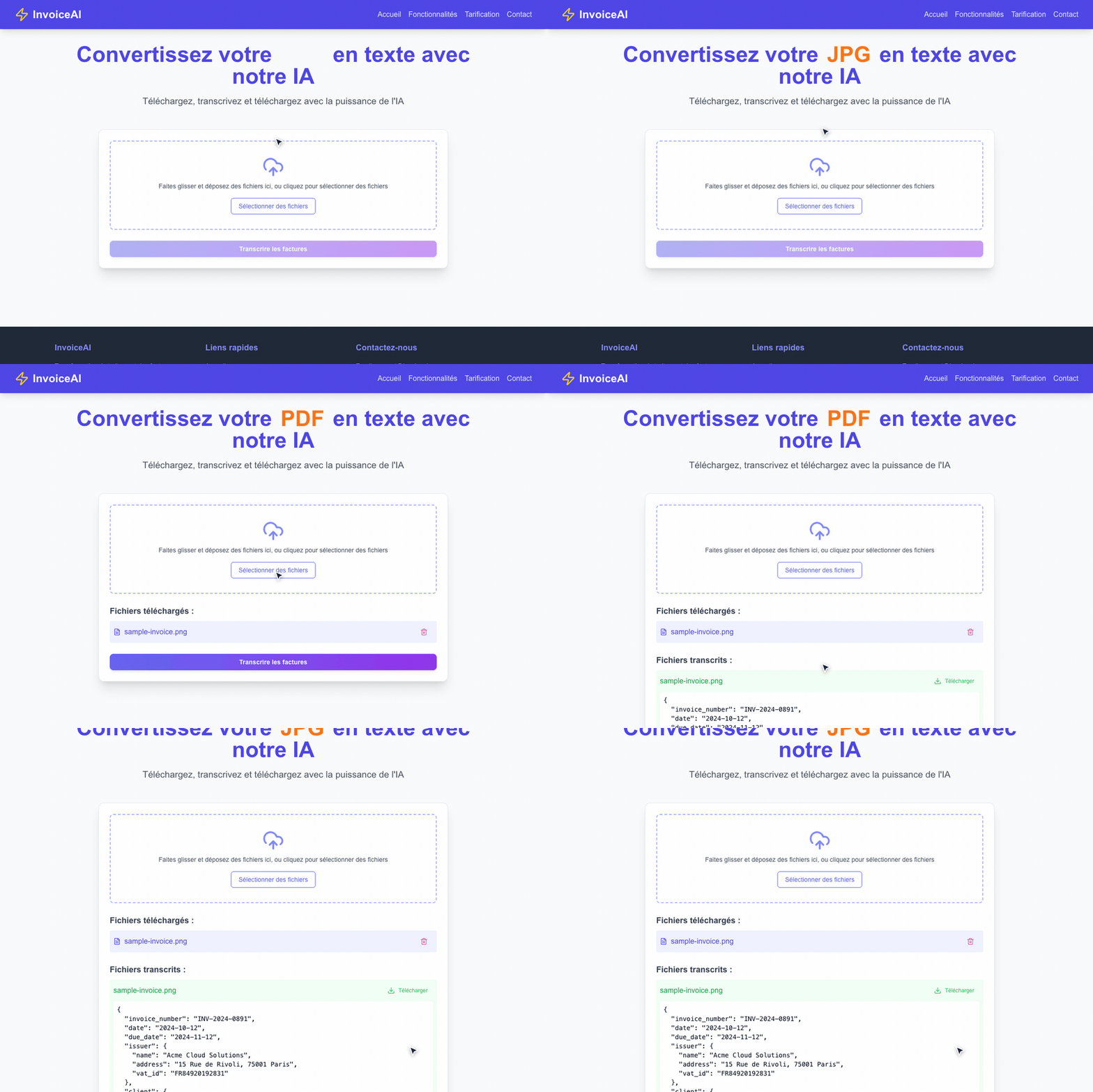
InvoiceAI is a modern document extraction web application that transcribes scanned invoices, receipts, and billing documents into validated, structured JSON in seconds. Powered by Mistral AI's multimodal document understanding, it eliminates manual data entry and complex regex-based OCR templates.
- Document AI OCR: Leverages Mistral AI agents to accurately extract data from messy scans, skewed images, and multi-page receipts.
- Normalized Schema: Parses vendor details, client info, dates, invoice numbers, tax rates, line items, and totals into consistent JSON.
- Batch Drag & Drop: Queue multiple invoices simultaneously with instant file badge previews and removal controls.
- Instant JSON Export: One-click download of parsed JSON files ready for ERP systems, spreadsheets, or accounting workflows.
- Offline Mock Mode: Built-in mock transcription toggle (
MOCK_TRANSCRIBE=true) for deterministic local testing and UI development without burning API credits. - Fluid UI: Crafted with Next.js 14 App Router, Radix UI primitives, Lucide icons, and Tailwind CSS.
Yes, if you have invoice images (PNG, JPG) or documents and need structured, machine-readable JSON data without maintaining fragile OCR templates or rule-based parsers.
No, if you need invoice creation, invoicing lifecycle management, or a full double-entry accounting ledger. InvoiceAI is focused strictly on invoice transcription and data extraction.
{
  "invoice_number": "INV-2024-0891",
  "date": "2024-10-12",
  "due_date": "2024-11-12",
  "issuer": {
    "name": "Acme Cloud Solutions",
    "address": "15 Rue de Rivoli, 75001 Paris",
    "vat_id": "FR84920192831"
  },
  "client": {
    "name": "NexGen Media Inc.",
    "address": "42 Boulevard Haussmann, 75009 Paris"
  },
  "items": [
    { "description": "SaaS Enterprise Subscription", "quantity": 1, "unit_price": 249.00, "total": 249.00 },
    { "description": "Document AI API Usage (5k credits)", "quantity": 5, "unit_price": 35.00, "total": 175.00 },
    { "description": "Dedicated Cloud Support", "quantity": 1, "unit_price": 99.00, "total": 99.00 }
  ],
  "subtotal": 523.00,
  "tax_rate": "20%",
  "tax_amount": 104.60,
  "total": 627.60,
  "currency": "EUR"
}- Node.js:
20.xor22.x(nvm userecommended) - Mistral API Key: Get one at console.mistral.ai
-
Clone the repository:
git clone https://github.com/killerwolf/invoice-ai.git cd invoice-ai -
Install dependencies:
npm install
-
Configure environment variables:
cp .env.example .env.local
Edit
.env.local:MISTRAL_API_KEY=your_actual_api_key_here -
Start the development server:
npm run dev
Open http://localhost:3000 in your browser.
| Variable | Required | Default | Description |
|---|---|---|---|
MISTRAL_API_KEY |
Yes (for live API) | — | Your Mistral AI platform API key |
MOCK_TRANSCRIBE |
Optional | false |
When set to true, returns mock JSON with a realistic 1s delay (no API key required) |
| Command | Action |
|---|---|
npm run dev |
Starts the Next.js development server at localhost:3000 |
npm run build |
Compiles an optimized production build |
npm run start |
Runs the compiled production app |
npm run check |
Runs Biome code quality checks (formatting, lints, and imports) |
npm run check:write |
Automatically formats code and applies safe Biome fixes |
npm test |
Runs Jest unit tests |
node scripts/record-demo.mjs |
Records a demo GIF and MP4 video using headless Chrome |
Contributions are welcome! Please read our Contributing Guide and check out the Changelog.
This project is open source and available under the MIT License.