
English · 简体中文

Make project Markdown easy to find, read, and deliver.
中文 · English · App releases · GitHub · HRouter
Open a local folder, search and read your docs, make light edits, and export to Word or PDF. Your files stay on disk.
Who it’s for: Developers and teams working with READMEs, technical plans, product docs, and meeting notes.

- Open a folder or one Markdown file and recursively scan common document directories.
- Search filenames, headings, frontmatter, and body snippets.
- Quick open, recent files, favorites, pinned docs, and per-document scroll memory.
- Fixed row action icons for favorites, pinned docs, and related library controls when they were invisible in some environments.
- Added document locking so a file can stay readable while save, image insertion, and history restore are blocked.
- Added an edit history panel for previewing and restoring pre-save backups.
- Two primary views: Read and Edit. Edit is the Markdown source view and saves create pre-save backups.
- Editor selection shortcuts quickly insert bold text, links, math, tables, code blocks, and Mermaid diagrams.
- Technical document rendering: syntax highlighting, code copy, KaTeX math, Mermaid diagrams, GFM tables, and GitHub-style callouts.
- The help window includes a built-in Markdown guide that opens directly in the reader.
- Local image insertion, pasted screenshots, dropped images, and missing-image checks.
- PDF to Markdown draft conversion for selectable-text PDFs.
- DOCX to Markdown draft conversion with headings, lists, tables, and images where possible.
- Drag folders, Markdown files, PDF files, DOCX files, or images into the window.
- Export Word, PDF, reading HTML, and copy Markdown, plain text, or HTML.
- The GUI installer ships the
md-readerCLI (md-reader.exeon Windows) for system shells, Codex, and other agents. - Chinese / English interface switching.
- DOMPurify Markdown sanitization, strict CSP, and workspace-scoped file commands.
V3 no longer keeps an embedded terminal. The real terminal path was not reliable enough in the Tauri WebView2/xterm rendering chain, so future Agent/V4 work should call the external CLI first.


- Read project README files, PRDs, technical plans, and changelogs without opening an IDE.
- Search meeting notes, troubleshooting records, retrospectives, and delivery folders.
- Turn a local Markdown knowledge base into a searchable, pinnable, exportable library.
- Read technical docs with code, math, tables, and Mermaid diagrams.
- Quickly structure Markdown with shortcuts for math, tables, code blocks, task lists, and diagrams.
- Convert PDF or DOCX files into Markdown drafts before editing.
- Deliver Markdown content as Word, PDF, or reading HTML.
- Let Codex, Claude Code, and other tools read, convert, and search local docs through the CLI.
Release builds are published on GitHub Releases:
Current build targets:
- Windows x64: NSIS
.exeinstaller and.msi - macOS Apple Silicon / M-series:
.app.tar.gz
Only macOS Apple Silicon / M-series builds are published; Intel Mac bundles are no longer supported. If the macOS build is not Apple-signed or notarized, the first launch may require right-clicking the app in Finder and choosing "Open".
The GUI installer also ships the md-reader CLI (md-reader.exe on Windows). You can also build and run it locally:
cargo build --manifest-path src-tauri/Cargo.toml --release --bin md-reader
src-tauri/target/release/md-reader list ./docs --json
src-tauri/target/release/md-reader import input.docx --to md --out ./output --json
src-tauri/target/release/md-reader convert input.docx --to md --out ./output --json
src-tauri/target/release/md-reader export ./docs/example.md --to html --out ./exports --json
src-tauri/target/release/md-reader export ./docs/example.md --to txt --out ./exports --json
src-tauri/target/release/md-reader inspect input.pdf --json
src-tauri/target/release/md-reader search ./docs --query "keyword" --json
src-tauri/target/release/md-reader read ./docs/example.md --json
src-tauri/target/release/md-reader save ./docs/example.md --in ./draft.md --json
src-tauri/target/release/md-reader history ./docs/example.md --json
src-tauri/target/release/md-reader history-read ./docs/example.md --history ./docs/.reader-backups/example-xxx.md --json
src-tauri/target/release/md-reader restore ./docs/example.md --history ./docs/.reader-backups/example-xxx.md --json
DOCX conversion writes images to a Markdown-matching .assets folder, which keeps the result editable and useful for local agent workflows. CLI export supports md, txt, and html; rich Word/PDF export remains in the GUI. save, history, and restore reuse the GUI pre-save versions, and write/restore backs up current content first.
pnpm install
pnpm run tauri:devpnpm run tauri:buildLocal Windows builds require Rust/Cargo and Microsoft C++ Build Tools. Local macOS builds require Rust/Cargo, Xcode Command Line Tools, and a macOS environment.
Push a v* tag to create a GitHub Release:
git tag v3.5
git push origin main v3.5
The workflow builds Windows installers plus macOS Apple Silicon / M-series .app archives and uploads them to the matching Release. Current Windows local bundles are also uploaded manually as release assets.
Chinese launch copy and asset references are in docs/PROMOTION.md.
This project is open-sourced under the MIT License. See LICENSE.
I’m honestTai, the developer and operator behind HRouter. I share practical tools, reusable workflows, skills, and plugins on GitHub.
This project does not require HRouter. If you also work with AI coding tools, explore my HRouter model-routing service.
Explore HRouter · More projects
If this project helps your workflow, give it a star and share what you build. Feedback and feature ideas are welcome in Issues.
Star / Fork totals and retained-event history, scheduled to refresh daily.
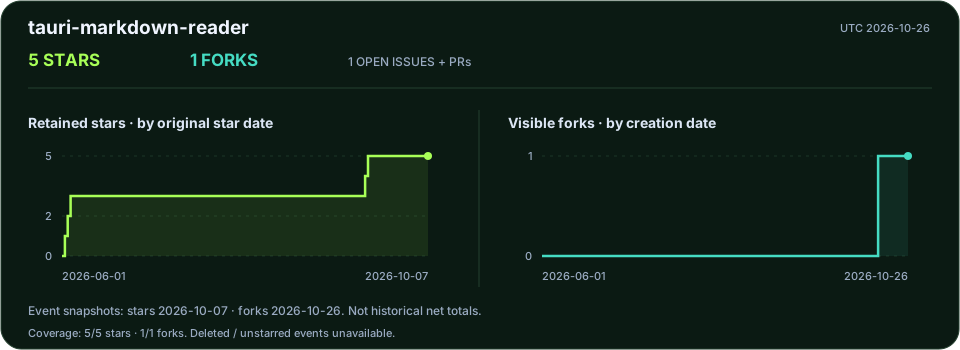
Observed daily totals · Methodology · All public projects

Historical curves reconstruct currently retained stars and visible forks, not historical net totals. Separate daily observations start on 2026-10-06; no fabricated backfill.