An MCP server that gives AI coding agents real .NET tooling: Roslyn code intelligence, dotnet build/test, affected-test selection, and an orchestrator that runs those tools concurrently as a dependency graph.





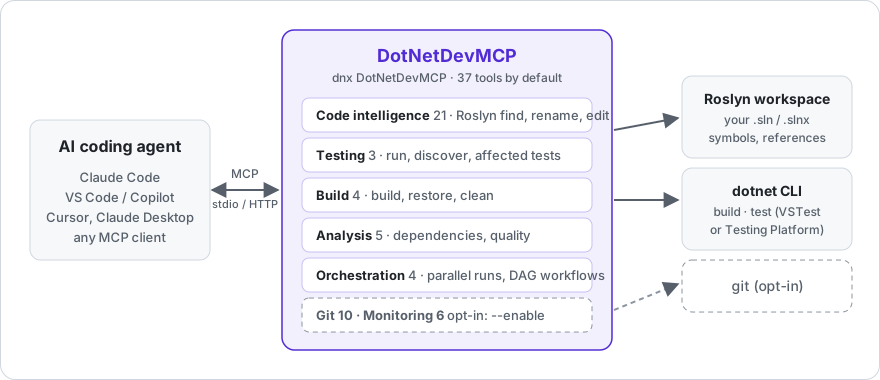
Agents working on .NET code usually get by with grep and shelling out to dotnet. That means they read files instead of symbols, edit text instead of syntax trees, and run one command at a time. DotNetDevMCP replaces that with 37 tools by default (53 with the optional groups below enabled) that use the compiler's view of your solution and can run builds, tests and analysis in parallel.
New here? The wiki has a first-session tutorial, setup for every MCP client, and troubleshooting.
Requires the .NET 10 SDK.
Claude Code
claude mcp add dotnetdevmcp -- dnx DotNetDevMCP --yesVS Code / Visual Studio (.mcp.json or .vscode/mcp.json)
{
  "servers": {
    "dotnetdevmcp": {
      "type": "stdio",
      "command": "dnx",
      "args": ["DotNetDevMCP", "--yes"]
    }
  }
}
Claude Desktop / Cursor / any stdio client (mcpServers form)
{
  "mcpServers": {
    "dotnetdevmcp": {
      "command": "dnx",
      "args": ["DotNetDevMCP", "--yes", "--", "--load-solution", "C:/src/MyApp/MyApp.sln"]
    }
  }
}
dnx downloads the package from NuGet.org on first run. Prefer a permanent install? dotnet tool install -g DotNetDevMCP, then use dotnetdevmcp as the command.
Pass --load-solution <path> to have Roslyn load your solution at startup, or let the agent call SharpTool_LoadSolution when it needs to. --http --port 3001 serves Streamable HTTP instead of stdio (localhost only, no authentication: see Security); it rejects requests carrying a foreign Origin header or a non-localhost Host header. --allowed-origin <origin> (repeatable) adds an extra origin to that allow-list, e.g. --allowed-origin http://localhost:5173 for a local dev-server proxy that forwards its Origin - the server sends no CORS headers, so this doesn't let a browser page call it directly. --clean-env starts dotnet and git with a minimal environment so tokens and cloud credentials in environment variables aren't passed on. dotnetdevmcp --help lists everything.
Git and Monitoring tools (see the table below) are off by default - a shell an agent already has covers them, and every registered tool costs context tokens in every session. Pass --enable git,monitoring (comma-separated and/or repeated, e.g. --enable git --enable monitoring) to turn either or both on.
By default, the Roslyn edit tools (SharpTool_RenameSymbol, OverwriteMember, AddMember, MoveMember, FindAndReplace, CreateRoslynDocument, OverwriteRoslynDocument, ManageUsings, ManageAttributes) never touch git - they apply changes to disk and return the usual compile-check output, nothing else. Pass --git-commit-edits to opt into the old behavior: each edit creates a sharptools/<timestamp> branch (if you aren't already on one) and commits the change, which is also what SharpTool_Undo needs in order to revert. Without the flag, SharpTool_Undo returns an explanatory error instead of failing obscurely. (--disable-git still exists but is a no-op now that git integration is opt-in by default.)
| Group | Tools | What they do |
|---|---|---|
| Code intelligence (Roslyn) | 21 | Load a solution; search and view definitions; find references and implementations; add, overwrite, move and rename members; manage usings and attributes; find-and-replace with syntax awareness; complexity analysis; undo. Forked from SharpTools. |
| Testing | 3 | dotnet_test_run (one dotnet test per project or solution, TRX parsed into per-test results with messages and stack traces), dotnet_test_discover, and dotnet_test_affected: Roslyn walks references from your changed files to the test methods that reach them, and runs only those. |
| Build | 4 | dotnet build, restore, clean, build with MSBuild properties. Structured error/warning output. |
| Analysis | 5 | Project dependency graph, circular-dependency detection, quality metrics, outdated-package scan. |
| Orchestration | 4 | orchestrate_parallel runs any of the server's own tools concurrently; execute_workflow runs them as a DAG. Resource limits and metrics. |
| Git (opt-in) | 10 | Status, branches, checkout, stage, commit, diff, log, push, pull. Enable with --enable git. |
| Monitoring (opt-in) | 6 | Process performance metrics, GC stats, resource utilization, health check, profiling sessions. Enable with --enable monitoring. |
Things you can say to an agent with this server attached:
- "Load
MyApp.sln, find every implementation ofIOrderRepository, and renameGetByIdtoFindByIdacross the solution." - "Run only the tests affected by what I just changed, and show me the failures with stack traces."
- "Build the API and the worker projects at the same time, then run both test projects."
- "Which projects have circular dependencies?"
The tools above are individually useful. The orchestrator is what makes them fast. Any tool on the server can be dispatched by name, in parallel or as a dependency graph, from a single call:
{
  "name": "execute_workflow",
  "arguments": {
    "workflowName": "ci",
    "steps": [
      { "name": "build-tests",  "toolName": "dotnet_build",    "arguments": { "projectPath": "tests/Api.Tests/Api.Tests.csproj" } },
      { "name": "build-worker", "toolName": "dotnet_build",    "arguments": { "projectPath": "src/Worker/Worker.csproj" } },
      { "name": "test-api",     "toolName": "dotnet_test_run", "arguments": { "path": "tests/Api.Tests/Api.Tests.csproj", "noBuild": true }, "dependsOn": ["build-tests"] },
      { "name": "deps",         "toolName": "dotnet_detect_circular_dependencies", "arguments": { "projectPath": "src/Api/Api.csproj" } }
    ]
  }
}build-tests, build-worker and deps start immediately; test-api waits for build-tests. Steps are throttled by a resource manager (default: processor count, adjustable with configure_resource_limits). Failures are reported per step; a failed dependency stops its dependents.
Under the hood this is ConcurrentExecutor / WorkflowEngine / ResourceManager, plain C# classes in DotNetDevMCP.Orchestration that can be used without MCP.
Measured with BenchmarkDotNet on an i7-10750H, .NET 10.0.9. The orchestration benchmarks use Task.Delay stand-ins for I/O-bound work, so they measure the engine's overhead and scheduling, not dotnet itself.
| Scenario (20 ops × 50 ms) | Mean | vs sequential |
|---|---|---|
| Sequential | 1,237 ms | 1.00 |
ConcurrentExecutor, throttled to 5 |
246 ms | 0.20 |
ConcurrentExecutor, unthrottled (12 cores) |
123 ms | 0.10 |
WorkflowEngine with dependencies |
185 ms | 0.15 |
Task.WhenAll (lower bound) |
62 ms | 0.05 |
| Workflow with a mix of dependent and independent steps | Mean | vs sequential |
|---|---|---|
| Sequential | 308 ms | 1.00 |
WorkflowEngine |
185 ms | 0.60 |
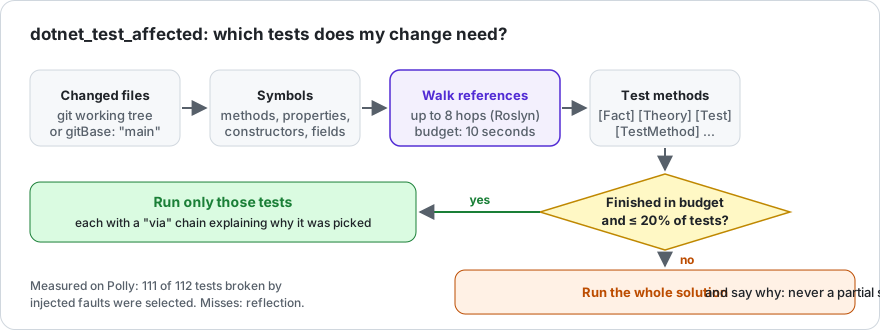
After an edit, the agent usually reruns the whole suite. dotnet_test_affected asks Roslyn instead: take the symbols declared in the changed files, follow references (up to maxDepth hops, default 8) until you land in a method with [Fact], [Theory], [Test], [TestCase] or [TestMethod], then run exactly those. Changed files default to the git working tree, or gitBase: "main" for a branch. dryRun: true lists the tests without running them; framework: "net10.0" runs one target framework of multi-targeted test projects.
The walk has a time budget (maxSelectionSeconds, default 10). A change to code that everything depends on reaches too much to trace cheaply; then the test projects that reference the changed projects run instead (the whole solution if that's all of them), and the response says so (selectionComplete: false, ranScope). The same happens when the selection is more than 20% of all tests (maxSelectedFraction), where a filtered run is no faster. Changed files the walk can't trace (a .csproj, .razor, appsettings.json, a deleted file) switch to the same project fallback and are listed in untracedFiles; a changed Directory.Build.props, global.json or .editorconfig runs the whole solution. You never get a silently partial selection. Runs are killed after timeoutSeconds (default 600) so a hanging test cannot hang the agent; the response names the test modules that never finished. maxDepth: 3 narrows more changes but misses more tests. Works with VSTest and with Microsoft.Testing.Platform ("test": { "runner": "Microsoft.Testing.Platform" } in global.json). The project fallback also follows restored NuGet package references (a test project whose obj/project.assets.json references another solution project's package id, with no ProjectReference between them, is still selected). A change to Directory.Packages.props is narrowed to the test projects that actually use the package ids whose version moved only when it is the only changed file (documentation outside every project aside), only the Version attributes actually changed (not a Condition, a GlobalPackageReference, or any other edit riding along), and every solution project has been restored; any other change to that file, a change alongside another file, or an unrestored project anywhere in the solution runs the whole solution instead, with a note explaining which of those applied.
On this repository, editing ConcurrentExecutor.cs selects 22 of 44 tests (the ConcurrentExecutorTests plus the OrchestrationServiceTests that reach it through OrchestrationService). Measured through the MCP tool, build included, i7-10750H:
| Tests | Wall | |
|---|---|---|
dotnet test from a shell |
44 | 9 s |
dotnet_test_run |
44 | 8.3 s |
dotnet_test_affected (change to ConcurrentExecutor.cs) |
22 | 6.6 s |
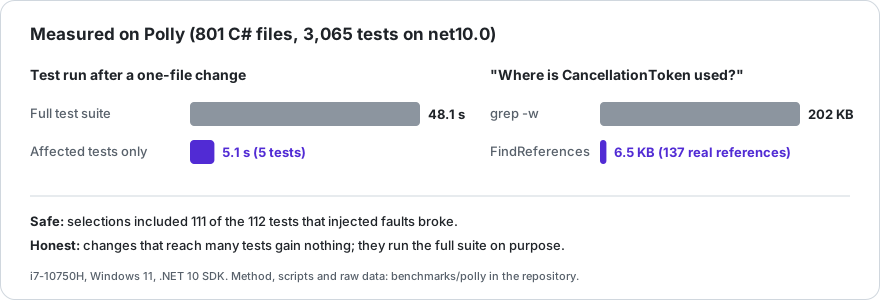
The suite here is small, so the saving is small. On a real library the picture is clearer: benchmarks/polly replays 40 Polly commits and injects faults into its code. A one-file change ran its 5 affected tests in 5.1 s against 48.1 s for the net10.0 suite (same session), and the selections included 111 of the 112 tests the injected faults broke (the miss builds its object through reflection). Changes that reach hundreds of tests gain nothing: of the last 40 commits, 16 ran a filtered selection and 24 ran the full suite. The first selection of a session on busy code is slower (Roslyn binds the files it touches, then caches them). dryRun: true shows what it picked and why (via).
DotNetDevMCP runs as you, for an agent you trust with your code. dotnet build and dotnet test execute whatever the solution
contains, so a malicious test or .csproj runs with your privileges, exactly as it would in your terminal; the server adds no
sandbox. What it does guarantee: tool arguments can't smuggle extra options into dotnet or git, Roslyn edits stay inside the
solution directory, and --clean-env keeps secrets in environment variables away from child processes. For code you don't
trust, run the agent and the server together in a container or VM with no credentials; the image below contains only the
server, which already keeps builds and tests off your machine. Don't expose --http beyond localhost. Details:
SECURITY.md.
The server can run in a container with no network, capped memory and processes, no capabilities, and only your repository mounted, so builds and tests the agent triggers can't reach the rest of your machine. Build the image (v0.3.4 is the first release with a Dockerfile), restore once with network, then register the sandboxed server:
docker build -t dotnetdevmcp https://github.com/csa7mdm/DotNetDevMCP.git#v0.3.4docker run --rm -v "${PWD}:/src" -v dotnetdevmcp-nuget:/home/mcp/.nuget/packages --memory 8g --memory-swap 8g --pids-limit 512 --cap-drop ALL --security-opt no-new-privileges --entrypoint dotnet dotnetdevmcp restore /src/YourSolution.slnclaude mcp add dotnetdevmcp -- docker run -i --rm --network none -v "${PWD}:/src" -v dotnetdevmcp-nuget:/home/mcp/.nuget/packages:ro --memory 8g --memory-swap 8g --pids-limit 512 --cap-drop ALL --security-opt no-new-privileges dotnetdevmcp --load-solution /src/YourSolution.slnThis is the Docker Desktop form (Windows, macOS): run it from PowerShell, WSL or macOS, or prefix each command with
MSYS_NO_PATHCONV=1 in Git Bash. Native Linux needs a --user variant, and Windows repos with core.autocrlf need one extra
setting for git mode; both are in SECURITY.md,
along with what each flag blocks and the tests that prove it.
It doesn't protect everything: the mounted repository is writable by design; only the server is contained, not the agent or
the docker CLI (which needs root-equivalent daemon access on Linux); restore runs the solution's own build logic with
network access; a shared package cache can carry a planted build file from one repo to another (use one volume per untrusted
repo); and Docker Desktop's boundary is a VM kernel shared by all your containers.
- Questions, ideas, "is this a bug?": Discussions.
- Something broke: open a bug report. The tool name and the arguments it got are the most useful part.
- Want to help? Start with a good first issue or read CONTRIBUTING. Running DotNetDevMCP on your own solution and reporting what happened helps just as much.
- Docs: the wiki (tutorial, tool reference, troubleshooting) is open to edits.
- Security: report privately.
- Using it at work? Tell me in Discussions: it decides what gets built next. If your team wants help setting it up on your solution (affected-test tuning,
--clean-envfor private feeds, CI), or wants early input on team features (shared config, audit logging, sandboxed runs), say so there. - Everyone here follows the Code of Conduct. If DotNetDevMCP saves you time, you can sponsor its development.
git clone https://github.com/csa7mdm/DotNetDevMCP.git
cd DotNetDevMCP
dotnet build -c Release
dotnet test -c Release
dotnet run --project src/DotNetDevMCP.Server -- --help
To use a local build from an MCP client, point command at src/DotNetDevMCP.Server/bin/Release/net10.0/dotnetdevmcp (.exe on Windows).
src/
  DotNetDevMCP.Server/           entry point; stdio or HTTP; packs as the `dotnetdevmcp` tool
  DotNetDevMCP.CodeIntelligence/ Roslyn tools (SharpTools fork)
  DotNetDevMCP.Testing/          dotnet test runner, TRX parsing, Roslyn affected-test selection
  DotNetDevMCP.Build/            dotnet build/restore/clean
  DotNetDevMCP.Analysis/         dependency graph, quality metrics
  DotNetDevMCP.SourceControl/    git
  DotNetDevMCP.Orchestration/    ConcurrentExecutor, WorkflowEngine, ResourceManager, orchestration tools
  DotNetDevMCP.Monitoring/       process metrics
  DotNetDevMCP.Core/             interfaces and models shared by the above
tests/                           xUnit tests
benchmarks/                      BenchmarkDotNet suite; polly/ measures the tools on Polly
docs/architecture/               design notes and ADRs
Built on the official MCP C# SDK 2.x. Package versions are managed centrally in Directory.Packages.props.
0.3.4. The Roslyn tools are mature (they come from SharpTools). Testing, build, git and orchestration are newer and have been exercised on this repository and a few others; expect rough edges on unusual project layouts. Issues and PRs welcome, see CONTRIBUTING.
Known gaps: dotnet_test_affected follows C# references only (no reflection, no DI-by-convention, no string-keyed lookups), so a change reached only through those paths will not select the test; use dryRun to check what it picks. Calls through an interface or base class are followed. The project fallback follows ProjectReferences and NuGet package references: package references are now followed when the test project has been restored; cross-repo consumers are not. Builds and tests are not sandboxed (see Security). Tests that hang instead of failing are only caught by a run that finishes. Test attribute detection covers xUnit, NUnit and MSTest by attribute name. Past the command-line length limit the filter widens from methods to classes, then to the whole project (more tests, never fewer).
MIT. The code-intelligence module is a fork of SharpTools by кɵɵѕнī, also MIT; see LICENSE and ADR-001 for why it was forked rather than referenced.