




Point recon at a domain to see its public technology and identity footprint: email providers and controls, identity indicators, SaaS services, and cloud infrastructure. No credentials, API keys, or active scanning. Use the CLI for a quick lookup, versioned JSON for automation, or the local MCP server from an agent.
recon reports evidence-backed observations, not a complete inventory or a security verdict. A domain does not establish an organization's boundaries.
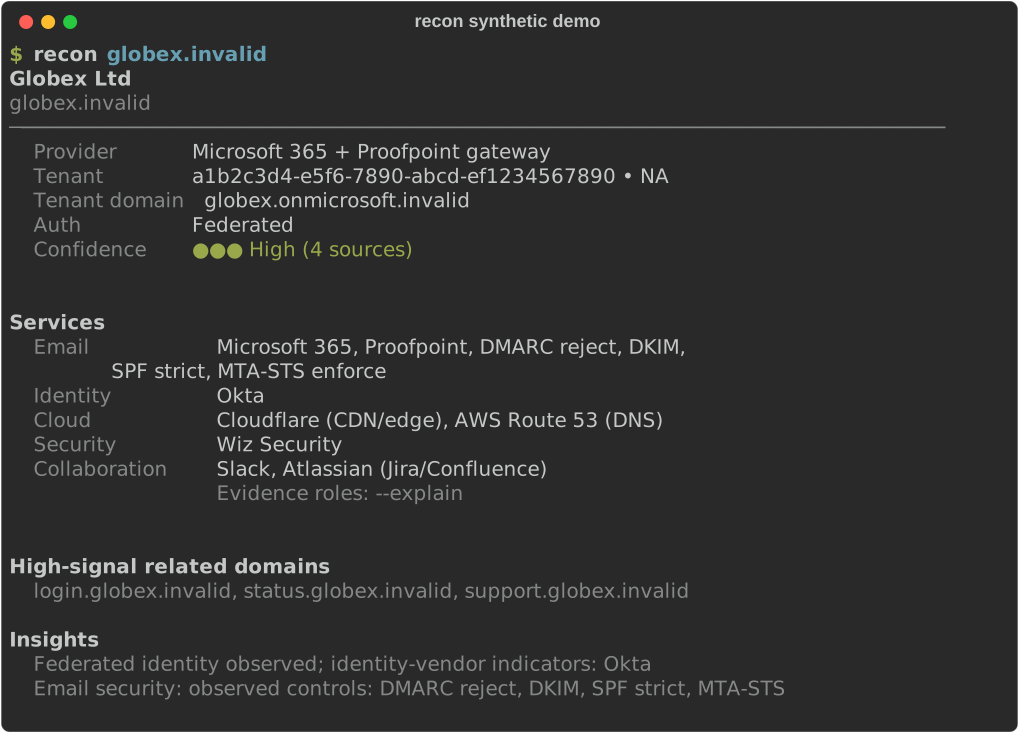
Synthetic illustration, generated, not captured. The real formatter renders
a deterministic, no-network fixture for Example Industries Ltd. No real
organization is depicted, and no live lookup of reserved example.com
reproduces this fixture.
Accessible text transcript
demo@recon:~$ recon example.com    # synthetic fixture, not a captured run
6 sources: 5 matched, 1 no match
Example Industries Ltd (unverified)
example.com
Reserved name: results are public residue, not an organization.
──────────────────────────────────────────────────────────────────────────────
  Provider      Microsoft 365 + Proofpoint gateway
  Tenant        a1b2c3d4-e5f6-7890-abcd-ef1234567890 • NA
  Tenant domain example-industries.onmicrosoft.example.com
  Auth          Federated
  Confidence    ●●● High (3 sources)


Services
  Email            Microsoft 365, Proofpoint, DMARC reject, DKIM,
                   SPF strict, MTA-STS enforce
  Identity         Okta
  Cloud            Cloudflare (CDN/edge), AWS Route 53 (DNS)
  Security         Wiz Security
  Data & Analytics Snowflake, Datadog
  Collaboration    Slack, Atlassian (Jira/Confluence), GitHub, Zoom
                   Evidence roles: --explain


High-signal related domains
  login.example.com, support.example.com, status.example.com

Insights
  Federated identity observed; identity-vendor indicators: Okta
  Email security: observed controls: DMARC reject, DKIM, SPF strict, MTA-STS
macOS / Linux:
curl -fsSL https://raw.githubusercontent.com/blisspixel/recon/main/scripts/install.sh | bashWindows (PowerShell):
powershell -NoProfile -ExecutionPolicy Bypass -Command "irm https://raw.githubusercontent.com/blisspixel/recon/main/scripts/install.ps1 | iex"The installer sets up recon for your user account, including Python when needed.
Open a new terminal afterward. Python 3.15 is the default development and release
runtime; 3.11 through 3.15 remain supported. Already have a supported Python? Use
pip install recon-tool in a virtual environment, or uv tool install --python 3.15 recon-tool /
pipx install --python python3.15 recon-tool on managed distributions like Arch Linux and Omarchy.
For review-before-run instructions, other package managers, updates, and recovery,
see the installation guide.
recon --version      # offline install check
recon doctor         # online connectivity and installation diagnostics
Lookups make DNS queries visible to recursive and authoritative infrastructure.
MTA-STS is the only default target-owned HTTP request; Google CSE and BIMI
certificate probes require explicit --direct-probes. There is no port
scanning or application crawling. Replace the placeholder to start:
recon "<domain-you-want-to-review>"Ordinary lookups may reuse the 24-hour result cache and say so when they do; a
result whose collection had unavailable sources is never reused. Use
--no-cache to bypass the cache for both reading and writing;
certificate-transparency enrichment has a separate cache. See
first lookup and cache behavior.
The bare command stays compact. Request evidence or structured output when needed:
recon example.com                      # compact panel
recon example.com --explain             # evidence and source status
recon example.com --json                # structured record
recon example.com --plain               # linear text for screen readers and grep
recon review example.com               # fresh, evidence-linked review bundle
recon batch domains.txt --json          # look up a supplied domain list
recon delta example.com                # compare with a cached baseline
recon update                           # update through the original package manager
These examples use reserved domains; real lookups will not reproduce the synthetic illustration above. For multi-domain reviews, recon describes observed similarities and differences without inferring ownership or a corporate relationship. See the evidence-first review workflow and batch guide.
The PyPI package installs the CLI and MCP runtime. Connect the local server to Claude Desktop, Claude Code, Cursor, VS Code, Windsurf, or Kiro:
recon mcp install --client=claude-desktop
recon mcp doctor
Restart the client and begin with manual tool approvals. Ask for one domain's email and identity indicators, or a service comparison across supplied domains. Missing evidence means "not observed", not "not used"; collection failures remain explicit. Local execution is the default, and the project does not operate a hosted service.
See MCP setup and supported clients and skills, plugins, and their validation status.
recon includes a thin, keyboard-first desktop shell plugin for Omarchy
located in integrations/omarchy/:
- Keyboard-driven workflow: focus domain input automatically, press
Enterto run bounded inspection, and pressCtrl+Dto toggle baseline delta comparison. - Direct process invocation: passes structured arguments directly (
["recon", domain, "--json"]) without shell interpolation. - Safe clipboard handling: pasting text never triggers an automatic network request.
- Zero background daemons: runs unprivileged inside Omarchy's Quickshell environment.
See integrations/omarchy/README.md for installation and shortcuts.
| Need | Guide |
|---|---|
| Install, update, uninstall, or troubleshoot | Getting started |
| Find a command or flag | CLI reference |
| Build automation or hand off evidence | JSON schema, review bundles |
| Understand results and their limits | How it works, limitations, reporting observations |
| Linux and Omarchy environment setup | Linux / Omarchy guide |
| Check plans and shipped changes | Roadmap, changelog |
| Find architecture, security, research, or release procedures | Full documentation index |
Catalog corrections and documented vendor patterns are especially useful. Start with CONTRIBUTING.md for setup, verification, and contribution requirements; coding agents should also read AGENTS.md.
Use issues for bugs and feature requests. Keep public examples reserved and synthetic; never post evaluated company domains, tenant IDs, or per-domain results. See the private reporting paths and security policy. Intended for defensive use.