
A command-line tool for your own Telegram account. Find the real IDs of your chats and forum topics, search and export messages, keep an archive you can search offline, send and schedule messages, and run your groups — admins, members, invites, topics, settings — from a menu, a terminal or a script.
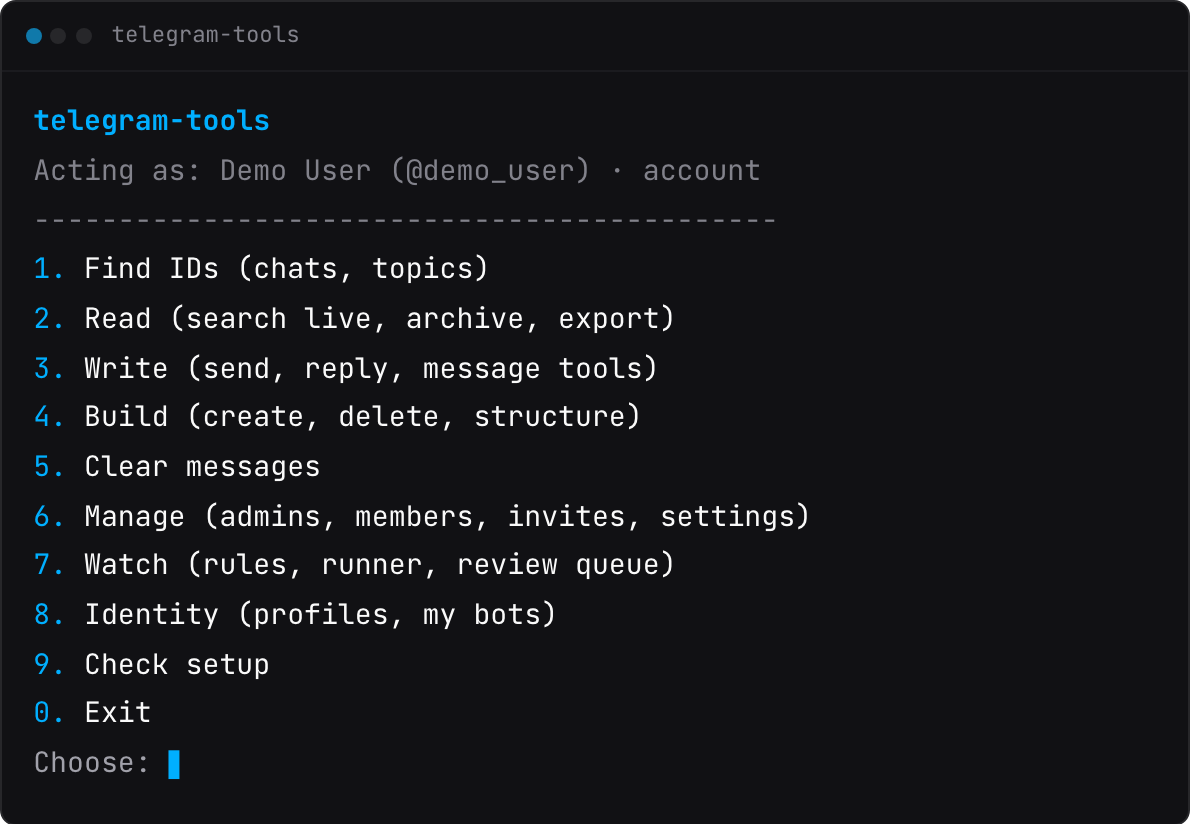
Run telegram-tools with no arguments and that is what you get. Try it before you install: the website lets you click through the real menu in your browser, and its guide goes further into most commands.
The tool also empties a forum topic without deleting the topic, the one job the Telegram app won't do.
Everything runs on your machine with your own API key: no server, no third party, nothing leaves your computer except the Telegram calls you asked for and the downloads you approve. Built on Telethon.
pipx install telegram-tools
# or
uv tool install telegram-tools
# or
pip install telegram-tools
Needs Python 3.11+, and uv downloads one for you if it's missing. pipx and uv keep the tool in an environment of its own; pip installs it into whichever one is active.
The newest version reaches GitHub before PyPI:
pipx install git+https://github.com/banozz0/telegram-tools.git
# or
uv tool install git+https://github.com/banozz0/telegram-tools.git
Two optional extras: proxy to connect through a proxy, and qr to log in by QR code — pipx install 'telegram-tools[proxy,qr]'. Without its extra, a command that needs one refuses instead of quietly doing without.
The tool signs in as you, not as a bot, so it needs your own Telegram API key:
- Log in at https://my.telegram.org/apps with your phone number.
- Create an application — any name works; platform "Desktop".
- Save its api_id and api_hash, and treat the hash like a password:
mkdir -p ~/.telegram-tools
cat > ~/.telegram-tools/.env <<'EOF'
TELEGRAM_API_ID=123456
TELEGRAM_API_HASH=your-api-hash-here
EOF
Then log in and check the setup:
telegram-tools auth       # your phone number, then the code Telegram sends
telegram-tools doctor     # says what's missing, and never prints a secret
auth --qr logs in by scanning a code with a phone that's already signed in (Settings → Devices → Link Desktop Device). A two-step-verification password is asked at the prompt and stored nowhere. Environment variables and a .env in the current directory also work, and win over ~/.telegram-tools/.env.
telegram-tools                                    # no arguments: the menu
telegram-tools discover                           # your chats and topics with their real IDs (--all for every chat)
telegram-tools search --chat @mygroup --keyword deploy
telegram-tools search --chat @mygroup --topic 141 --output topic-141.json    # or --format csv|jsonl|markdown|html
telegram-tools archive sync                       # a local copy of everything you can read...
telegram-tools archive search --query "deploy AND green"                     # ...searched offline
telegram-tools send --chat -1001234567890 --topic 141 --text "deploy is green"   # shows it, then asks y/N
telegram-tools clear-messages --chat @mygroup --topic 141                    # dry-run; --execute to delete
Every command has --help with all of its flags.
Run telegram-tools with no arguments and you get the nine rows pictured at the top; once it has connected, the line above them names the account it acts as. Every command has a row, so you never need to remember a flag. You pick chats, topics and bots from live lists instead of typing IDs, and 0 steps back. The menu asks exactly what the commands ask, and has no --yes at all.
| Command | What it does |
|---|---|
discover |
Lists your chats, channels and forum groups with their numeric IDs, and every forum topic's ID. |
search |
Finds messages in one chat by text, sender, date or topic. Prints a table, or exports JSON, CSV, JSON lines, Markdown or HTML. --archive answers from the local archive, offline. |
archive |
A local, full-text-searchable copy of everything your account can read. sync resumes where it stopped, and sync --full also marks what was deleted since; search, export and status never connect; retention and forget prune it. |
review |
Links and files the archive saw, waiting for you — the only way anything is ever downloaded. You approve a fetch, it lands in quarantine through eleven checks — the last a local ClamAV, if you have one — and you accept or reject it. |
send |
Posts text, files or both to a chat or one forum topic, optionally as a reply. |
message |
What a message's long-press menu does: reply, edit, delete, forward, copy, react, pin, poll, typing, mark a chat read or unread, bookmark, draft — and pins lists what a chat has pinned. |
create, delete |
Make or remove a supergroup, a broadcast channel or a forum topic. delete removes only what create can make again. |
clear-messages |
Empties forum topics and keeps the topics and their IDs. |
leave |
Takes your account out of a group or channel. Nothing in it is deleted. |
structure |
A chat's shape as a file: export a blueprint (topics, default rights, slow mode — never people or messages), diff it against another chat, apply it. |
admin, member, join-requests, invite, settings |
Running a group: admins and their rights; bans, kicks, mutes and restrictions; join requests; invite links; a chat's or a topic's settings. |
folders |
Your chat folders — the tabs above your chat list: list, create, edit, delete. |
watch |
Rules over live events — alert, tag, bookmark, archive, queue for review, never download or change anything — and the foreground runner that fires them. |
schedule |
Messages posted later. send --at is server-held: Telegram posts it even with your machine off. schedule post is runner-held: watch run posts it, only while it's up — and it is the only way to repeat one. |
bots |
The bots you own, and what @BotFather edits: name, bio, description, commands, photo, default admin rights. |
auth, profiles |
Log accounts in and out, list them, remove one. |
doctor |
Checks your setup without printing a secret. |
- Download anything you didn't approve. A sync notes links and files and fetches none. A download needs your
y/Nat a terminal, then runs eleven checks in quarantine — scheme, every redirect, private-network addresses, file path, size, time, archive bombs, type against magic bytes, checksum, duplicates, and the scanner — and needs a secondy/Nto keep. No rule, schedule or--yescan do either step. - Call a file clean because nobody looked. The only scanner is a local ClamAV; without one, the verdict is
UNSCANNED. - Run in the background.
watch runis a foreground process you start and stop. Nothing installs a service. - Copy people or history. A blueprint carries a chat's structure — never members, admins, messages or invite links.
- Manage bot accounts. Creating or deleting bots, a bot's
@usernameand its token stay with @BotFather.botsedits settings and never runs a bot. - Use a cloud. Credentials, sessions, the archive and the audit log stay in
~/.telegram-tools/.
How much a command asks before it acts depends on how hard its change is to undo:
| Kind of command | What it asks before acting |
|---|---|
Reads — discover, search, archive search, every list, show and status, doctor |
Nothing. |
Changes — send, the message verbs, create, bots, settings set, admin, member, join-request, invite and folder changes |
A preview, then y/N. |
Hard to undo — clear-messages, message delete, delete, leave, member ban and kick, admin demote, settings set --forum off, folders delete, structure apply, archive retention and forget |
A dry-run by default. For real: --execute and typing a confirmation — DELETE, or the exact title or name of what you're touching. No --yes. |
--yes answers the y/N in advance, for scripts. On send and the message verbs it works only for a chat in your send allowlist, and there, as on create and bots, it skips the preview too; the admin, member, join-request, invite and folder changes still print theirs. It doesn't exist on auth, profiles remove, settings set, schedule post, or the review queue's approve, accept and reject.
Whichever row it's in, every write:
- Says who's acting, on what. Every command opens with the account and the target:
Acting as: Sven (@sven) · account · Target: Agency › 💻 Deploys (-1001234567890). - Checks your rights first. Before a write to a chat, it asks Telegram what your account holds there, and refuses by name when a right is missing.
- Re-checks the target after you answer. A chat renamed or replaced in the meantime refuses, instead of acting on whatever holds the name now.
- Reads back the result. A
Read back:line says what it found afterwards, orunverified:and why. On most writes an unverified readback still reportsok—leaveandstructure applyreportpartial— so a script should checkevidence.readback. - Logs it. One line per executed write goes to
~/.telegram-tools/audit.jsonl, from the menu too. No token, phone number or API hash can reach it, or any envelope or error message. - Guards its own files. Sessions are
0600in0700folders, and every write refuses while anything in~/.telegram-toolsbutexports/is readable by others;doctorprints thechmodthat fixes it.
Command by command: the guide's safety section, and each command's --help.
telegram-tools --profile work auth        # log a second account in
telegram-tools --profile work discover    # act as it: the flag goes before the command
export TELEGRAM_TOOLS_PROFILE=work        # or make it this shell's default
telegram-tools profiles                   # which accounts this machine is logged in as
Each profile keeps its own session under ~/.telegram-tools/profiles/<name>/. auth --logout ends one after you type its name. All profiles share one archive: each message records the account that synced it, and --identity tg:user:ID narrows an archive search, export or status to one.
Store each bot's token under a nickname you choose, then put --as-bot NICK before the command:
# in ~/.telegram-tools/.env
TELEGRAM_BOT_TOKENS=mybot:12345:AAExampleToken,alerts:67890:BBExampleToken
telegram-tools --as-bot alerts send --chat -1001234567890 --topic 141 --text "deploy is green"Every screen then names both identities: Acting as: @alertsbot · bot (via Sven (@sven)). A bot can send (not --at), create topic, use most message verbs, run the admin commands where it's an admin, leave and watch; anything else refuses before connecting. The same tokens let bots make the three edits only a bot can: its commands, removing its photo, and its default admin rights. The tool only reads tokens — it never writes or prints one.
--yes skips the y/N, and nobody sees where the message goes, so it only works for destinations you named in advance:
# in ~/.telegram-tools/.env
TELEGRAM_SEND_ALLOWLIST=-1001234567890:141,-1009876543210,@myalerts
Each entry is a chat ID or @username, optionally :topic-id for one topic. Unset, every --yes send is refused. The same list covers the message verbs and the alerts a watch rule sends.
Add TELEGRAM_PROXY=socks5://127.0.0.1:1080 to the .env (socks5, socks4 or http, optionally with user:password@). It needs the proxy extra; without it the command refuses rather than connect from your own address.
A time with no offset is this machine's local time, in every flag and prompt that takes one; a trailing Z or an offset like +05:00 always wins. Previews echo the moment with its offset, and everything written for machines — --json, exports, the archive, the audit log — stays UTC.
Put --json before the command and it prints exactly one JSON object on stdout; tables, previews and prompts move to stderr. --jsonl streams one line per record first.
telegram-tools --json discover
telegram-tools --json send --chat -1001234567890 --topic 141 --text "deploy is green" --yes
The object carries a status (ok, empty, partial, dry_run, cancelled, refused, failed), the result, the identity and target the run acted on, and on a refusal a stable error.code, with an error.hint naming the command or edit that fixes it when there is one.
| Exit | Meaning |
|---|---|
| 0 | done — ok, empty, dry_run |
| 1 | not done — cancelled, declined, or partial |
| 2 | refused — usage, config, permission, a platform error |
| 3 | needs a person — the command asks for confirmation and there is no terminal to ask on |
| 130 | interrupted |
Under --json, a command that needs an answer and has no terminal to ask on exits 3 with APPROVAL_REQUIRED instead of waiting, and error.hint is the command for a person to run. --yes answers only a y/N, and only where the Safety model says it does. skill/SKILL.md is a ready-made agent skill: every command, field and rule an agent needs.
Everything is in ~/.telegram-tools/: the .env, one folder per login under profiles/, the archive (archive.sqlite), the review queue's quarantine/ and media/, exports/, watch rules/, config.json and the audit.jsonl log. Nothing is uploaded anywhere.
Used regularly by its author, and still growing — see the changelog. This is a solo project whose code was written by AI agents under review: issues are welcome, fixes are best-effort, and there is no support promise. Before contributing, read CONTRIBUTING.md.
MIT. See LICENSE.