
This is a fork. UniSkin was created by piti6 and stopped working on Unity 2021.2 and newer. This fork gets it running again and is where the maintenance happens now. Please open issues here, not upstream.
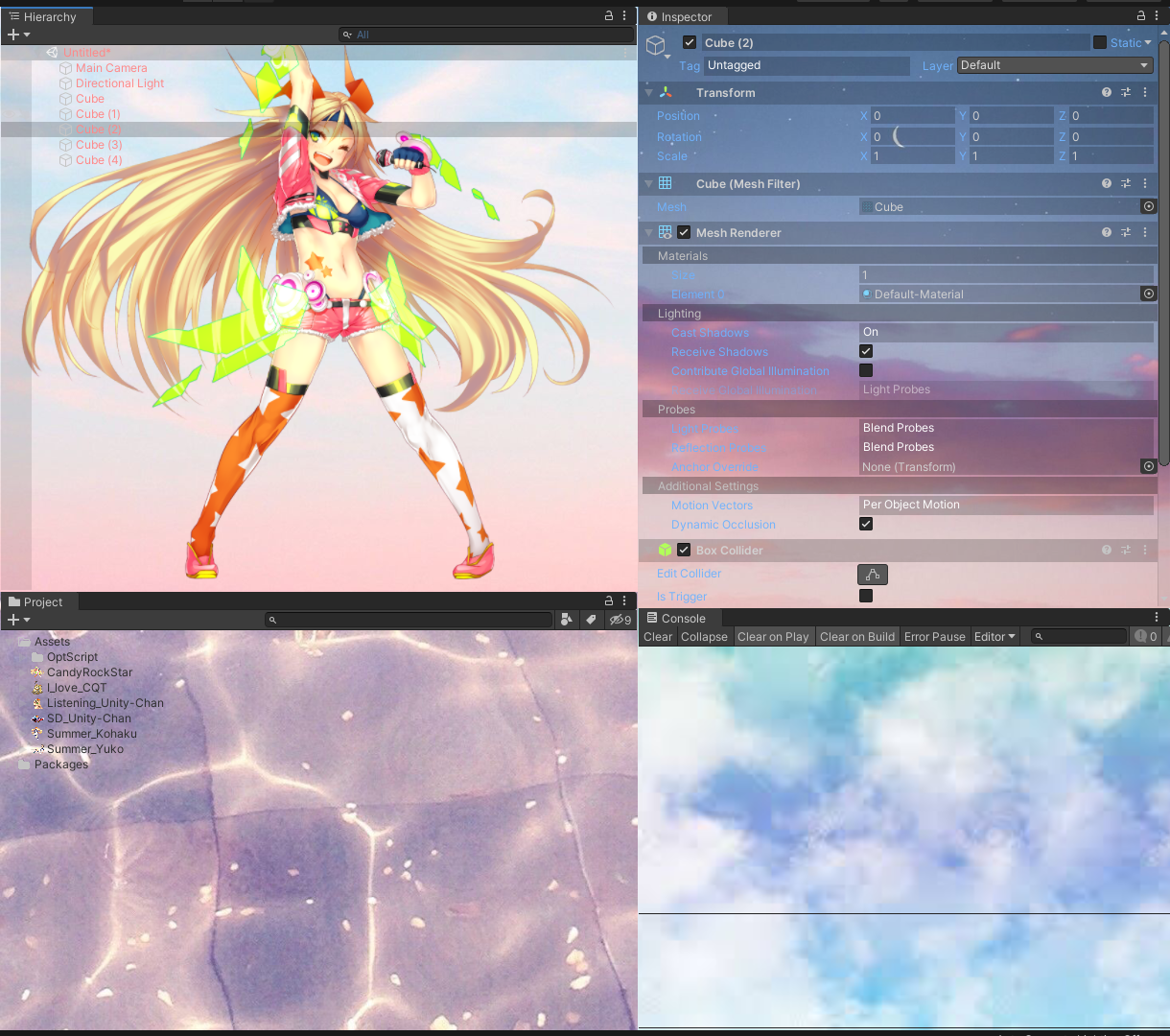
Make your custom editor skin with UniSkin :)
Upstream stopped working on Unity 2021.2+, and part of what it did cannot be made to work again at all. This fork fixes what is fixable and replaces the rest with a mechanism that does work.
Working:
- Per-window background images. Pick a window, give it an image, and it is drawn as that window's background.
- Per-window tinting. A backdrop tint whose alpha thins the window's own opaque backdrop so the background shows through, and a separate tint for text and icons so they stay legible.
- No more
NullReferenceExceptionflood. Upstream threw once per editor update, forever, on 2021.2+. - Colour backgrounds, texture encoding, texture leaks and a domain-reload path that silently discarded unsaved edits are all fixed as well.
Not working, and not fixable:
Per-GUIStyle customisation - the instruction list, the font and per-state
colour editors - has no effect on Unity 2021.2 and newer. The UI is still there
but changing those values does nothing.
This is not a bug in the fork. Editor code resolves its styles once, in static
constructors, into static fields, and about two thirds of those resolutions are
new GUIStyle(...) copies that are permanently disconnected from the skin. This
fork goes further than upstream and patches those live instances directly -
including the exact objects the IMGUI debugger reports were used to draw - and
reads the values back afterwards. They survive the whole repaint, on the right
object, and the editor still renders the original. The managed GUIStyle
background and colour fields simply no longer drive rendering.
What replaced it is tinting. IMGUI applies GUI.backgroundColor to style
backdrops and GUI.contentColor to text and icons at draw time rather than
reading them from the style, so that path still works - it is per window rather
than per style, but it is real.
Window > UniSkin Diagnostics reports what the renderer can actually see, which
is worth running before assuming something is broken.
Skin files (.skn) from the original version still load. Fields that did not
exist then resolve to their neutral value, so nothing comes back blank.
Minimum Unity version is now 2021.3. If you are on an older editor, use the original.
-
Apply fully customized GUISkin per EditorWindow GuiStyle
- Colored background
- Textured background
- Transparent background
- Font size
- Font color
- Font style
-
Additional two custom texture background per EditorWindow
-
Uses single file to preserve skin (.skn), so you can handle skin file easily
- Unity 2021.3+
- Compile verified against
- Unity 2022.3.42f1c1
- Not supported
- ~ Unity 2021.2 (use the original instead)
- Automatic
- Open Package Manager Window at Unity menu Window -> Package Manager
- Select「Add package from git URL」menu at the left top button
- Type https://github.com/System32X-code/UniSkin-Modern.git and hit Add button
- Manual
- Include next line inside of manifest.json dependencies.
"space.mkim.uniskin": "https://github.com/System32X-code/UniSkin-Modern.git"
- Include next line inside of manifest.json dependencies.
- Select Unity menu Window -> UniSkin opens Skin editor window.
- Select 「Load from file」
- Select 「Sample.skn」file loads sample skin preset.
- Basically, UniSkin follows Unity layout system policy, as follows:
- UniSkin shares one skin per computer, across overall Unity versions and projects.
- You can save current skin as file or you can load skin from file.
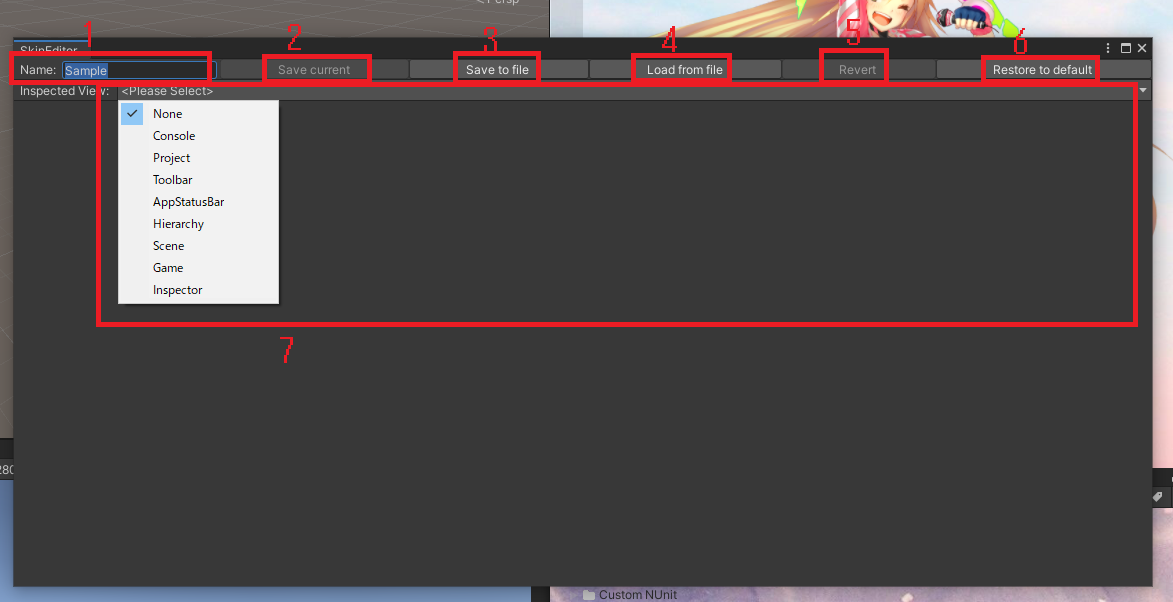
- Changes skin name.
- Save current changes to current skin instance.
- Save current skin instance and changes to file.
- Load skin from file and overwrites to current skin instance.
- Revert current edit changes.
- Remove current skin and restore default Unity skin.
- Select EditorWindow to inspect. Popup list shows current activated windows. (If you want to customize specific EditorWindow, you should open that window.)
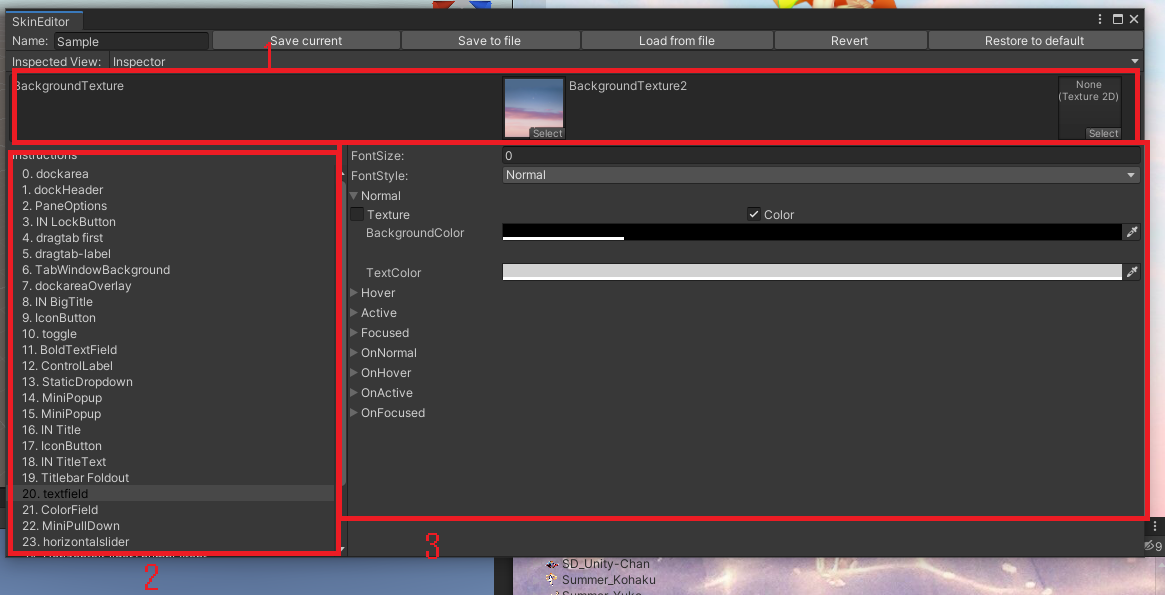
Before to start
- Changes in selected inspected window will referesh instructions list.
- That is, edited all of instructions on current instructions list does not mean that every style was completely edited. there will be more that if you didn't check all possible elements on that EditorWindow (e.g Inspector window has plenty of GuiStyle, which is pain)
- Custom background texture
- You can add custom background textures rendered by GUI.DrawTexture(ScaleMode.ScaleAndCrop);
- Basically you'd prefer to use these to show backgrounds, as GuiStyle backgroundTexture uses ScaleMode.StretchToFill.
- Usually there's plenty of non-transparent elements on EditorWindow that hides custom backgrounds. To show custom backgrounds, you should make them completely transparent status. check 「3. Edit style」section.
- Instruction select window
- Select specific style to edit current Inspected window style.
- Same style will be edited together.
- If you select instruction, elements that uses same GuiStyle on EditorWindow will be highlighted so that you can recognizes which one you are working on.
- Edit style
- Edit current selected elements style.
- FontSize: changes font size. note that if selected style does not used for text display, of course it does nothing at all.
- FontStyle: changes font style. (attribute, such as bold/italic)
- Normal/Hover/Active/Focused/OnNormal/OnHover/OnActive/OnFocused
- Checkout https://docs.unity3d.com/ScriptReference/GUIStyle.html, it acts exactly same as it is. 「On」 series (OnNormal, OnHover, etc..) usually used in controls that has On/Off statement, such as Toggle/Checkbox.
- Inside Foldout of one of above style
- Texture/Color
- On Texture mode, you can use Texture as selected style background. note that this renders texture as ScaleMode.StretchToFill.
- On Color mode, you can use Color as selected style background. Alpha value also affects to display, so you can use full-transparent color to hide current style background. which needs to show custom background textures.
- TextColor: changes text color. Alpha value also affects to display.
- Texture/Color
Issues and pull requests are welcome :)
Help with a nicer sample skin is especially appreciated - neither the original author nor I are designers. (Nothing that infringes someone else's copyright, please.)
- Original author: piti6 - UniSkin
- This fork: System32X-code
Released under the MIT License, same as the original. See LICENSE.