Repository navigation
Live Preview
English · Español
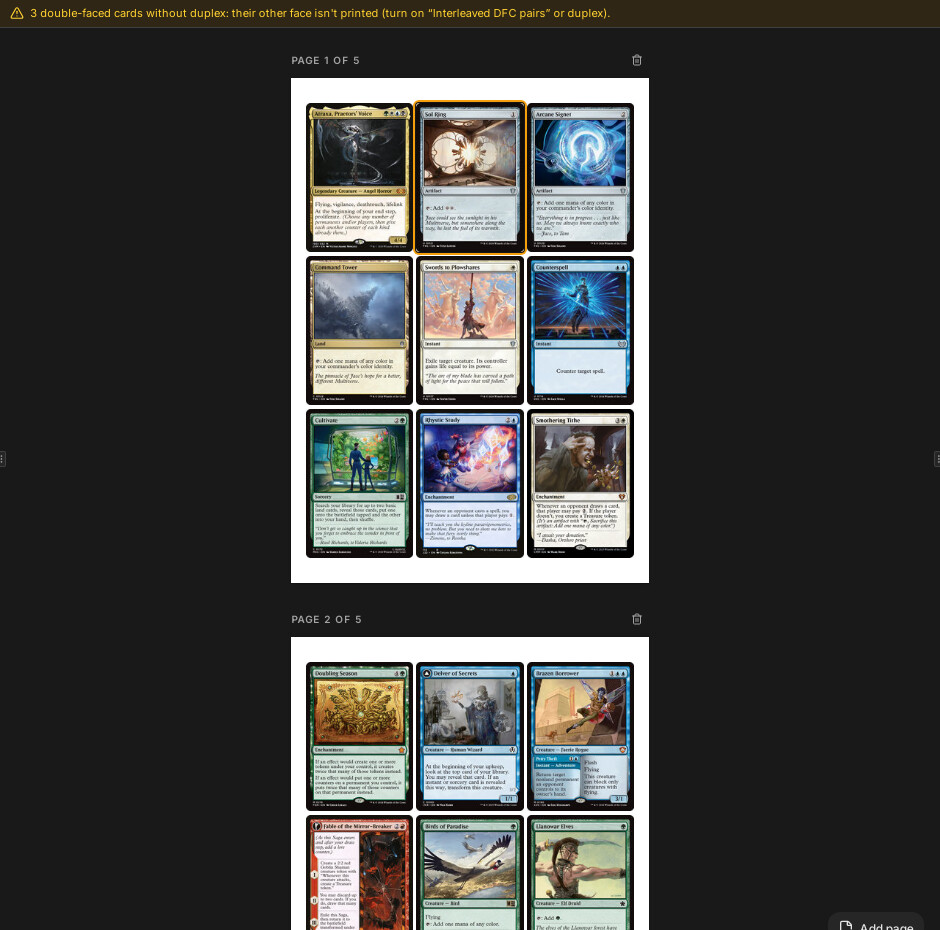
The centre panel shows the sheets as they will print: one page per front sheet, every card placed exactly where the PagePlan says, with thumbnails that Rust renders on demand through the same image pipeline as the PDF. React only paints boxes and <img> tags; it never computes layout or processes pixels.
Source: src/features/preview/ (preview-pane.tsx, page-view.tsx, slot-view.tsx, slot-menu.tsx, acciones-carta.ts, arrastrar-ficheros.ts, mover-a-dialog.tsx, visibilidad.tsx), src/lib/image-url.ts, src/stores/plan-store.ts, src/stores/ui-store.ts, src-tauri/src/protocol.rs, src-tauri/src/render.rs.
flowchart LR
    DS["deck-store (cards, settings)"] -->|"100 ms debounce"| PS["plan-store (compute_page_plan)"]
    PS -->|"plan.pages (front only)"| PP["PreviewPane"]
    PP --> PV["PageView per sheet"]
    PV --> SV["SlotView per Slot"]
    SV -->|"urlMiniatura(...)"| IMG["img src = pbimg://.../r/..."]
    IMG --> PR["protocol.rs: Ruta::Render"]
    PR --> M["AppState::miniatura (renders cache)"]
    M --> PIPE["imaging::pipeline::render"]
-
PreviewPanereadsusePlan(the plan and the last error),useDeck(cards, settings, default back) anduseUi(zoom, selection, flags). It shows onlyplan.pages.filter(p => p.side === "front"). Back sheets exist in the plan (and in the PDF) but are not pages of the preview; "See backs" instead swaps each front slot's image for the back it will carry. - Scale:
escala = zoom * PX_POR_MMwherePX_POR_MM = 96 / 25.4(CSS pixels per mm at 100 %). A sheet iswidthMm * escalabyheightMm * escala; a slot is positioned attrim.x * escala,trim.y * escala. No other geometry exists on screen. See Layout Engine for why. - The empty cells of the last sheet come from
plan.cells(orplan.bigCellsif the last sheet is a large-card sheet) minus the slotindexvalues already occupied (vaciasinpreview-pane.tsx). Each one is a button that opens "Add card" (the first one also carries the label); the card goes to the end of the deck. - Plan warnings (
dfcWithoutBack,missingDefaultBack,bigCardsDoNotFit) and the plan error render as an amber bar under the toolbar. The toolbar tooltip says the preview is approximate and the PDF is exact.
A memo component per sheet: a header "Page n of N" with a delete-page-cards button, and a white sheet div of paper size. Inside: one SlotView per Slot (keyed cardId:face), the empty cells, and, if cutGuides.enabled and the page has guides, an SVG overlay with viewBox in millimetres (0 0 widthMm heightMm) so Page.guides are drawn without conversion; stroke width is widthPx * 25.4 / 96 mm. The sheet element is passed to useVisible (below); conImagen={visible} decides whether slots mount <img>.
A memo component. Structure:
- An absolutely positioned box at the slot's
trim(left/top/width/height= mm x scale). This is the drag handle, the drop target, the click target, and carriesdata-carta=<cardId>(used to find the card under the cursor when files are dropped from the OS). - Inside it, a clipping box at the slot's
bleedrectangle (offset relative totrim), so bleed shared with neighbours is cut exactly like the PDF does. - Inside that, the
<img>, sized(trim.w + 2*full) x (trim.h + 2*full)withfull = slot.bleedFullMm, placed at(trim.x - full - bleed.x). This mirrorspdf/compose.rsdibujar_casilla(the render carries full bleed on all four sides; the clip keeps what the plan allows). - Overlays in the trim frame: selection ring, hover ring, drop ring, insignia badges (top-left), lock icon (top-right), and an info bar (name, set, collector number, language when not English) if "Card info" is on.
Image selection:
- Normal:
slot.imagewithslot.applyEdits ? card.edits : null. - "See backs" on and the slot is not a back slot: the image is
card.back.imagefordfc/custombacks, otherwisedeck.defaultBack; edits are not applied; the thumbnail is treated as a back (back: true, so edge darkening only followsapplyBacks). It is shown in place, un-mirrored; it is a view aid only. - Blank cards (
source.kind === "blank") show a dashed box with a plus; a plain click (no Ctrl/Shift) selects the slot and opens "Add card" to fill it (anadirEnHueco). A slot without image shows an "image off" icon with the card name. -
loading="lazy",decoding="async",draggable={false}. - For designed cards,
slot.imageis the stored thumbnail of the design:diseno::vista::aplicar(src-tauri/src/diseno/vista.rs) paints a 1000 px thumbnail, encodes it as JPEG quality 92 and stores it in the blob store withImageOrigin::Designed(guardar_miniatura). The preview shows that thumbnail through the same/r/route, while the PDF repaints from the design at print size (Export, Designer App Layer).
insignias(card) in src/lib/cartas.ts returns { texto, tono, ayuda } entries rendered as small coloured badges with a tooltip:
| Badge | Tone | When |
|---|---|---|
| mark label (VARIANT / OPTIONAL / SIDEBOARD in English) |
marca (violet) |
DeckCard.marca is set (MARCAS in cartas.ts) |
PROXY / DRAFT (BORRADOR in the source strings) |
info / warning | card has a design with status ready / otherwise (no Scryfall-image badges for designed cards) |
| CUSTOM, CUSTOM <-> | info | custom image, with or without a linked Scryfall card |
↩ EN |
warning |
meta.langFallback: requested language did not exist, fell back to English |
| LOWRES | warning | imageStatus === "lowres" |
| PLACEHOLDER, MISSING | error | Scryfall has no real image |
Marks are set from the slot menu ("Mark" submenu, marcarCartas). Printing is unaffected; the cuentan rule excludes marked cards from deck size, copy counts, statistics and the exported list (see Statistics and Export). Badges are hidden while "See backs" is on.
Unmounting images of hidden sheets
Decision: images are mounted only for sheets near the viewport. Why: a 20-sheet deck is 180 big images; keeping them all decoded makes WebKit hold huge bitmaps, and Rust would render every thumbnail even if never seen. With unmounting, WebKit can release the bitmaps and Rust processes only what is visible (the protocol comment says the same).
useVisible(el) in visibilidad.tsx: an IntersectionObserver with root = the scroll area's viewport element and rootMargin: "100% 0px" (one viewport above and one below). The root comes from a context, RaizScroll, which PreviewPane fills by passing onViewportChange={setViewport} to the shared ScrollArea (src/components/ui/scroll-area.tsx). Invariant: the root MUST be the ScrollArea viewport, not the document. The document itself never scrolls (only the ScrollArea viewport does), so with the default root every sheet would always count as visible. The slot boxes (drop targets) are always mounted; only the <img> depends on conImagen.
Scrolling must use the shared ScrollArea (never overflow-auto), and is tested in WebKitGTK, not Chrome (Frontend Architecture).
src/lib/image-url.ts builds URLs; src-tauri/src/protocol.rs serves them (registered with register_asynchronous_uri_scheme_protocol in src-tauri/src/lib.rs). The base is convertFileSrc("", "pbimg") (pbimg://localhost/ on Linux and macOS, http://pbimg.localhost/ on Windows), falling back to pbimg://localhost/.
| Route | Builder in image-url.ts
|
Response | Used for |
|---|---|---|---|
/r/<sha256>/<params base64url>/<width> |
urlMiniatura(blob, params, width) |
JPEG | Processed thumbnail of a blob (Ruta::Render) |
/t/<sha256 of URL> |
urlBusqueda(huella) |
JPEG/PNG | Thumbnail of a Scryfall search result downloaded by Rust and cached under renders/t/
|
/d/<huella>/<width> |
urlDiseno |
PNG | Preview of a registered design (design_register) |
/c/<huella>/<width> |
urlCapa |
PNG | The design without the artwork (design_overlay) |
/b/<sha256>/<side> |
urlArte(blob, 1000 | 2000) |
image | A downsized illustration from the blob store |
/x/<pack>/<n> |
urlExtra |
PNG | An extra image of a downloadable frame pack |
/f/<huella>.woff2 |
(raizProtocolo()) |
font | Fonts of installed themes |
leer_ruta validates strictly: hashes must be 64 hex chars (es_huella), widths must be one of ANCHOS = [146, 244, 488, 672, 745, 1000] (mirrored in image-url.ts), params at most 2048 chars. Bad input gives 400, unknown routes 404, missing blobs 404, other errors 500. Successful responses carry Cache-Control: max-age=31536000, immutable: the URL contains everything that changes the image, so it can be cached forever.
PreviewParams (src-tauri/src/render.rs, exported to TS): { edits, edge, back, bleedMm, bleedMode, fillCorners, card }, JSON then base64url, built by parametros(settings, edits, isBack, bleedMm). Rust decides whether edge darkening applies to this image (origin and back flag) with the same edge_for as exporting, so the screen and the PDF cannot disagree. SlotView overrides card with the slot's own trim size so large cards render at their size. fillCorners is #[serde(default)] so URLs without it still parse.
-
ESQUEMAhandleratendertakes a permit fromAppState.renders(atokio::Semaphoresized toavailable_parallelism), so a screenful of thumbnails cannot saturate the machine. -
AppState::miniatura(blob, params, width)(render.rs): read the blob, buildspec_de_miniatura(Width(width), JPEG quality 85,edits,bleedMm), and look forapp_cache_dir/renders/<spec.key()>.jpg; on a miss runimaging::pipeline::renderand write the cache atomically. - The width requested is the trim width; the actual image also carries the bleed pixels (
round(bleedMm * px_per_mm)per side).
Why a cache directory at all: renders/ holds only derived data, so it can be deleted with no loss; the decks' images live in the blob store (Storage and Blobs).
anchoPara(mmCarta, escala, tope) in preview-pane.tsx: needed pixels = cardWidthMm * escala * devicePixelRatio; pick the smallest ANCHOS entry that covers it, capped by the user's "preview quality" preference (ui-store.calidadVista, default 488, changed in the decklist panel). A different width is a different cache key, so zooming re-renders at the new size lazily.
useUi.zoom (default 0.8, clamped to ZOOM_MIN = 0.4 .. ZOOM_MAX = 2.5, rounded to 2 decimals, persisted in localStorage under the preferences key). Controls: minus/plus buttons (with tooltips «Alejar» / «Acercar»), a numeric field (percent), reset to 100 %, and Ctrl/Cmd + wheel (useZoomConRueda): steps of 5 %, mouse wheel notches count as one step, trackpads accumulate until 40 units; the wheel listener is non-passive so it can cancel the browser's own zoom, and scroll offsets are corrected in requestAnimationFrame so the point under the cursor stays put.
- Selection lives in
ui-store(seleccion: string[],ancla).seleccionarConClic(acciones-carta.ts): click selects one; Ctrl/Cmd toggles; Shift selects the range from the anchor in deck order (with Ctrl, adds to the selection). Double click opens "Edit card" (Card Editor Dialog). Statistics lists can also select cards (seleccionarEnDeck). - Keyboard (
useTeclado, ignored inside inputs, dialogs and menus): Delete removes the selection, Ctrl+D duplicates, Ctrl+A selects all, Escape clears. - Context menu (
slot-menu.tsx,SlotMenu): acts on the selection if the clicked card is in it, otherwise selects just that card. Items: on a single blank slot, "Add card from Scryfall…" first (anadirEnHueco); Duplicate; Edit card; Change variant and Change card (Scryfall cards); Design proxy / Edit design / Remove design; Link selected... and link/relink (custom cards); Image language; Mark; Replace image; Change back (pick image / use deck back); Export image (Front… / Back…,exportarImagen: save dialog with PNG, JPEG, WebP, TIFF and BMP filters, the extension decides; see Export); Move before / after / to position (MoverADialog); Lock/Unlock; Delete. The menu is rendered withContenidoContextual(src/components/contenido-contextual.tsx), which ignorespointerupandclickfor the first 250 ms after it opens: the menu appears under the cursor (and shifts to fit the window), so the release of the right button that opened it landed on an item and Radix took it for a click, running an action by accident.src/components/ui/is read-only, hence a wrapper aroundContextMenuContent; the keyboard is not affected. The opening time is taken by a stable ref callback (useCallback) that runs when Radix mounts the content node: the wrapper itself renders while the menu is still closed (only Radix's content waits for opening), so stamping the time on render made the pause useless, and a new callback on every render would stamp it again. The deck menu of the Library and the menus of the game table use the same wrapper (Deck Library, Game Table). - Every mutation goes through the deck store (
setCartas), so it autosaves and is undoable; the plan then recomputes. Undo and redo also have visible buttons at the start of the preview toolbar (tooltips «Deshacer (Ctrl+Z)» / «Rehacer (Ctrl+Mayús+Z)», disabled whenpasado/futurois empty), since the shortcuts alone were not discoverable. The two changes that alter the deck most at once, removing cards (eliminarCartas) and «Auto ordenar» (autoOrdenar), also show a toast with a «Deshacer» action (acciones-carta.ts::conDeshacer, which callsuseDeck.deshacer()). Pure list operations are insrc/lib/deck-ops.ts(moverGrupo,duplicar,quitar,huecos,actualizar). - Drag and drop between cards uses
@dnd-kit/corewith aPointerSensorthat needs 6 px of movement. EachSlotViewis both draggable and droppable (id = card id); empty cells are droppable with idvacia:<x>:<y>. On drop,soltarSobre(ids, destino)moves the dragged group (the whole selection if the dragged card is in it, viaobjetivo): forward drags land after the target, backward drags before it, an empty cell sends them to the end. ADragOverlayshows the card thumbnail slightly rotated, with a count badge for groups. Inferred: with "Pair DFC interleaved" the front and itsdfcFaceslot share the same card id, so both share one drag/drop id; verify before relying on drags in that mode. - Files dropped from the OS (
arrastrar-ficheros.ts,useArrastrarFicheros): Tauri'sonDragDropEventgives physical-pixel positions;soltarFicherosconverts bydevicePixelRatio, finds the card under the cursor through[data-carta]; dropped on a card, the first image replaces that card's front (reemplazarConFichero->blob_import_files, the card becomes custom, crop and rotation reset); dropped elsewhere, all images are added as custom cards. Onlypng/jpg/jpeg/webpcount (EXTENSIONES_IMAGEN). - "Add page" adds a page worth of blank cards (
anadirPagina(cols*rows)); "Auto arrange" callsarrange_cards(Layout Engine); the toolbar also has the DFC filter, "Card info", "See backs", "Statistics" and "Add card".
src/features/preview/__tests__/acciones-carta.test.ts (move/drop semantics, undo, selection, auto-arrange applies Rust's order), arrastrar-ficheros.test.ts (extension filtering, DPR conversion, drop behaviour, cleanup), src/stores/__tests__/plan-store.test.ts; Rust: render.rs and protocol.rs tests.
- The preview shows the plan's front sheets only; do not look for back sheets in the DOM.
- Never compute positions in the components: if something is in the wrong place, fix
layout::plan. - A new route in
protocol.rsmust validate its input like the others (hash shape, whitelisted sizes) because it is reachable from the webview. - If you change anything that alters rendered pixels, bump
PIPELINE_VERSION(Imaging and PDF); otherwiserenders/serves stale files and theimmutableheader keeps old URLs cached in the webview.