


A reality check for world models.
A world model predicts the future of a scene from a starting context and a sequence of actions. worldproof looks at those predictions and tells you where and why they go wrong. It compares a model's rollout against ground truth and against physical rules (does an object vanish, does the count of objects change, does the model react to the action at all), then writes a report card.
It does not score task success, planning quality, or how nice the video looks. That is a different job. See SPEC.md for the exact scope.
| Question | Who answers it |
|---|---|
| Does the acting model succeed at the task? | VLABench, LIBERO |
| Can the model be trained and used for planning? | stable-worldmodel |
| Is the prediction correct, and where does it break? | worldproof |
Status: alpha. v0.1.0 is published on PyPI. The API and the on-disk rollout format may still move before v1; the data contracts that are frozen are listed in SPEC.md section 5.
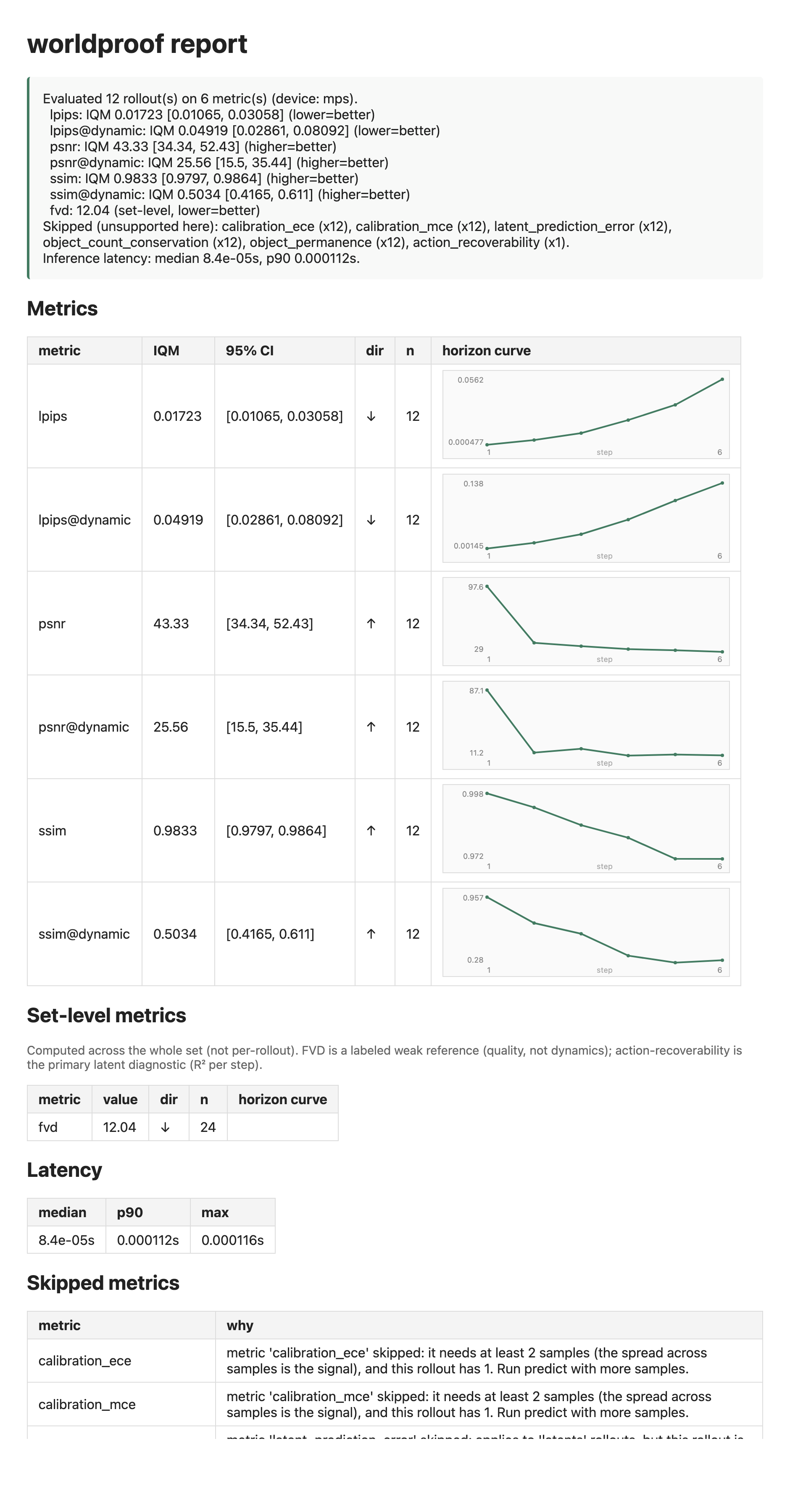
Here is a report card for a copy-the-last-frame baseline on Push-T, a manipulation benchmark that runs in a simulator. Global PSNR looks high (the scene barely moves), but the dynamic-region score slides down over the horizon: the baseline cannot predict the one thing that actually moves, the pushed block. That gap is the whole point of the tool. It also runs on real camera footage, see the SO-101 example further down.
worldproof is on PyPI:
pip install worldproofFor the latest development version, install straight from git:
pip install "worldproof @ git+https://github.com/BuceaGeorgia/worldproof"The core install is small on purpose: numpy, torch, and pillow only, so
worldproof evaluate runs on a laptop with no GPU. Install the torch build that
fits your machine first (CPU, CUDA, or Apple Silicon MPS). worldproof never pins
a CUDA-specific torch. See pytorch.org.
Heavier features are optional extras. They are imported only when you use them, never at import time.
| Extra | What it adds |
|---|---|
worldproof[fidelity] |
the LPIPS perceptual metric |
worldproof[fvd] |
the default FVD extractor (torchvision Kinetics r3d_18, opt in with evaluate --fvd) |
worldproof[swm] |
the stable-worldmodel adapter and its gym sim oracle |
worldproof[atari] |
AtariSimOracle, a deterministic Atari sim oracle (CPU, ROMs bundled) |
worldproof[lerobot-data] |
LeRobotDatasetSource, reads LeRobotDataset v3.0 (parquet and mp4) as ground truth, no lerobot package, works on Python 3.10 |
worldproof[io] |
reading video-backed rollout folders |
This makes a handful of rollouts with the built-in toy simulator and a naive
baseline, scores them, and writes a report card. Core dependencies only. The
full script is examples/quickstart.py, run in CI on
Ubuntu, macOS, and Windows.
import json, tempfile
from pathlib import Path
import numpy as np
from worldproof import (
    ToySimOracle, CopyLastFrameBaseline, make_rollout, save_rollout,
    iter_rollouts, evaluate, report_json, report_html, Capabilities,
)

out = Path(tempfile.mkdtemp())
oracle, model = ToySimOracle(size=48), CopyLastFrameBaseline()
rng = np.random.default_rng(0)
for i in range(6):
    actions = rng.uniform(-2, 2, (6, 2)).astype(np.float32)
    save_rollout(make_rollout(oracle, model, seed=i, actions=actions, n_samples=2),
                 out / "rollouts" / f"ep_{i:02d}")

rollouts = list(iter_rollouts(out / "rollouts"))
report, run_report = evaluate(rollouts, capabilities=Capabilities.detect(has_tracker=True))
(out / "report.json").write_text(json.dumps(report_json(report), indent=2))
(out / "report.html").write_text(report_html(report, rollouts, run_report))
print(report.verdict)worldproof has two commands, kept separate on purpose. generate may be heavy
(it runs a model). evaluate stays light and never runs a model, so it always
works on a laptop.
# run a model and a sim oracle to produce a folder of rollouts
worldproof generate --sim toy --model action-blind --n 8 --out rollouts

# score them (runs the metrics your machine supports, reports what it skipped)
worldproof evaluate rollouts --json report.json --html report.html
--model accepts copy-last-frame, action-blind, or swm:<checkpoint> (a
real latent world model, needs worldproof[swm]). --sim accepts toy or
gym:<env-id> (for example gym:swm/TwoRoom-v1).
evaluate runs the metrics your machine supports and reports what it skipped and
why. A MacBook gets a partial but real report, never an install error.
The demos above use built-in models and simulators. Real use means plugging in
yours, and there are three ways to do it. All three are shown working in
examples/bring_your_own.py, which runs on the
core install with no downloads. One thing to know up front: the generate
command only wires the built-in models, so your own model goes through the
Python API below. Anything you save as a rollout folder is then scored by
worldproof evaluate like any other folder.
1. Wrap your model. Subclass WorldModelAdapter and implement one method:
given the context frames and the action sequence, return n_samples predicted
futures. A latent model passes modality="latents" and also implements
encode(frames).
from worldproof import WorldModelAdapter

class MyModel(WorldModelAdapter):
    def __init__(self):
        super().__init__(model_id="my-model", modality="pixels", seed=0)

    def _predict_futures(self, context, actions, horizon, n_samples, rng):
        # call your real model here; return n_samples arrays,
        # each (horizon, H, W, C) uint8
        ...
2. Feed it your recorded data. Subclass DatasetSource and yield windows
of your trajectories: the context frames, the actions that were taken, and the
frames that actually followed (the ground truth). Then score any model against
them. If your data is already a LeRobotDataset v3.0, skip this step and use
LeRobotDatasetSource.
from worldproof import DatasetSource, OracleRollout, evaluate, rollouts_from_dataset

class MyRecordings(DatasetSource):
    def truths(self, *, n, context_steps, horizon, seed=0):
        for window in ...:   # read your storage
            yield OracleRollout(context=..., actions=..., future=...,
                                context_id="...", is_failure=False)

rollouts = rollouts_from_dataset(MyRecordings(), MyModel(),
                                 n=16, context_steps=3, horizon=6)
report, run_report = evaluate(rollouts)
3. No wrapper at all. If you already have predictions and ground truth as
arrays (computed anywhere, in any framework), build Rollout objects, save
them, and evaluate the folder. This is the path for scoring stored outputs.
from worldproof import Rollout, RolloutMetadata, save_rollout

rollout = Rollout(
    modality="pixels",
    context=context_frames,          # (T, H, W, C) uint8
    actions=actions,                 # (horizon, action_dim)
    predictions=(predicted_frames,), # one (horizon, H, W, C) array per sample
    metadata=RolloutMetadata(fps=10.0, model_id="my-run", resolution=(H, W)),
    ground_truth=true_frames,        # (horizon, H, W, C)
)
save_rollout(rollout, "my-rollouts/ep_00")
worldproof evaluate my-rollouts --json report.json --html report.htmlThe on-disk folder layout is a documented contract (lossless PNG and npy, one directory per rollout); see SPEC.md section 5 if you want to write it directly from another tool.
Runnable examples, each writes a report.json and a report.html.
pip install worldproof[atari]
python examples/atari_demo.py
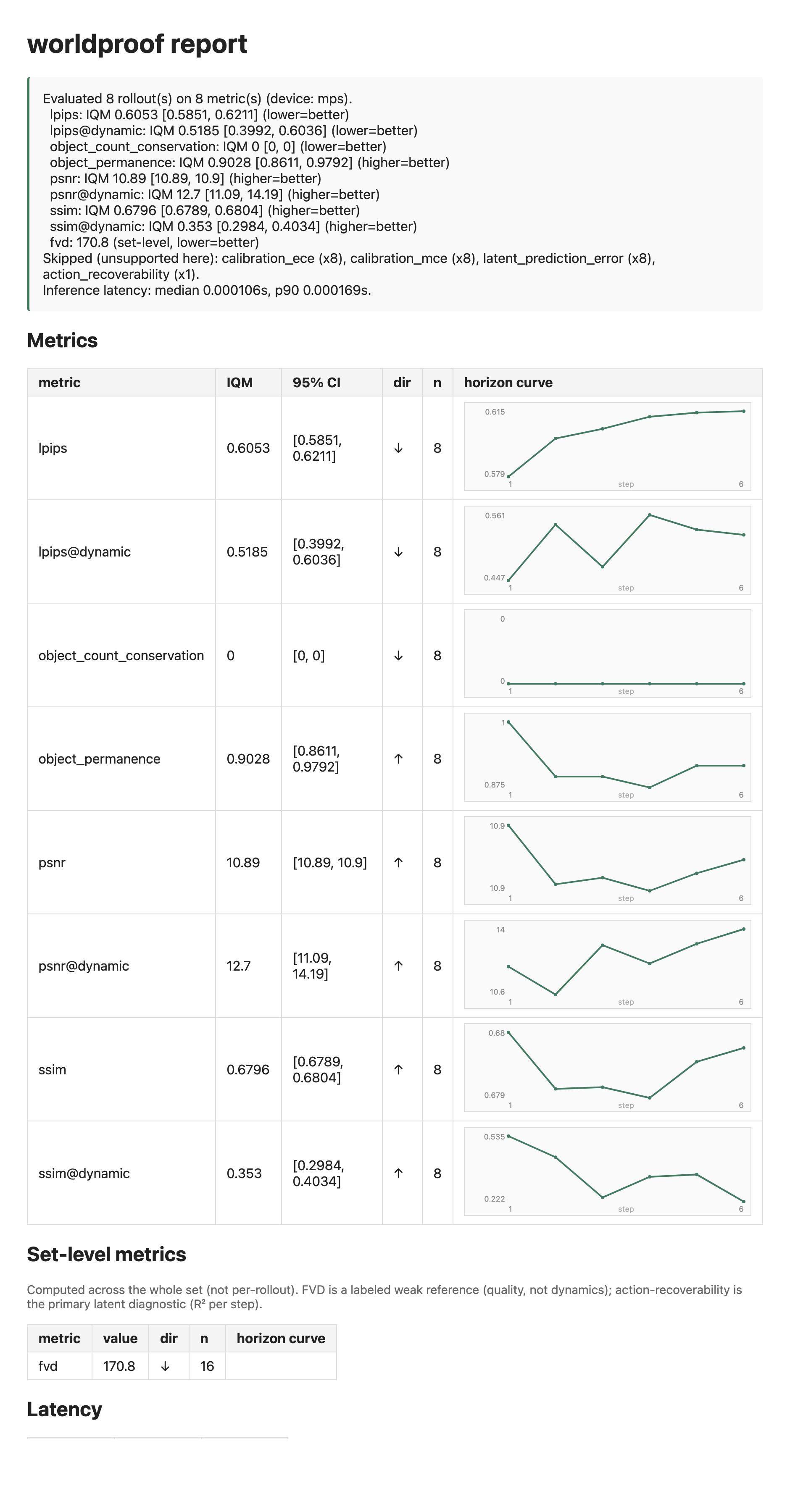
The Atari emulator is deterministic and runs on CPU, so it gives varied game pixels that exercise the metrics on a laptop. On Pong the copy-last-frame baseline scores badly on fidelity because the ball moves every frame. Atari sprites sit on a plain background, so this example also turns on the built-in tracker, which lets the object invariants (count conservation and permanence) run alongside the fidelity metrics.
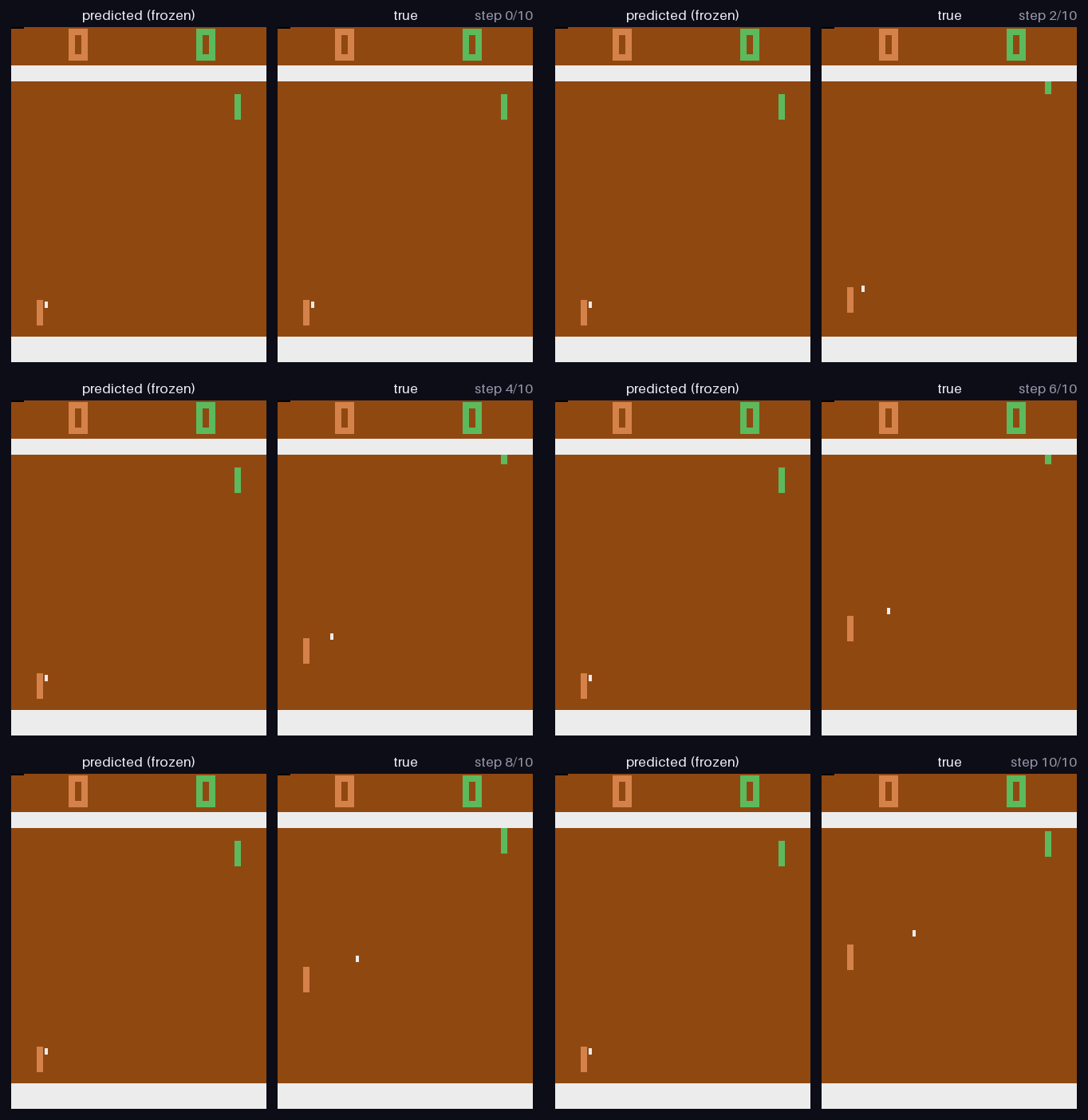
Here is that failure as pixels rather than numbers: the baseline's prediction freezes the scene while the real game keeps moving.
pip install worldproof[lerobot-data]
python examples/lerobot_demo.py                                          # lerobot/pusht (a simulator)
python examples/lerobot_demo.py --repo Qiu-Xinchuan/so-101_pen-transfer  # a real SO-101 arm
python examples/lerobot_demo.py --repo lerobot/droid_1.0.1               # DROID, real manipulation
python examples/lerobot_demo.py --repo <any LeRobotDataset v3.0 on the Hub>
This reads a LeRobotDataset v3.0 straight from its parquet and mp4 files, so it
works without the lerobot package and runs on Python 3.10. That opens up the
whole LeRobot Hub, both simulated benchmarks and real robot recordings.
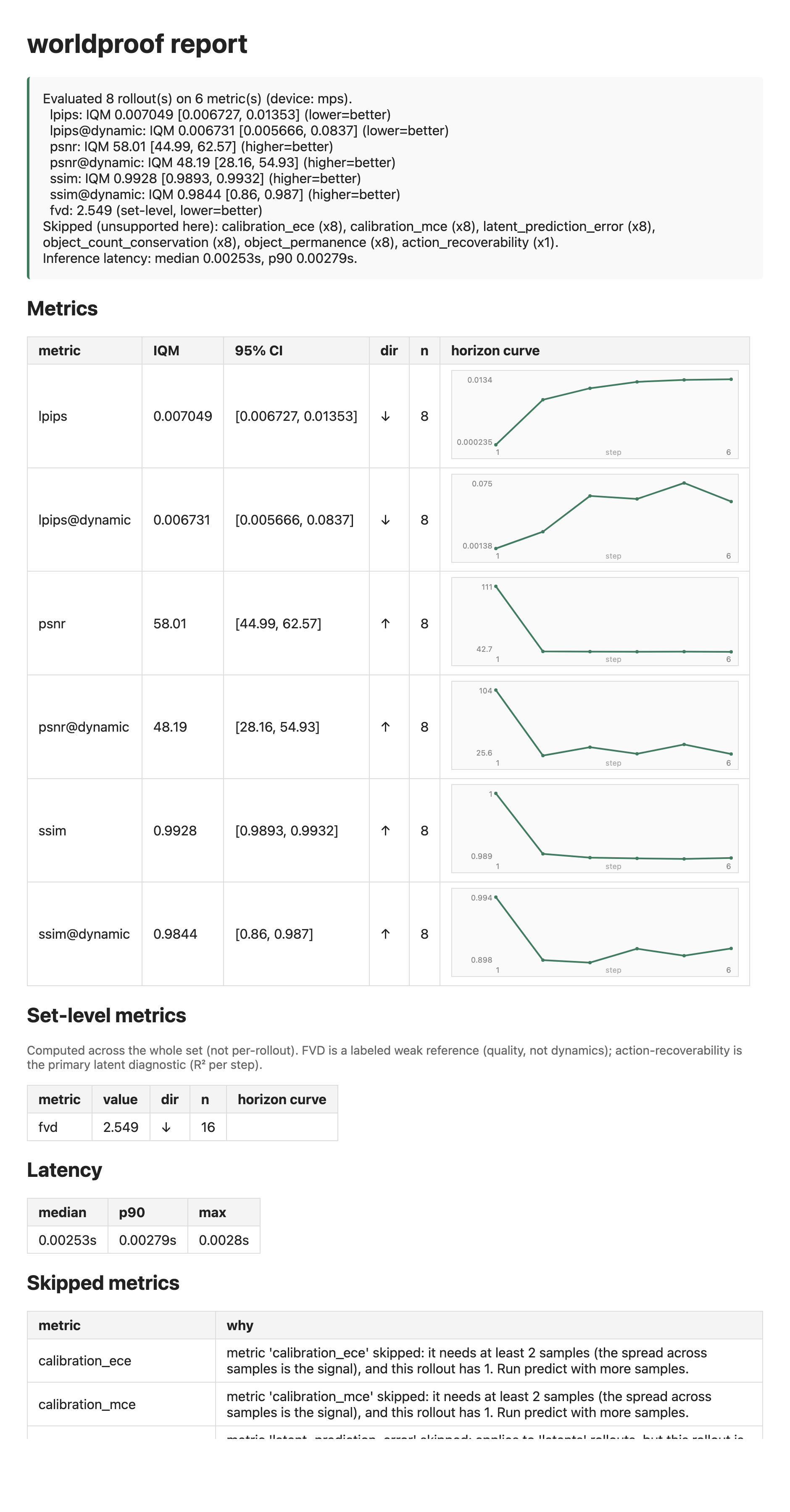
The Push-T report at the top of this page comes from a simulator. Here is the same pipeline on real cameras: a physical SO-101 arm doing a pen transfer, three cameras at 480 by 640, 64 rollouts over a 6-step horizon. The baseline scores high even on the moving regions (dynamic-region PSNR 53.9 dB, SSIM 0.983), and the dynamic-region curve does not degrade across the horizon at all: it starts at SSIM 0.972 and ends at 0.950, wandering rather than falling.
That flat curve is the result, and it is a warning about the eval rather than about any model. If predicting six steps ahead is no harder than predicting one, there is nothing for a good model to be better at, so no metric can rank models on this footage. To separate models on slow real recordings you need a longer horizon or a more dynamic task.
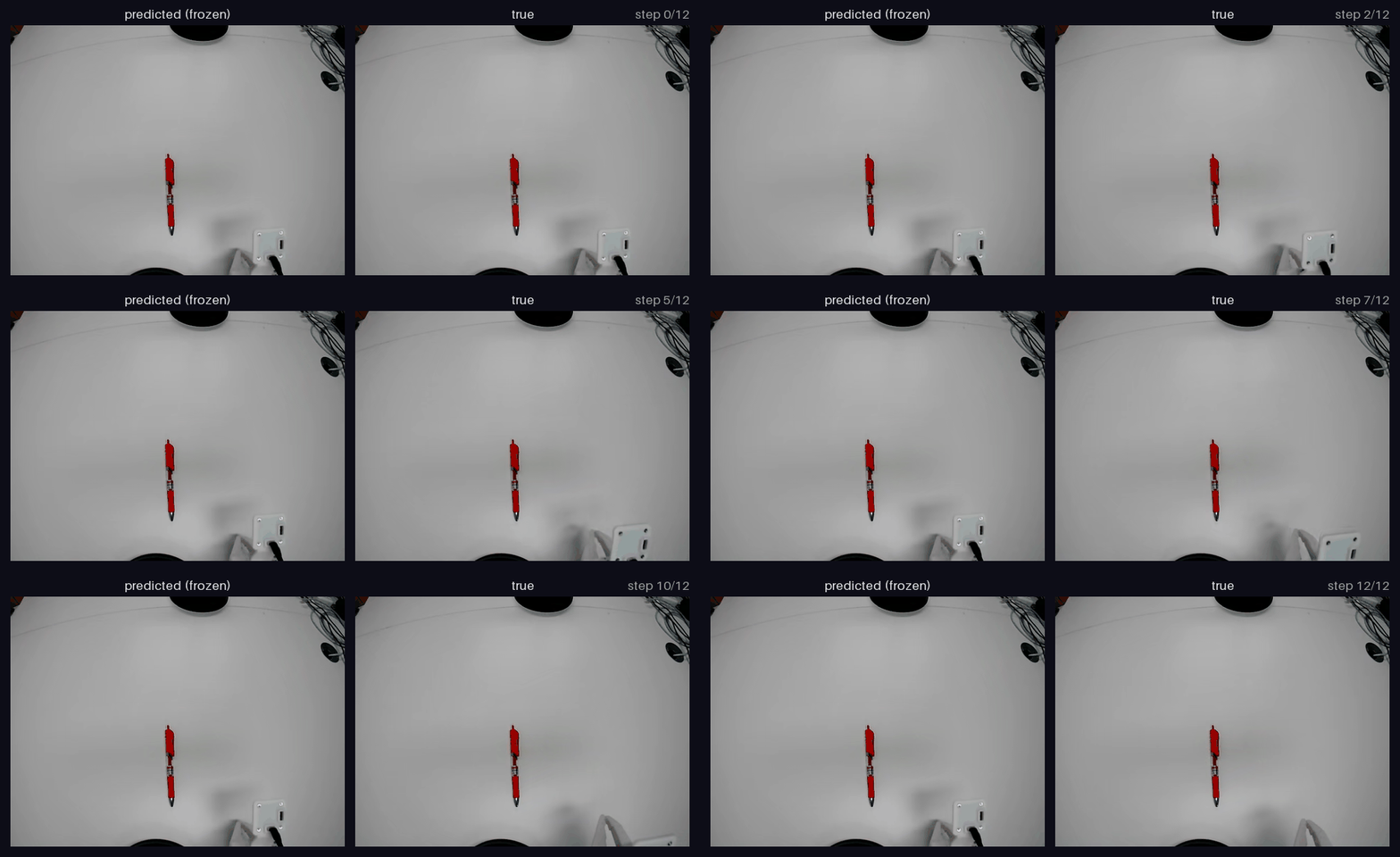
Here is the busiest stretch of a real episode, frozen prediction against true frames. Even here the change is small: the arm slides the white fixture away while the frozen prediction keeps it in place. On footage like this a longer horizon is what separates models.
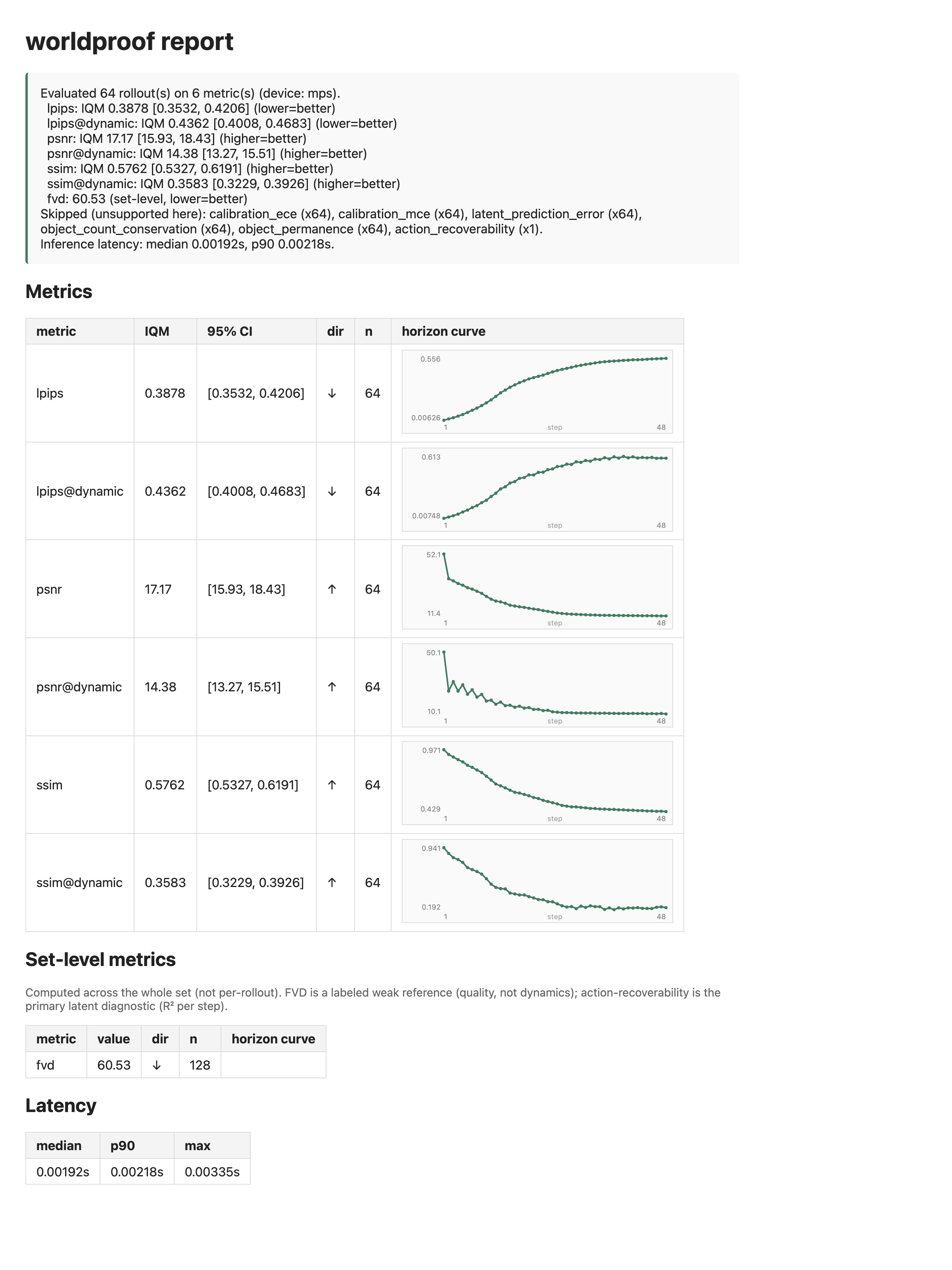
python examples/lerobot_demo.py --repo lerobot/droid_1.0.1 --n 64 --horizon 48The SO-101 result says a short horizon on slow footage cannot rank models. DROID answers the follow-up question. It is real manipulation footage at 15 fps, so the scene moves about twice as far per step, and the same copy-last-frame baseline degrades instead of holding still.
Run out to 48 steps and the horizon curve shows where the usable window is. The dynamic-region score falls steeply and monotonically for the first dozen steps (SSIM 0.873 at step 1, 0.446 at step 12), keeps falling more slowly out to about step 24, then floors at roughly SSIM 0.20 and PSNR 10.3 dB and stops moving.
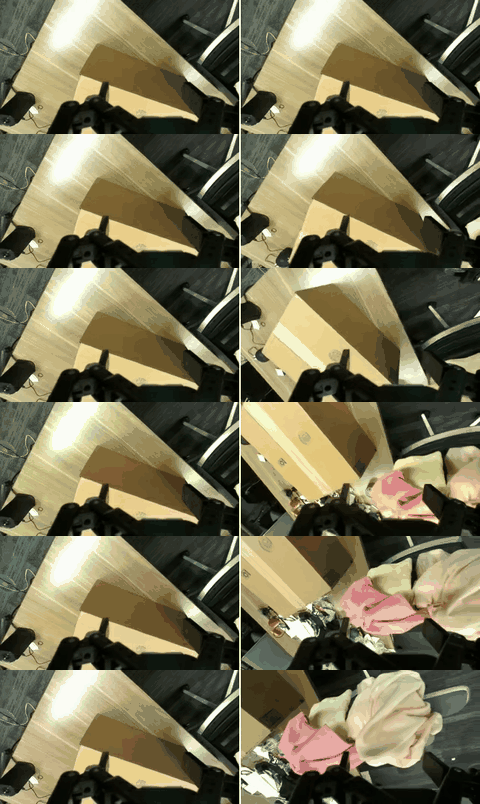
Here is what that decay looks like. Left is the prediction, right is what actually happened, over the same 48 steps. The baseline holds the last frame it saw while the real scene keeps going, and by the end the two images have nothing in common.
So both ends of the range are dead. Below about four steps everything is close to perfect and models tie; past about 28 steps the prediction has decorrelated and models tie again, this time at the floor. On footage like this the horizon worth evaluating on is somewhere between, roughly 8 to 24 steps.
Two caveats. This is a copy-last-frame baseline, so it marks where a trivial predictor becomes separable; a real model stays correlated longer and would push the upper end out. And LPIPS does not separate DROID from the SO-101 recording at all, and points the other way on the masked variant — the pixel metrics agree here, the perceptual one does not.
pip install worldproof[swm]
python examples/pusht_demo.py
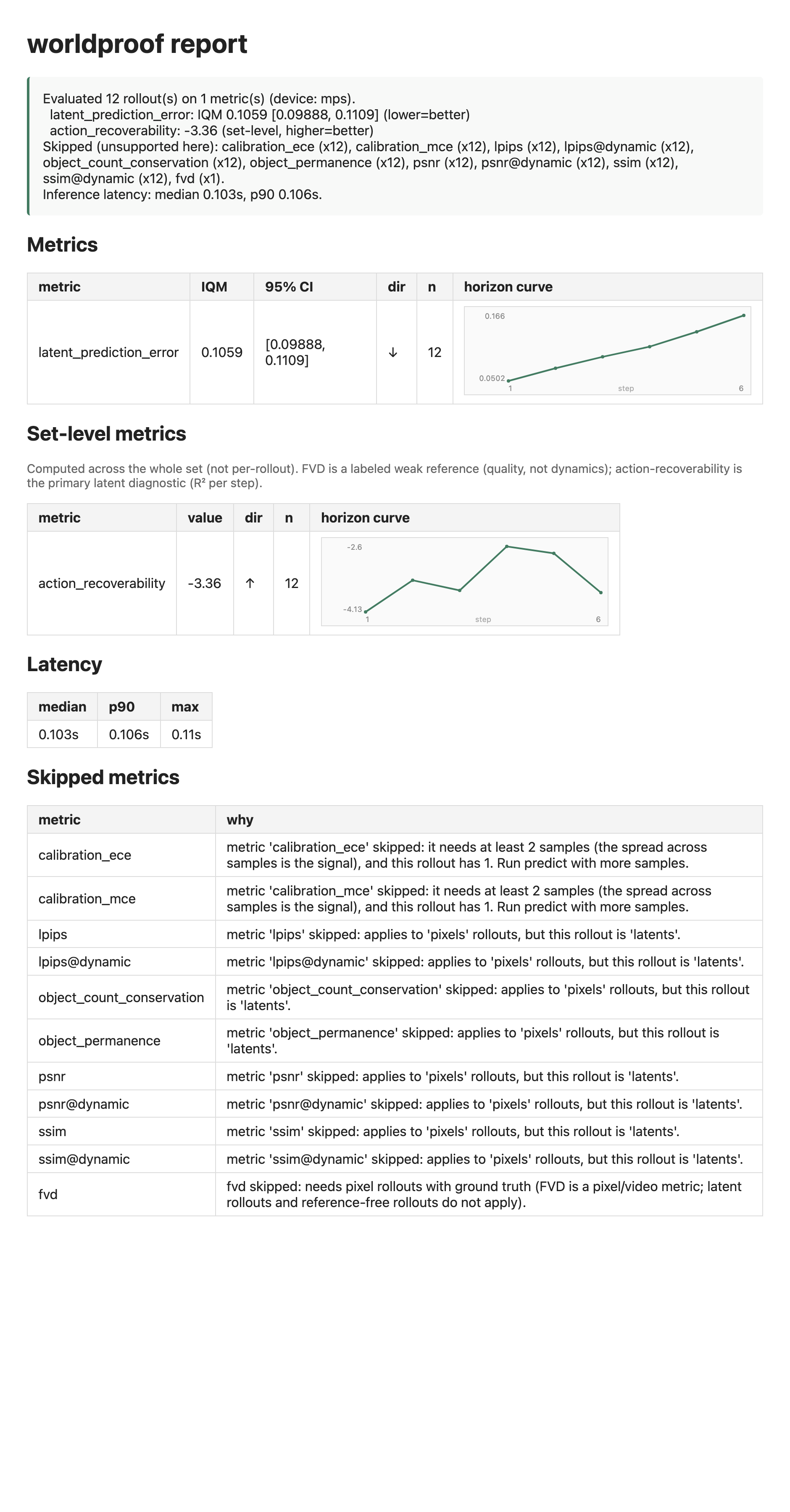
This runs the real quentinll/lewm-pusht checkpoint. A latent model predicts in
its own encoded space, so the report shows the latent metrics (latent prediction
error and action recoverability) rather than pixel scores. Read the notes in the
script: driving it on real trajectories needs a dataset step that is still open,
so the example ships with a stand-in dataset that proves the pipeline against the
real model.
- Pixel fidelity: PSNR and SSIM (pure numpy) and LPIPS (an extra), each as a curve over the horizon and again on the moving regions only, so a static background cannot inflate the score.
- Latent prediction error for latent models, in the space the model predicts in.
- Action recoverability, the main latent check: can the actions be recovered from the predicted latents? A latent space can look sharp and still fail this.
- Calibration: does the spread across samples match the actual error (ECE, MCE)?
- The signature checks: counterfactual divergence (same start, two action sequences, does the predicted change match reality) and failure faithfulness (does the model reproduce a real failure or imagine success), fed by a sim oracle that produces true futures for any action sequence.
- Invariants: object count conservation, and object permanence through occlusion.
- FVD, reported as a weak reference (it tracks video quality, not dynamics). The
math ships and is tested. A default feature extractor ships too (torchvision
Kinetics r3d_18, opt in with
evaluate --fvd), or you can pass your own for a paper-comparable backbone.
Every metric ships with a corruption test it responds to and passes a ranking test (a real model beats a naive baseline beats a broken one). Scores across rollouts use the interquartile mean with bootstrap confidence intervals, not a bare mean and standard deviation.
- FVD's default extractor is a torchvision Kinetics r3d_18, not the I3D used in most published FVD, so its numbers are not comparable to those. It is a weak reference either way. Pass your own extractor for a paper-comparable backbone.
LeRobotDatasetSourcereads v3.0 datasets that store frames as mp4. Older v2.x layouts and datasets that store frames in parquet are follow-ons. mp4 frames are lossy, which the report can note.- The tracker behind the invariants is a clean-scene numpy tracker. Messy real video needs a stronger tracker, which is deferred.
- Driving the real latent checkpoint on real trajectories needs a dataset step that reproduces the model's action encoding. The reusable provider is shipped; that last piece is open.
worldproof[swm]pinstransformers<5. The published checkpoints predate the transformers 5.x weight rename, which breaks loading.- The
lerobotmodel adapter is not supported. Its world models cannot be driven by an external action sequence into our rollout, and they need a lot of GPU memory. The LeRobot data path is supported throughLeRobotDatasetSource.
Development uses uv. Consumers never need it.
uv sync --all-extras --group dev
uv run pytest
ruff check --fix && ruff formatApache-2.0.